# About Postman v1 (Postman Legacy)
## Postman v1 (Postman Legacy)
{% hint style="info" %}
We have moved! Access Postman v1 (Postman legacy) at .
Please note that Postman v2, a different product, is now hosted at [https://postman.gov.sg/](https://legacy.postman.gov.sg/).
For more information regarding Postman v2, do check our guide at
{% endhint %}
Postman is a mass messaging tool for the Singapore Government. These messages can be sent via our web app directly (see [campaign guide](https://guide.postman.gov.sg/campaign-guide/before-you-start)) or via sms/email API integration (see [sms API guide](https://api-docs.postman.gov.sg/)/[emailAPI guide](/email-api-guide/overview)).
We've sent out more than 100 million messages from over 90 agencies. These include quarantine orders, COVID-19 test results, and employer notices.
Start using Postman by logging in with your `@agency.gov.sg` email address!
### Should I be using Postman v1/Postman v2?
Email API, only available for existing email API users.
Postman v1 SMS users that will not be included in BTN
Please continue using Postman v1 to send out your SMSes
Postman v2 SMS for agencies included in BTN, including
Postman v2 SMS - API
Postman v2 SMS - Admin Portal (UI)
Postman v2 SMS - SFTP
Am I affected by BTN?
The following organisations will not be affected by BTN
Public healthcare institutions
Exceptions that have been cleared by the BTN and SNDGO team.
If you are unsure whether or not you are affected by BTN, please contact us.
All agencies affected by BTN have already been contacted by the BTN team
## What can Postman Web App do?
* **Easily customize messages to reach a wide audience**: Create a message template, upload a file containing customization parameters, and we will handle the rest for you.
* **Mass send emails**: Just click `Send campaign` and Postman will send those messages out to your intended audience via email.
* **Mass send SMSes**: Enter your Twilio credentials under `Settings`, and Postman will send those messages via SMS. No integration with Twilio is needed.
* **View stats**: Keep track of your campaign's progress as it is sending and check back when it is completed.
* **Scheduled sending**: Create your campaign but send it out at a later **time**.
## What can Postman email API do?
We provide a **modern, cost-effective, and compliant PaaS** for government agencies to send programmatic emails and messages. Head over to the [email API guide](https://guide.postman.gov.sg/email-api-guide/overview) to find out more.
## What can Postman sms API do?
Head over to our [sms API guide](https://api-docs.postman.gov.sg/) to find out more.
## Is Postman secure?
Emails, SMSes and Telegram messages are not 100% secure. Users should be wary of putting sensitive information directly in your message body. Depending on the level of sensitivity, users can consider using recipient-specific, high-entropy links or requiring further authentication to see sensitive information.
## Can Postman be accessed on the government intranet?
The Postman web app can be accessed on GSIBs that allows Secure Internet Surfing.
## What data can Postman handle?
We use cloud infrastructure so we can handle up to **Confidential (Cloud-Eligible)** data. For more information, you may refer to the section of our guide on [IM8 Policies](/email-api-guide/overview/im8-policies) (`.gov.sg` login required).
| Normal email/SMS | Non-sensitive to sensitivity low-normal |
|
## Difference between the Web App and Programmatic APIs
**Web App:** Users can access Postman by going to . The web app has a user interface that allows users to send templated messages via campaigns.
**Programmatic APIs**: Users who manage their own systems could also call our APIs to send messages programmatically. In order to use this feature, you need to generate an API key from `Settings` in the Postman web app. You can find more by going to our [sms API guide](https://api-docs.postman.gov.sg/)/[emailAPI guide](/email-api-guide/overview) here.
| Access Type | Channels | Type of Use Case | Prerequisite |
| ------------------------------------------------------------------------------ | ---------------------------- | ---------------------------- | ------------------------------------------------------------------------------------------------------------------------------------------------------------------------------------------------- |
| [Web app](https://guide.postman.gov.sg/campaign-guide/quick-start) | Email, SMS, and Telegram Bot | Manual intervention required |
@agency.gov.sg email access to log in
You will need to request for a @agency.gov.sg email address from your respective agency if you do not have one.
|
| [API](https://github.com/opengovsg/postmangovsg/blob/master/docs/api-usage.md) | Email & SMS | System-generated | Engineering or IT team to send messaging info from the source system to Postman. |
## Open-source contribution
Postman is open-sourced. Visit our [GitHub repo](https://github.com/opengovsg/postmangovsg) to start contributing to our code. Contributing guidelines can be found [here](https://github.com/opengovsg/postmangovsg/blob/master/docs/CONTRIBUTING.md).

# How to send a campaign?
This page will teach you how to use Postman.
### Choose the channel that fits your purpose.
Once you are logged in, click on **Create new campaign** button, and you will be prompted with the following screen to choose your channel and fill in a campaign name.
Postman is a multi-channel messaging service that allows you to send messages through 2 channels:
* [Email](/campaign-guide-email/email)
* [SMS](/campaign-guide-sms/sms-campaigns)
However, do not that each channel has its own setup so do navigate to the specific section to find out more.
***Campaign name** is simply for your own record purposes, it does not appear in the email you send to the public.*

Once you've chosen your channel, please follow the following steps:
### Step 1: Create a message template
Postman allows you to control how much each message is personalised. Message templates can be used in a few ways:
| **Message Template** | **Use Cases** |
| ------------------------------------------------------------------------------------------------------- | ---------------------------- |
| No `{{ }}` | Generic message for everyone |
| Mostly standardised content with a few keywords like `{{name}}` `{{item}}` for fields that are relevant | Appointment reminder |
| `{{keyword}}` | Unique message for everyone. |
{% hint style="warning" %}
Postman has implemented **a universal footer** for all email campaigns in order to comply with [Singapore's Spam Control Act ](https://sso.agc.gov.sg/Act/SCA2007)and align with international bulk email practices ([CAN-SPAM Act](https://www.ftc.gov/tips-advice/business-center/guidance/can-spam-act-compliance-guide-business) or [EU’s ePrivacy Directive](https://ec.europa.eu/information_society/doc/factsheets/024-privacy-and-spam-en.pdf)). Please go to our [unsubscribe page](https://guide.postman.gov.sg/campaign-guide/quick-start/email/weekly-digest-of-unsubscription) to learn more about this feature.
{% endhint %}
### Step 2: Set up a contact list in CSV format

Most of our users have an internal database that includes all of their contacts. You can export the contact list in a CSV file.\
\
If you are not sure what to include in your CSV file, you can `Download a sample .csv file` in the step for uploading the recipient list in CSV format.
Note the following points to ensure that the details in your CSV file are correctly displayed in your email:
* Make sure there is a field called **recipient** that will contain the phone number or email address.
* Make sure the headers are in **lowercase.**
* Your email should be formatted like ****.
* Phone number should be formatted like **88888888** with no space, no dash, and no +65.
{% hint style="danger" %}
*Take note to remove recipients who previously requested to unsubscribe from your communications.*
{% endhint %}
### Step 3: Send your campaign
You can test the message by sending it to yourself. When you are satisfied with it, go ahead and send your campaign.
## Remove Duplicates in Excel
{% hint style="info" %}
Postman does not remove duplicates for recipients in view of some use cases that require sending unique messages to the same individual multiple times. **Scroll down** to the [**Remove Duplicates in Excel** ](https://guide.postman.gov.sg/quick-start#remove-duplicates-in-excel)section to find out how to remove duplicates in excel\*\*.\*\*
{% endhint %}
Select your data > go to **Data** > **Remove duplicates** > **select all columns** > click **OK.**
For comprehensive instruction on duplicate removal, please go to [Microsoft Excel Support Page](https://support.microsoft.com/en-us/office/find-and-remove-duplicates-00e35bea-b46a-4d5d-b28e-66a552dc138d).

# Before You Start
If you are an agency user, please read this before you use Postman to send your messages.
## Create a common email
Although you can login with your primary email account, we recommend one email account per agency as Postman does not manage users for an agency.
Twilio credentials will be tied to an agency email account. You might have to contact your IT administrator to create a common email account that allows multiple subscribers. The primary advantage of such a set-up is that past campaigns can be seen under one account for audit purposes.
## Can I have multiple users from the same agency sharing the same account?
Sharing is caring! All users from the same agency should share one account. The rationale behind our set-up is that communications out to the public should be vetted before you press send. Each agency has its own communication guidelines & policy.
We leave it up to each agency to govern its usage of Postman. If you are sending a message broadcast to the entire country, please make sure your use case has been vetted by the [Ministry of Communications and Information](https://www.mci.gov.sg/).
## Sign in
Similar to FormSG and Go.gov.sg, **no registration is required to use Postman**.
Simply enter your .gov.sg email. You will receive an OTP in your inbox for log in.
Since login OTP emails are sent to your WOG email address, you can follow the steps [here](https://docs.developer.tech.gov.sg/docs/postman-sgdp-guide/login-on-the-go) to use SGMail’s Postmaster feature to forward the OTP email to your phone number. You will then receive the OTP via SMS.
{% hint style="warning" %}
From 3 May 2023, Singpass login for Postman has been removed. Please log in using your `gov.sg` email accounts.
{% endhint %}

## Start creating your first campaign
Postman is a multi-channel messaging service that allows you to send messages through 3 channels:
* [Email](/campaign-guide-email/email)
* [SMS](/campaign-guide-sms/sms)
However, do note that each channel has its own setup so do navigate to the specific section to find out more.
* Try out the different channel using our [Demo mode](/campaign-guide-general/quick-start/before-you-start/demo-mode).
* Jump straight to creating your first campaign [here](/campaign-guide-general/quick-start).
##
# Demo Mode
Try out different channels before investing time to procure and set up your credentials.
{% hint style="info" %}
Without setting up credentials, each user is entitled to:
**3 campaigns each for SMS**
**Up to 20 recipients for each campaign**
{% endhint %}
The purpose of the demo campaign is to help you become more familiar with the SMS channel without the prerequisite of setting up their own credentials.
Once you are familiar with the flow, you can follow our video guide for the step-by-step set up for Twilio for SMS sending or book a slot with the Postman team if you need additional help.
{% embed url="" %}
## Where can I find the banner to access the demo mode?
You can now access the demo mode for SMS on the upper left-hand corner in Postman once you sign-in.

## Guide on Setting up SMS
Guide to set-up your Twilio credentials for SMS sending: [Quick Start > SMS](https://guide.postman.gov.sg/quick-start/sms).
## Regular Pricing for SMS
For information on regular pricing, please go to [FAQs > For Senders > Cost Breakdown](https://guide.postman.gov.sg/faq/faq-sender/cost-breakdown).
# Email Campaigns - Basics
Mail merge is painful and takes a long time. Sending emails using Postman is not. Learn how to quickly send mass emails using Postman.
## The basics
* **Send rate**: 150 emails per second
* **Shared resource:** The email service is shared by WoG
* **Max number of emails per campaign:** No limit
* **Max number of recipient**: No limit
* **Daily cap:** 4.5 million emails per day
## No prerequisite
Postman will handle the email sending for you. **You do not need to do anything to start using our service**. Simply log in and start using Postman. Go back to [Quick Start](https://guide.postman.gov.sg/campaign-guide/quick-start) to learn how to use Postman.
## Cost
Free. For more details and comparison among the three channels (email, SMS, Telegram), go to [Cost Breakdown](https://guide.postman.gov.sg/faqs/faq-sender/cost-breakdown).
## Customising your Sender Details
{% hint style="info" %}
**27 August 2024:** Postman's default sender email address has been changed from `donotreply@mail.postman.gov.sg` to `info@mail.postman.gov.sg`
{% endhint %}
You can customise the sender field when creating your campaign in step 1. The email will be received by recipients as “*`Your agency name`*`via Postman`”, with the default sender email address for all Postman campaigns being `info@mail.postman.gov.sg.`
You can also choose to send a copy of each email that each recipient in your contact list receives, by clicking on the "`BCC to me`" checkbox. This will send a copy of each email to your inbox.
## What if I need to update my agency logo?
We understand that logo refreshes happen from time to time. Logos can only be updated by the Postman team, so when you need your agency logo updated, send a request through our form [here](https://go.gov.sg/postman-contact-us), and we will get back to you on the next steps!
## How can I format my email?
Go to [Formatting and Images](https://guide.postman.gov.sg/campaign-guide/quick-start/email/format-bar).
{% hint style="info" %}
You can watch the video on Postman's [workplace group](https://onepublicservice.workplace.com/groups/postman.gov.sg/permalink/2722770121325355/) to go through the set-up.
{% endhint %}
# How do I send an email campaign?
Watch this video to learn how!
{% embed url="" %}
# Scheduled Sending
Created your campaign, but want to send it at a future date and time\*? Postman's scheduled sending feature now allows you to do so, so you no longer have to log in to send campaigns after work hours
*\*This feature is also available for SMS.*
### How do I schedule my campaign?
You can schedule your campaign in step 4 of the campaign creation page by clicking `Schedule for later.`
Select your desired date (day, month, year) and time (hour, minute, AM/PM) by clicking on the icons or typing into the relevant section. Make sure to select a *future* date and time. Then, click `Schedule Campaign`.
Schedule your preferred date
Schedule your preferred time
Note: scheduling for a past time and date will not be allowed.
You will be brought to your campaign preview dashboard, where you can view your scheduled date, time, and schedule details, as well as your email preview.
Campaign preview dashboard
### Can I reschedule a campaign?
Yes! On your scheduled campaign's dashboard, simply click on the `Reschedule campaign` button. Then, repeat the steps above to reschedule.

### Can I cancel a scheduled campaign?
If you would like to cancel your scheduled campaign, again navigate to that campaign's dashboard, then click on the `Cancel scheduling` button. You will be asked to confirm the cancellation, and your campaign will then be saved as a draft for you to retrieve later.
### Where can I view my scheduled campaigns?
On your main campaigns dashboard, you'll see a history of campaigns that you sent in the past, as well as any drafts and scheduled campaigns. The status of your scheduled campaigns will be reflected as `Scheduled`. Filter for `Scheduled` if you have campaigns on multiple pages for easy access.
Status of current campaigns
Use the filter to access your scheduled campaigns at one glance
On this page, you can also click on the drop-down button beside the `Duplicate` bar to `reschedule or cancel` your campaign.
Reschedule or cancel from the campaign dashboard
### How will I know when my campaign has been sent?
Aside from viewing the status of your campaign on your dashboard, you will also receive an email from Postman informing you that your campaign has been sent.
# Bounced Emails and Halted Campaigns
Please read through this guide to understand the difference between hard and soft bounces, as well as halted campaigns.
## What are the different kinds of bounce?
Emails like may look like a well-formatted email address, but if it is not managed by a real human being, services like Google will send a bounce message when the email is sent out. This is considered a hard bounce, which increases Postman's bounce rate and negatively affects Postman's reputation score.
1. **Hard bounce:** Invalid email addresses.
2. **Soft bounce:** Out-of-office messages or message notifications that the recipient's email inbox is full.
## What is the impact of a hard bounce?
Hard bounce affects Postman's reputation score. A reputation score is a measure of the email service reputation. **Postman needs to maintain a low bounce rate in order to have a good reputation score.** Think of this as having good credit from the bank. Banks need you to have a good credit score in order to provide a credit card for transactions. Similarly, Postman needs a good reputation score to send emails to Internet Service Providers (ISPs) in order to deliver emails to recipients.
## What do you need to do as a user to help Postman retain a good reputation score?
We need your help as a user to ensure that your mailing list is clean before you send an email campaign through our service. We understand that the first email campaign that you send out might contain a lot of invalid email addresses, but we ask you to use the bounce list once your campaign is over to clean and maintain your contact list.
## Why is my campaign halted?
A campaign will be halted when there are too many hard bounces (due to invalid email addresses, which are addresses that do not exist), and will affect Postman's reputation score.
Postman encourages all users to maintain clean contact lists as a best practice, which means that email addresses should be valid and subscribed to the mailing list.
To ensure that your campaign will not be halted, especially campaigns of high time sensitivity and urgency, please check that your mailing lists are clean before uploading them in CSV format to your Postman campaign:
1. check with your source system to ensure that no invalid addresses are included in the list e.g. non-existent email addresses, misspelled email addresses.
2. unsubscribe requests are adhered to - it is also good practice to remove unsubscribers when the request is received, though discretion of doing so is left to the agency in case of critical content.
If your halted campaign has high time sensitivity or high urgency (e.g. impact on MoP is high/ops will be severely impaired if campaign is not immediately sent out), please [contact us](https://go.gov.sg/postman-contact-us) for assistance.
## What are some ways to ensure my contact list is clean?
Here are some tips in building and maintaining your mailing list:
1. **Ensuring verified email collection upstream**: Consider using FormSG’s `verified email field` to collect email addresses from the intended recipients. This will ensure that you only collect email addresses from people who have access to the email account.
2. **Remove invalid email addresses from your mailing list**: We know that email addresses can become invalid over time when recipients change email addresses. You should always clean your mailing list regularly. You can do this easily with our export button on the campaign dashboard page. If an email campaign has bounced emails (hard bounce), it will be captured in the .csv file.
3. **Check for formatting errors:** Make sure that the format for the email is correct, e.g. . You can use this [tool](https://observablehq.com/@jeantanzj/email-validation) to do a quick check for any major formatting problems.
{% hint style="warning" %}
Do not collect emails through Zoom registration forms. We know from experience that people do not put in their real emails in these forms.
{% endhint %}
## Suspect that your list might need cleaning up?
{% hint style="info" %}
If your lists are from some time ago, or you know that it hasn't been maintained in some time, we would advise you to use this [Bulk Email Checker](https://bulk.email-checker.net/) to clean your list before uploading it in Postman. This helps you ensure that your campaigns will not be halted, especially if they are urgent campaigns.
{% endhint %}
# Email Statistics
Go through this page to understand the stats from your campaign.
The campaign dashboard shows you all the campaigns that you have sent in the past. Campaigns with an export button mean that there are errors or invalid emails in that particular campaign.

You can click into your campaign to see the breakdown of the summary stats.
## Types of Status for Email
Email campaigns would generate two types of status:
{% hint style="info" %}
1. **SENT**: Your email was successfully delivered to the recipient
* In your campaign delivery report, the status for successfully delivered emails will read “success”. If recipients have already opened the emails, the status will be “read”.
2. **INVALID**: The email address was not valid. It could be a [soft or hard bounce](https://guide.postman.gov.sg/campaign-guide/quick-start/email/halting-of-email-campaigns#what-are-the-different-kinds-of-bounce).
{% endhint %}
You generally would not have any **ERROR** status. To see the entire list of invalid emails, you need to click on the `Export` button.

Once you click on the `Export` button, you will get a CSV file with the following columns.

| Error Codes | Description & Follow-up Action |
| -------------------------------------------------------------------------------------------------------------------------------------------------- | ------------------------------------------------------------------------------------------------------------------------------------------------------------------------------------------------------------------------------------------------------------------------------------------------------------------------------------------------------------------------------------------------------------------------------------------------------------------------------------------------------------------------------------------------------------------------------------------------------------------------------------------------------------------------------------------------------------------------------------------- |
| **Blacklisted** |
The email recipient is not valid and might not exist. You have sent emails to this invalid email address before and we have added this email address to Postman's blocklist given that the email address is invalid.
Action: Please remove this email address from your contact list. If you think this email address is blacklisted mistakenly, please contact us.
These are hard bounces and they are invalid emails. No real human is using these email addresses. The email recipient is not valid and might not exist. We will be adding this recipient to our blacklist and we will not send emails to this recipient again for any future campaign.
Action: Please remove this email address from your contact list.
Note: email distribution lists (i.e. group email addresses) will also be hard bounced. Action: please use individual email addresses in the CSV recipient list.
The email inbox might be full or the person might have an out-of-office message.
Action: None. You can continue to send emails to these recipients in the subsequent campaign.
|
| **Error** |
Incorrect email formatting. Please check for typo, space, and symbols and amend this email address.
Action: Check for typo, space, and symbols in the recipient field and amend the email address.
|
# Formatting your Message Template
We support
1. Bold, italic, underline
2. Colour
3. Title, subtitle, header, and normal text
4. Left, right, center alignment of text
5. Bullet and number list
6. Link insertion
* Use the link icon in the formatting bar.
7. Image insertion through [GoGovSG](https://go.gov.sg/#/) (for all public service officers except for those from healthcare institutions and schools) or [ForEduSG](https://for.edu.sg/#/) (for officers from schools) or [ForSG](https://for.sg/#/) (for officers from healthcare institutions).
8. Simple tables can be created using the table icon in the formatting bar.
{% hint style="info" %}
You can use [GoGovSG](https://go.gov.sg/#/) or [ForEduSG](https://for.edu.sg/#/) or [ForSG](https://for.sg/#/) (this depends on your agency - see point 7 above) to upload your image file and add it to the content of your email using the image icon. Remember to copy the `https://file.go.gov.sg/image_name.png` or `https://file.for.sg/image_name.jpeg` links and not the `https://go.gov.sg/image_name` `https://for.sg/image_name` links
{% endhint %}

## Embedding an Image in Email
You can use [GoGovSG](https://go.gov.sg/#/) (for all public service officers except for those from healthcare institutions and schools) or [ForEduSG](https://for.edu.sg/#/) (for officers from schools) or [ForSG](https://for.sg/#/) (for officers from healthcare institutions) to embed an image in Postman's template.
Go to [GoGovSG](https://go.gov.sg/#/) or [ForEduSG](https://for.edu.sg/#/) or [ForSG](https://for.sg/#/) and log in using your official institution email address. Select `create new link` from file and upload your image.

Copy the shortened link into a new browser window. Copy the `file.go.gov.sg` link or `file.for.edu.sg` or`file.for.sg` into your Postman template by using the html tag shown below. The link that you paste into your Postman template should begin with *https\://*...

Then, in your campaign template, click on the image icon and paste your `file.go.gov.sg` link or `file.for.edu.sg` or`file.for.sg` link into the "Source" field, then click "insert". Your image will then appear in the template box, and you can resize it by 50%, 75% or 100%.
# Variable Fields
You may wish to personalise your emails with variable fields whose content will change depending on recipient information. Postman allows you to do this by the following steps:
1. Use double curly brackets **{{ }}** in the message template to indicate a variable field (see the screenshot below for an example). The field will be populated with the recipient's unique test result as reflected in your CSV file (see step 2).

2\. In the same CSV file that you upload with recipient information (in step 3 of the campaign creation flow), include the corresponding variable field names and the accompanying information for each unique recipient.
* text in the variable content fields should *not* have spacings - instead, replace spacings with underscores e.g. instead of "test result", the variable field in the message template *and* your CSV file should reflect "test\_result".
* by convention, all text content in variable fields must be in *small letters.*

# Unique URL Link per Recipient
There are 2 ways to insert unique clickable URL links into your message template, customised by recipient.
## Method 1: Unique link couched in a word
1. Highlight the word/phrase that you want hyperlinked, and click the "Insert link" icon.
2. In the "Link to" field, type in `{{url}}`.
3\. In your CSV Recipient list, include a column with the header `url`. Fields under this column must begin with `https://`
##
## Method 2: Unique link is displayed in full (also possible for SMS)
1. In the message template, write your variable field as `{{xxx_link}}`. You can fill in the first word with any word you want, as long as it is followed by `_link`. For example:
2\. In your CSV file, the header must also follow this naming convention i.e. `xxx_link`
By following these steps, the full link will appear in the message that your recipient receives.
# Pasting Content from Microsoft Word
Postman now supports direct pasting of content from Microsoft Word to the Postman email template.
The following text formatting styles are now supported for direct pasting of copied content that you may have from other documents like Microsoft Word. These styles are also available in the Postman formatting bar:
1. Bold
2. Italics
3. Underline
4. Headings (for your easy reference, the following list maps the naming convention in the Postman template to the naming convention used in Microsoft Word)
* title (Heading 1 in Microsoft Word)
* subtitle (Heading 2 in Microsoft Word)
* normal text (Heading 3 in Microsoft Word)
* header (Heading 4 in Microsoft Word)
5. Text alignment (left-aligned, right-aligned, centre, and justified text)
6. Links
* links can now be directly pasted into the Postman template without the need for using the link icon
7. Tables
* simple tables that can be created using the table icon in the Postman template are supported for direct pasting.
* nested tables (cells/tables within tables) are not currently supported.
8. Lists
* nested lists are now supported, in both ordered (i.e. numbering like 1, 2, 3... or a, b, c...) and unordered (e.g. bullet points) formats.
9. Line spacing
* to start a new line with a line spacing from the previous line, press the 'ENTER' button.
* to start a new line without any line spacings from the previous line, press 'SHIFT'+'ENTER'.
# Manage your Unsubscriptions
Recipients requesting to unsubscribe from your campaigns are to be expected. How will you know when they do, and how can you prevent it?
## What is an unsubscription, and where can recipients find it in Postman emails?
Postman allows for recipients of email campaigns to indicate their wish to unsubscribe from future emails sent by your agency.
This feature is present at the header of Postman emails, beside the sender domain:
As well as the footer:
## Why does an unsubscribe option exist?
In order to comply with [Singapore's Spam Control Act ](https://sso.agc.gov.sg/Act/SCA2007)and align with international bulk email practices ([CAN-SPAM Act](https://www.ftc.gov/tips-advice/business-center/guidance/can-spam-act-compliance-guide-business) or [EU’s ePrivacy Directive](https://ec.europa.eu/information_society/doc/factsheets/024-privacy-and-spam-en.pdf)), all emails sent from Postman contain an unsubscribe option in the standard footer for recipients to unsubscribe to future emails that are promotional in nature, or not to their interests.
As a data controller since you manage the recipient lists, you should also ensure good data control and privacy protection, and respect their unsubscribe wishes.
## What does it mean for campaign owners?
As a campaign owner, you will receive a weekly unsubscription digest.
Please exercise your best judgment to determine whether or not to remove these recipients from your mailing list based on the content of your email.
If your email is **promotional** in nature, please remove these recipients from your mailing list to respect their wishes.
However, if you believe that your emails are **essential and/or compulsory** in nature e.g. emails informing of medical test results, appointment details, other regulatory/administrative content, it will be your discretion on whether to remove the recipient from the mailing list.
## What do I need to know as a campaign owner in Postman?
1. On your campaign dashboard, you will be able to see how many unsubscribe requests have been made after your campaign is sent.
2\. The delivery report on your campaign dashboard provides information on unsubscription requests and the recipients’ reasons for 30 days after sending is completed. This is to help you with cross-checking with your mailing list to ensure these unsubscription requests are honoured.
{% hint style="info" %}
Do note that if a recipient unsubscribes some time after the campaign is sent, you will still receive the unsubscription notification via email regardless of how long ago the campaign was sent. E.g. if Mary unsubscribes in June, when your campaign was sent in March, you will still receive the unsubscription notification via email in June.
{% endhint %}
3\. In the recipient unsubscription flow, they will be asked for the reason for their unsubscribe request (e.g. they no longer want to receive emails from this campaign, they never signed up, etc.). This helps you gather more information on your campaigns and why people unsubscribe.
# Understanding Unsubscriptions
Learn more about unsubscription best practices, and how you can reduce your unsubscription rates.
## **Why is adhering to unsubscription requests important?**
Aside from regulatory compliance, healthy communication with your recipient base is important. This means respecting their preferences in managing their inboxes, which has knock-on impacts on their attitudes towards interacting with your agency, and their openness to receiving future communications from you.
Furthermore, if recipients are unable to locate the unsubscribe link in emails, they may resort to marking your emails as spam. This will not only restrict your emails from getting to them in the future, but will also hurt Postman’s reputation score and future email deliverability.
Since Postman is the communications channel through which they receive these mailers, it is also good governance on our end to help both users like you, and your recipients, get the best experience out of using Postman.
## **What is a good unsubscribe rate?**
Various sources peg a good unsubscribe rate in the range of <2%. Campaign Monitor found an average unsubscribe rate of 0.17%, so you can use this as a rule of thumb when analysing your own unsubscription data. Read more [here](https://www.campaignmonitor.com/resources/knowledge-base/what-is-a-good-unsubscribe-rate/).
## **How do I reduce unsubscription rates?**
There are several ways to reduce the likelihood of a recipient unsubscribing from your campaigns:
1. **Segment your mailing list carefully** - you would want to carefully consider the exact profiles of recipients that fit your purposes, rather than sending to the entire mailing list. This increases the relevance of your campaign to their needs/preferences/interests.
2. **Make your emails easy-to-read** - this means less wordiness, get to the point, with important information up front. This reduces reader fatigue, and helps your readers understand immediately the purpose of your campaign.
3. **Keep your subject lines short and direct** (5 words or less) - this makes your email look less like an ad.
4. **Frequency** - if you are sending out regular campaigns, find a frequency that fits your reader base best. There is no hard and fast rule, depending on the content of your campaign.
# Sending Password-Protected Emails
Send high sensitivity emails using the password-protected email feature.
To access the new feature, ensure that the password-protected checkbox is checked.

### Step 1. Create a generic message in Message A text box
This is a generic message that will be delivered to the recipient's email inbox. Postman will generate the unique link called `{{protectedlink}}` for you but you must include a {{protectedlink}} field as a placeholder in the generic Message A template for us to generate the link.
You should ensure that the recipient knows how to unlock the password-protected page in this message.
An example message might be: `Please click on the following link {{protectedlink}} to open your private content. To open the password-protected email page, please enter the last 4 characters of your NRIC, including the letter in uppercase, followed by your date of birth in DDMMYYYY format. For example, if your NRIC is "T1234567A" and your birthdate is "13 January 2004", the 12-character password will be "567A13012004"`.

### Step 2. Create a password-protected private message in Message B text box
This is the template for the private or secret message, which will be password-protected. The unique link generated by Postman will lead to a webpage that prompts the recipient to enter in a password and open the page to see the private and the personalised content.

Add in a new column in your CSV file call password and include passwords that the recipients would know. For example, the password can be the last four characters of NRIC and last four digits of the phone number (212A8888).

Once you have uploaded your CSV file, you will see the preview of the first recipient in your excel.

### Step 3. Send yourself a test message and open the link in your browser to ensure the private or secret message is formatted correctly
To open the link from the test message, you need to know the password for the first recipient in your excel list. In the example above, the first recipient is Postman, and therefore the password to enter here is Postman's password.

### Step 4. Once you are happy with the generic and private message, click send campaign
Now you are done!
#### Or, watch this video for a visual learning experience!
{% embed url="" %}
# Tutorial
Copy & paste these templates to experience the set-up for a password-protected campaign
## Message A
```
Greetings,
This is the general message that the recipient will receive in his or her email inbox.
-----
Please click on the following link {{protectedlink}}
to open your private content.
To open the password-protected email page, please enter the
last 4 characters of your NRIC, including the letter in uppercase,
followed by your date of birth in DDMMYYYY format. For example,
if your NRIC is "T1234567A" and your birthdate is "13 January 2020",
the 12-character password will be "567A13012020". Why are you receiving an email from Postman?
Postman is a mass email and SMS service for the Singapore government.
We send password-protected emails on behalf of government agencies.
-----
This is a system-generated email. Please do not reply.
```
## Message B
```
Customise the header image with your agency logo ⤴.
This is a secret or private message that will be password-protected.
You can customise this page by following this **guide**.
---
Dear {{name}},
Your secret pin is {{pin}}.
Please keep your pin safe and not share it with others.
Sincerely,
Agency X
(This is a computer-generated letter which requires no signature)
```
## CSV File
You can use the sample CSV file that we have created and change the recipient's email address to your email address.
{% file src="/files/-MDKjkNyy6y1WL3Gt6hS" %}
Download sample csv here
{% endfile %}
## Sample Password-protected Page
Check out a sample page [here](https://postman.gov.sg/p/1/ab11edcd-d3c0-49c7-bebf-43857380e416).\
**PW**: 567A13012020

# SMS Campaigns - Basics
Send mass SMSes with Postman! These SMSes are sent through Twilio, our SMS aggregator. We will guide you through setting up an account with Twilio, before you can begin sending SMSes on Postman.
{% hint style="info" %}
**Update 21 Mar 2024:** We have updated our [SMS Onboarding process](/campaign-guide-sms/onboarding-overview); new users will now sign up for their own Twilio accounts, more information here.
{% endhint %}
{% hint style="warning" %}
**This portion of the guide is only for existing Postman SMS Users**
For agencies looking to onboard Postman's **SMS API**, this is currently not available.
You may access our new SMS API Docs [here](https://api-docs.postman.gov.sg).
{% endhint %}
## The basics
### What is the difference between Twilio and Postman?
Postman is a free multi-channel communications platform built by Open Government Products for all public service agencies. Postman provides a convenient interface for you to craft your message, upload your recipient list, and send your campaign. Using Postman itself is free.
Twilio is a commercial cloud communication service that allows users to send messages (including SMS) through an Application Program Interface (API). Twilio bills users directly for its services; in this case, any SMSes you send using the Postman interface will be billed to you directly by Twilio. Postman does not pay for the SMSes that you send, but neither does Postman charge you for sending SMSes using our interface.
### Why Twilio?
We evaluated other cloud-based SMS service providers like Nexmo and AWS SNS before we chose Twilio. We chose Twilio for its simple user interface with an interactive debugger. Its API documentation is also well written, and its API easy to set up. The API also optimises the rate limit to send bulk messages, and allow for users to retry for messages with errors during the first attempted delivery.
Importantly, Twilio API's success rate is 99.999% & uptime is around 99.95% monthly.
Since inception, we have used Twilio for SMS sending services, such as NDP ticketing, Digital MCs, SGH's elective surgery appointment reminders, and quarantine ops by MOH and ICA during Covid-19.
### Can I trial using Postman to send SMSes before deciding whether to onboard onto Twilio?
We understand that setting up your Twilio account to obtain the credentials to input in Postman, as well as settling billing processes, may take time. Therefore, we offer all user accounts **3** free demo SMS campaigns per account, at up to **20** free SMSes per campaign, so that you can try out the Postman interface for yourself. No need to set up Twilio credentials at this point. Simply log in with your gov.sg email address and click on `Create a demo campaign now`. If it's your first time logging into Postman, click `Try demo SMS/Telegram`.
For new Postman users
Dashboard view for Postman users with existing campaigns
# Before Starting Out
What else do I need to know about Twilio/Postman, before I commit?
### Useful Information
* [**Send rate**](https://support.twilio.com/hc/en-us/articles/115002943027-Understanding-Twilio-Rate-Limits-and-Message-Queues)**:** SMSes are sent by Twilio at a default of 10 messages per second. If you would like to increase this rate, you will need to liaise with Twilio to configure this, and then configure it in your Postman dashboard. More on how to do so [here](/campaign-guide-sms/sms/sms-send-rate).
* **SMS character** [**limit**](https://www.twilio.com/docs/glossary/what-sms-character-limit)**:** each message segment is capped at 160 characters. Beyond this character limit, the single SMS will consist of 2 or more message segments, depending on the length of your SMS. You will be charged at a per-message-segment rate.
* **Resources**: each agency/department will need its own Twilio account set up before SMSes can be sent via Postman. This is for billing and governance purposes. Not to worry - we will guide you through the set up of this account!
* **Maximum number of SMSes:** there is no limit to how many SMSes or recipients you can send using Postman's interface. Our record is 144,000 SMSes sent in 1 batch by a government agency.
* **1-way SMS:** currently, sending SMSes on Postman is one-way only. What this means is that agencies can send mass SMSes to recipients using Postman, but there is currently no functionality on Postman for you to receive any responses that your recipients might send.
### Billing and Costs
Twilio works on a pre-payment method - you will need to top up your account with credits before SMSes can be sent. [Recharge triggers](https://support.twilio.com/hc/en-us/articles/223135607-How-do-I-set-a-recharge-or-notification-trigger-) can be set so that you don't have to manually top up these credits.
Billing is generally done using a *corporate credit card.* Read more about Twilio's billing methods [here](https://support.twilio.com/hc/en-us/articles/360042138913-Payment-Options-for-Twilio-Invoices).
{% hint style="info" %}
If you are unable to obtain a corporate credit card, you can explore direct invoicing with Twilio. However, Twilio requires a minimum spend of US12,000 annual (or about 25,000 SMSes per month) to qualify for this mode of payment.
{% endhint %}
#### What is the cost?
At this point of writing (Mar 2024), it costs USD$0.0415 per message segment of 160 characters to send to recipients with Singapore numbers. If your message is longer than 160 characters, you will be charged the cost of as many message segments.
You may refer to Twilio's [page](https://www.twilio.com/sms/pricing/sg) for the latest rates. You will be charged the cost according to the destination handset i.e. you will be charged the US rate for sending to a US number, even if the recipient with this number is based in Singapore.
# Summary of Costs
What will I need to pay?
Using the Postman platform itself to send the SMSes are **free**.
However, there are 2 other costs that will need to be borne by agencies:
1. **Sender ID registration costs (IMDA)**
* This is charged by IMDA for the registration and maintanence of your sender ID, which is a nation-wide regulation.
* Total costs - one-time set-up fee of $500 per organisation + $200 annually per sender ID.
* This is charged regardless of which aggregator you use.
* Read more [here](https://www.sgnic.sg/smsregistry/overview).
2. **Twilio per-SMS costs (Twilio)**
* This is charged by Twilio for each SMS that you send, at USD$0.0415 per message segment of 160 characters to send to recipients with Singapore numbers. Do note that the cost may vary depending on the country code of your recipient's mobile number.
* Read more [here](https://guide.postman.gov.sg/campaign-guide-sms/sms-campaigns/before-starting-out#billing-and-costs).
# SMS Onboarding Overview
I've decided to use Postman to send my SMS campaigns! What do I need to do now?
We're happy to hear that you want to onboard! Click over to the next page for more detailed instructions on how to get started. Broadly, these are the steps you need to take:
1. [Register your desired Sender ID with SGNIC - note that these sender IDs should be used only for internal-facing SMSes.](/campaign-guide-sms/onboarding-overview/onboarding-step-1-senderid-registration)
2. [Sign up for a Twilio account](/campaign-guide-sms/onboarding-overview/onboarding-step-2-onboarding-form)
3. [Set Up your Twilio account](/campaign-guide-sms/onboarding-overview/step-3a-receive-your-account-invitation)
4. [Configure your Twilio account](/campaign-guide-sms/onboarding-overview/step-4-configure-your-twilio-account)
5. [Send a test message on Twilio](/campaign-guide-sms/onboarding-overview/step-5-send-a-test-message)
6. [Fill in your Twilio credentials in your campaign in Postman.](/campaign-guide-sms/onboarding-overview/credentials)
# Step 1: Sender ID Registration
Now that you've decided to use Postman for your SMS campaigns, first ensure your desired Sender ID is registered under the Full SSIR Regime.
As part of national scam prevention efforts to filter out non-legitimate SMSes to citizens, IMDA has necessitated the registration of SMS Sender IDs for all organisations in Singapore on the SMS Sender ID Registry (SSIR), including public agencies, from 31 January 2023. You can read more about this new policy [here](https://www.imda.gov.sg/Content-and-News/Press-Releases-and-Speeches/Press-Releases/2022/Full-SMS-Sender-ID-Registration-to-be-required-by-January-2023). The Sender ID refers to the name that you see at the top of an SMS sent to you by an officially-registered organisation.
Example of a Sender ID
Some large agencies might already have registered their Sender IDs. This is especially the case for generic agency-name Sender IDs like `MSF` or `MTI`. If you are unsure if the Sender ID you would like to use has already been registered by your agency, please do check internally before submitting your registration.
#### How do I register for a Sender ID?
You will need to register via the SSIR portal [here](https://smsregistry.sg/web/login). Approval will take a few days as the Singapore Network Information Centre (SGNIC) - a wholly-owned subsidiary of IMDA - will need to conduct specific name and homoglyphic checks on your desired Sender ID. More information on Sender IDs and fees imposed by IMDA [here](https://www.sgnic.sg/faq/sms-sender-id-registry).
SSIR portal
Want to know more about Sender IDs? We have compiled commonly-asked questions by agency users like yourself [here](https://guide.postman.gov.sg/campaign-guide/sms/more-about-senderid-registration).
# Step 2: Sign up for a Twilio account
How do I get started with Twilio?
{% hint style="info" %}
**Updated 21 March 2024**: We have updated this portion of the guide, where agencies will now have to apply for an account directly with Twilio.
{% endhint %}
You will now need to create a Twilio account to continue using Postman to send out your messages
{% hint style="danger" %}
Postman **does not** manage Twilio accounts on behalf of agencies
{% endhint %}
### Before creating a Twilio account
You will need the following before signing up for a Twilio account:
1. Email address: This email address will be associated with the Twilio account that you are signing up for
2. Mobile Number: This number will be receiving security codes required when logging into your Twilio account.
3. [Complete your sender ID registration](broken://pages/W7d2QdNp6lZJDWeoXXol)
### Creating a Twilio account
1. Refer to Twilio's documentation on how to [sign up for your free Twilio trial](https://www.twilio.com/docs/messaging/guides/how-to-use-your-free-trial-account#sign-up-for-your-free-twilio-trial) to use their messaging service.
2. Upon signing up for a free account on Twilio, you will be taken to your Twilio Console Dashboard Homepage.
# Step 3: Set up your Twilio account
You've submitted your form! What's next?
Log into Twilio to set up your profile and billing details.To complete your set up, you will need to
1. 1.[Set up your account name](https://app.gitbook.com/o/QLgaqqZYDEHNkRvAtT8a/s/l3mC1ibWq8HG4BKl4qlL/postman-v2-admin-portal-for-ui-users-internal/how-do-i-onboard-postman-v2-internal-sms/3.-set-up-your-twilio-account#id-1.-set-up-your-account-name)
2. 2.[Set up your billing details](https://app.gitbook.com/o/QLgaqqZYDEHNkRvAtT8a/s/l3mC1ibWq8HG4BKl4qlL/postman-v2-admin-portal-for-ui-users-internal/how-do-i-onboard-postman-v2-internal-sms/3.-set-up-your-twilio-account#id-2.-set-up-your-billing-details)
3. 3.[Map your registered Sender ID to your Twilio account](https://app.gitbook.com/o/QLgaqqZYDEHNkRvAtT8a/s/l3mC1ibWq8HG4BKl4qlL/postman-v2-admin-portal-for-ui-users-internal/how-do-i-onboard-postman-v2-internal-sms/3.-set-up-your-twilio-account#id-3.-map-your-registered-sender-id-to-your-twilio-account)
### 1. Set up your account name
This helps us and Twilio better identify your account should you need help, without having to go into your account itself, which we prefer in order to respect the privacy and security of your account.Go to `Account` > `General settings` > `Account details` > `Account name.`
### **2. Set up your billing details**
{% hint style="danger" %}
Postman **does not** manage the billing of Twilio accounts on behalf of agencies.
{% endhint %}
{% hint style="info" %}
Setting up your billing details is necessary so that your tagged Sender ID will reflect correctly on your SMSes. Otherwise, your SMSes will continue to show "Likely-scam".
{% endhint %}
**Information about Twilio billing**
Twilio works like a prepaid phone card. You will need to top up the credits in your Twilio account to start sending SMSes. We strongly recommend using your **corporate credit card** for this.
The alternative is direct invoicing, which is only available as an option if you send more than 25,000 SMSes a month (or meet the minimum spend of USD$12,000 annually). If this is your preferred option, please contact us so we can put you in touch with our Twilio account manager.
For more information about billing, refer to Twilio's document [here](https://www.twilio.com/docs/messaging/guides/how-to-use-your-free-trial-account#how-to-upgrade-your-account).
*Note: if you do not upgrade your account, you will not be able to send SMSes with your registered alphanumeric Sender ID.*
#### Set up Billing options - corporate credit card
To set up your billing options, go to `Billing` > `Manage Billing` > `Upgrade`.
Fill in the requested information
Insert your tax number (GST number)
Key in your corporate credit card details
### 3. Map your registered Sender ID to your Twilio account
{% hint style="info" %}
You can only submit start mapping your Sender ID after you've set up your billing details.
{% endhint %}
You will need to prepare the following documents and submit them to Twilio via their application form.
As part of the Know-Your-Customer (KYC) processes, Twilio is required by IMDA to conduct checks on all approved Sender IDs submitted by organisations, before they can proceed to tag your SMSes with the Sender IDs after your campaign leaves the Postman gateway.
You will need to submit the following **to Twilio**, to get your sender IDs mapped:
1. **ACRA BizFile Report**
* Bizfile Report should not be more than 3 months old
2. **Proof of Registration with SSIR**
* Screenshot of confirmation that the Sender ID is registered with SSIR (Screenshot(s) should reflect Company Name and Sender ID approval)
3. **Letter of Authorisation**
For more information on how to submit Twilio's application form, refer to their documentation [here](https://help.twilio.com/articles/15390253628059).
# Step 4: Configure Your Twilio Account
Now that the administrative set-up is done, you can set up your Twilio credentials! Follow the steps here in chronological order. This is a one-time set-up.
{% hint style="info" %}
You can only start configuring your Twilio account after you have completed the [setup](/campaign-guide-sms/onboarding-overview/step-3a-receive-your-account-invitation).
{% endhint %}
You will first need to configure your Twilio account to ensure that it is functioning and is mapped to your Sender ID.
Upon configuring your Twilio account, you will be able to obtain the necessary Twilio credentials required for you to input into your Postman campaign. More information can be found in Step 6. Fill in your Twilio credentials in Postman
### Before you start, note the credentials you'll need to save-keep to input into Postman:
1. [Account SID](https://postman-v1.guides.gov.sg/campaign-guide-sms/onboarding-overview/pages/J89FopQzDZgJb9qSC8yv#id-1.-account-sid)
2. [API Key SID](https://postman-v1.guides.gov.sg/campaign-guide-sms/onboarding-overview/pages/J89FopQzDZgJb9qSC8yv#id-2.-your-api-key-sid)
3. [API Secret (*this is unretrievable once you proceed beyond this step, so make sure you have saved somewhere, or you will need to redo the set-up process to generate new keys*).](https://postman-v1.guides.gov.sg/campaign-guide-sms/onboarding-overview/pages/J89FopQzDZgJb9qSC8yv#id-3.-api-secret)
4. [Messaging Service ID](https://postman-v1.guides.gov.sg/campaign-guide-sms/onboarding-overview/pages/J89FopQzDZgJb9qSC8yv#id-4.-your-messaging-service-sid-without-buying-a-phone-number)
### 1. Account SID
An account SID is the unique identifier assigned to your agency account, much like an NRIC number. This is immediately available on your dashboard once you log into your account console
Locate your account SID
#### 1a. Account SID - Postman v1 campaign settings
Insert your Account SID from your Twilio account console into Postman v1.
### 2. Your API key SID
To set up your API key for Postman, select **`API keys & tokens`** on the side dashboard under **Accounts**.
Select "API keys & tokens"
Then, create a new **standard** API key by selecting `Create API key`.
Select "Create API key"
Create a `friendly name` for your API key so you can easily identify it in the future, and select `Standard` as the API key type.
Name your API key, and set key type as "standard"
#### 2a. API Key SID - Postman v1 campaign settings
Insert your API Key SID from your Twilio account console into Postman v1.
### 3. API Secret
When creating your API key, a `secret key` associated with your API key will be shown.
Save your secret key
{% hint style="danger" %}
**Once you lose this secret key or if you do not save it, you will NOT be able to retrieve it again after moving on to the next step**
{% endhint %}
Save the API key SID and Secret Key somewhere safe!
Check the box and click `Done`.
{% hint style="danger" %}
Make sure you **copy and save** these details somewhere safe
{% endhint %}
#### 3a. API Secret - Postman v1 campaign settings
Insert your API Secret Key from your Twilio account console into Postman v1.
### 4. Your messaging service SID (without buying a phone number)
This is the last detail you need to save before proceeding to Postman.
{% hint style="info" %}
Note: we used to ask users to purchase a US phone number at USD$1.15. This will enable a one-way messaging ability (from you to recipient). With the implementation of the Sender ID regime by IMDA, this is no longer required - *only if you are sending ONLY to Singapore numbers.*
{% endhint %}
**However, if you are sending SMSes to foreign numbers,** you will still need to purchase a phone number. Otherwise, your messages will not be delivered. Find out how to purchase a phone number [here](/campaign-guide-sms/onboarding-overview/step-4-configure-your-twilio-account/what-if-i-need-to-buy-a-phone-number), and follow these [steps](/campaign-guide-sms/onboarding-overview/step-4-configure-your-twilio-account/what-if-i-need-to-buy-a-phone-number) to set up your messaging service ID. You can ignore the steps below if you are purchasing a phone number.
**If you don't have a need to purchase a phone number, follow these steps to obtain your messaging service SID.**
Go back to your Twilio home page, and select`Set up a Messaging Service`.
Click "Set up a Messaging Service"
On the side bar, click `Develop > Messaging > Services > Create Messaging Service.`
Create your messaging service
Name your messaging service and indicate the purpose. This will help you better identify your use cases if you have multiple, and will also help Twilio detect your specific use case quicker should you need their help for troubleshooting.
Fill in the required details
#### Set up your alphanumeric Sender ID
Configure your alphanumeric Sender ID by selecting `Alpha Sender` under `Add Senders > Sender Type.`
Select "Alpha Sender"
Click Continue. *You may ignore the notification indicating that Alphanumeric Sender is not enabled for this account.*
**Specify the Alphanumeric Sender ID you want to use in the text box. It is best to align this with the Sender ID that you registered with SGNIC.**
Add in your Sender ID
**If the Alphanumeric Sender ID you chose is protected,** you will notice either of the two things below.
* You encounter an error when setting it up on the Sender Pool page
* You may not receive any message when you send a test SMS
This also means that this Sender ID has been registered by another entity and you will not be able to use it.
Once you have completed the step above, you may click the `Skip Setup` button below.
Complete the set up
After clicking "Skip setup" in the step above, you should be brought to the Properties page of this Messaging Service. On this page, you should be able to find the **Messaging Service ID**.
This is your messaging service SID
#### 4a. Message Service ID - Postman v1 campaign settings
Insert your Messaging Service SID into Postman v1.
#### Or, watch this video for a visual learning experience!
{% embed url="" %}
# What if I need to buy a phone number?
Phone number purchase is necessary if you are sending SMSes to foreign numbers. Follow the steps here to purchase a number.
#### This step must be done before setting up your messaging service ID.
### How to buy a phone number?
On the left console, select `Develop > Phone Numbers > Manage > Buy a number.`
Buy your number
Select the phone number that you prefer.
Buy your number
### How to set up messaging service ID with phone number?
You need to create a messaging service and tie the phone number that you bought to this messaging service before you can send SMSes.
Go back to your Twilio home page, and select`Set up a Messaging Service`.
Set up your messaging service
On the side bar, click `Develop > Messaging > Services > Create Messaging Service.`
Create your messaging service
Name your messaging service and indicate the purpose. This will help you better identify your use cases if you have multiple, and will also help Twilio detect your specific use case quicker should you need their help for troubleshooting.
Set it up
Add your `Sender Pool`. Sender Pool is where you configure the sender details such as the phone number you bought, and input your alphanumeric Sender ID.
Click `Add Senders.`
Set up sender pool
Add the phone number you purchased to this service.
Select "Phone Number"
Select the number you want to associate with this messaging service (if you have more than one).
Select desired number
Number selected successfully
Then, go back [here](https://guide.postman.gov.sg/campaign-guide/onboarding-overview/step-4-configure-your-twilio-account#set-up-your-alphanumeric-senderid) to continue the set-up of your alphanumeric Sender ID.
# Step 5: Send a Test Message on Twilio
You've successfully configured your Twilio account! Now, try sending a test message to yourself, on your Twilio console.
Note that this step is done in Twilio, not Postman, yet.
Navigate back to the console and under **Try it out**, select **Send an SMS.** Insert your own phone number and select the messaging service that you set up earlier in step 4.
Type your message and click send to check if you receive the SMS and if the Sender ID is accurate.
Send a test SMS
**If you encounter an error with sending a test SMS**, it is likely that the Sender ID has yet to be mapped to Twilio. You may reach out to us [here](/contact-us) so that we can link you up with our Twilio account manager.
**If you don't receive your test SMS**, it is likely that this Sender ID has been taken by another agency. You should use the Alphanumeric Sender ID that you have registered with SGNIC in this field.
# Step 6: Fill in your Twilio credentials in Postman!
Congratulations for successfully setting up your Twilio credentials! Now, input these credentials into your Postman account. This is a one-time set-up.
### How do I set up?
First, log into your [Postman](broken://spaces/qQYf99nZtDsAL7kqovkU) account using your official government email address.
*(If you prefer to watch a video on how to set up, scroll to the bottom of this page)*
Click on `Settings` on your Postman dashboard, and select `Add credentials +`
Under your `Credential Label`, enter your registered Sender ID.
Add in your Twilio credentials.
For more information on how to map your Twilio credentials to Postman, refer to [4. Configure your Twilio account](/campaign-guide-sms/onboarding-overview/step-4-configure-your-twilio-account) when filling up the following details
1. [Account SID](https://postman-v1.guides.gov.sg/campaign-guide-sms/onboarding-overview/pages/J89FopQzDZgJb9qSC8yv#id-1a.-account-sid-postman-v1-campaign-settings)
2. [API Key SID](https://postman-v1.guides.gov.sg/campaign-guide-sms/onboarding-overview/pages/J89FopQzDZgJb9qSC8yv#id-2a.-api-key-sid-postman-v1-campaign-settings)
3. [API Secret](https://postman-v1.guides.gov.sg/campaign-guide-sms/onboarding-overview/pages/J89FopQzDZgJb9qSC8yv#id-3a.-api-secret-postman-v1-campaign-settings)
4. [Messaging Service ID](https://postman-v1.guides.gov.sg/campaign-guide-sms/onboarding-overview/pages/J89FopQzDZgJb9qSC8yv#id-4a.-message-service-id-postman-v1-campaign-settings)
Then, key in your phone number to validate your credentials.

Receive a success message once your credentials have been validated.

An SMS will also be sent to your mobile number.

#### Congratulations! At this step, you have completed the set-up.
You can now start sending campaigns with your own credentials. You will be billed by Twilio for the SMSes that you send.
## Remove your credentials
If you want to remove your credentials, simply click on the trash can icon beside the credentials that you want to delete.
{% hint style="danger" %}
**Deleting your credentials is irreversible.** We will prompt you to make sure that it is the right credential that you want to delete.
{% endhint %}
Delete your credentials
#### Here's a video on setting up your credentials, if you prefer!
{% embed url="" %}
# How do I send a campaign with my saved SMS credentials?
Once you've set up your credentials in Postman, you'll be able to access these credentials easily with every SMS campaign.
Once you have saved your Twilio SMS credentials under settings, you can choose the credentials from the dropdown list when it prompts you to insert credentials.
Some large agencies do this, especially when a shared email address is used for log-in, and users require different credentials for different campaigns for accountability and governance purposes.

# What else do I need to know about sending SMSes?
In this section, you can find answers to other questions you might have about using Postman to send SMSes.
These are questions commonly asked by agency users like yourself. Browse through for answers to questions that may not have been answered in the earlier sections!
1. [More](/campaign-guide-sms/sms/more-about-senderid-registration) about Sender ID registrations
2. Campaign delivery [statuses](/campaign-guide-sms/sms/sms-statistics)
3. [Configuring](/campaign-guide-sms/sms/sms-send-rate) your SMS send rate
4. [Sending](/campaign-guide-sms/sms/send-sms-to-a-foreign-number) SMSes to foreign numbers
5. [Best practices](/campaign-guide-sms/sms/sms-best-practices)!
6. [Twilio-related](/campaign-guide-sms/sms/useful-twilio-links) useful information
7. More about Postman's [SMS API](broken://pages/moXvEYP7czcGIUgpC2gD)
# More about Sender ID registration
What else do I need to know?
Necessary registration information has already been provided to you [here](/campaign-guide-sms/onboarding-overview). In this section, we include commonly-asked questions by agencies that have onboarded onto Postman and gone through the Sender ID registration process themselves. We hope this will be useful to you!
#### Do I really need to register for a Sender ID?
Yes - this is a mandatory initiative by SGNIC/IMDA. If you do not register, any SMS that you send to a Singapore number will be reflected as `Likely-SCAM,` regardless of where the recipient is in the world.This also means that your recipients may not trust your SMS content. IMDA also has eventual plans to block all SMSes with unregistered Sender IDs - this means that your messages will not reach your recipients at all.
#### What if I am intending to only send a one-off campaign?
We understand that one-off campaigns means that you may be registering a Sender ID that will only be used once, which may not justify the costs. In such situations, we generally advise agencies to check internally to see if already-registered Sender IDs can be "borrowed" to be used for this campaign.
#### If I don't use Postman to send SMSes, does that mean I don't need to register for a Sender ID?
No - regardless of whether you use Postman, you will still need to register for a Sender ID as long as you are intending to send SMSes on behalf of your agency. This is a nationwide policy mandated by IMDA.
#### Are there fees for registering my Sender ID?
Yes - SGNIC imposes a one-time setup fee of S$500 for each registered organisation, and an annual charge of S$200 for each registered Sender ID. Read more [here](https://www.sgnic.sg/smsregistry/overview).
# Can I see the send status of my campaign?
Postman provides you with delivery statistics for your campaigns.
The campaign dashboard shows you all the campaigns that you have sent in the past.
All campaigns
You can click into your campaign to see the breakdown of the summary stats.
You can also download the campaign delivery report, which gives you a more detailed view on the status of each recipient number.
{% hint style="info" %}
It is important to note for this that the status reflected here is what Postman receives from [Twilio](https://support.twilio.com/hc/en-us/articles/223134347-What-are-the-Possible-SMS-and-MMS-Message-Statuses-and-What-do-They-Mean-). There might be instances where the status reflects "SENT" but a recipient may not have received the message. This could be because the telco has not successfully delivered the message to the recipient. If the recipient has received the message, the status should reflect "DELIVERED".
If you are facing such a situation, you can find out more about the status of a particular message by logging into your Twilio messaging dashboard. Twilio explains the error codes [here](https://www.twilio.com/docs/api/errors).
{% endhint %}
Per-campaign delivery statistics
## Types of Status for SMS
SMS campaigns would generate two types of status:
{% hint style="info" %}
1. **SENT**: Your SMS was successfully delivered to the recipient.
2. **ERROR**: The mobile number was not valid. See error code descriptions for more details.
{% endhint %}
Unlike emails, you generally would not have any **INVALID** status. To see the entire list of SMS errors, you need to click on the `Export` button on the campaign landing page.
### Twilio Sending Status
| [**Queue**](https://support.twilio.com/hc/en-us/articles/223134347-What-are-the-Possible-SMS-and-MMS-Message-Statuses-and-What-do-They-Mean-) |
Twilio has received your request to create the message. All new messages sent from a specific Twilio phone number are created with a status of queued.
Action: Wait
\*If the message has been stuck in the queue state for > 2 hours, please email for additional assistance.
|
# How can I configure my SMS send rate?
The default send rate is 10 SMSes/second. Increasing this rate is possible - find out how.
If you are sending a large volume of SMSes in a single instance (e.g. >10000 SMSes in 1 sitting), and you require these SMSes to be sent out quickly before your next batch, contact us [here](https://form.gov.sg/#!/62b19812ff209e00126f2c47). We will link you up with our Twilio contact, where you can begin a conversation to agree on a suitable send rate.
Once that is agreed on, you should input your send rate in your Postman campaign set-up in step 4.
# Sending an SMS to a Foreign Number
You would have purchased a phone number and tied it to your Twilio account. This allows you to send SMSes to non-Singapore numbers.
#### Configure your recipient list for the foreign numbers, before uploading the recipient list in your Postman campaign workflow.
Postman will add the +65 for you automatically when you enter the eight-digit phone number for a Singapore phone number. If you wish to send SMS to an overseas number, you need to change your excel column type to `Text` and add +country code in front of the number to send the SMS internationally. Once you have added the +, press `save` and you will be able to upload the file to send SMS to foreign numbers.

If you are having trouble editing your CSV file, you can open the CSV file using any text editor and add in the + for the phone number and press `save`.
In some versions of Excel, the + might disappear when you open the CSV file again. If the + disappears, do not save the file again. Try opening your file using a text editor to check if the + is still present in the file.
Do note that different rate charges apply when you send SMSes to foreign numbers. Find out more [here](https://www.twilio.com/en-us/sms/pricing/us).
# SMS Best Practices
Similar to email best practices, here are some tips to help your SMS messages get maximum reach and comply with Government circulars on mass SMS sending.
1. SMSes sent early in the week (e.g. Monday) and day (especially waking hours from 8-10am) are more likely to be seen and read. This [article](https://simpletexting.com/the-best-times-to-schedule-a-text-message-campaign/) provides useful tips, and our own internal research has also shown this to be the case!
2. If recipients have reached out to you to unsubscribe from your SMS campaigns, respect their wishes to be removed from the list, unless your SMSes are of an urgent, or need-to-know nature.
3. Straightforward and direct content works most effectively, as they provide a sense of officiality.
4. You are not advised to use language that implies urgency or induce panic.
#### What kind of links can I include in my SMSes?
If you must include links in your SMS, please note the following points:
1. all links must be a .gov.sg link (or edu.sg for educational institutions/for.sg for healthcare institutions).
2. if you need to use a link shortener, use only [GoGovSG](https://go.gov.sg/#/).
3. do not send links, including QR codes, that ask for user credentials or that direct to log-in pages.
4. do not include links which are not integral to the message (e.g. if it is a generic website link).
5. do not include links to webpages that are locatable on your agency's website - rather, provide instructions to the MoP to locate the webpage.
# Useful Twilio Links
This page provides you with commonly-needed information, based on our interactions with users, from Twilio. Read on to get information on issues like error codes, invoicing, and subaccounts.
1. **Where can I find more information on Twilio's direct invoicing billing method?**
Read [here](https://support.twilio.com/hc/en-us/articles/360025603913-Reading-your-Twilio-Invoice) for more on invoicing.
Read [here](https://support.twilio.com/hc/en-us/articles/360022561474-How-to-Read-the-Twilio-Invoice-CSV-Supplement) for more on the CSV supplement provided for the invoicing method.
2. **Twilio asked me for my message SID. What is this?**
This message SID is not the same as the messaging service SID which you obtained during the set-up process. This is an identifier for the SMSes that you have sent out, which provides Twilio with more information about your message such as delivery status, message content, and relevant timings. It is a 34 character string that starts with “SM…” for text messages.
You can read more about it and find it [here](https://support.twilio.com/hc/en-us/articles/223134387-What-is-a-Message-SID-).
3. **How can I create subaccounts for my agency?**
Some agencies prefer creating subaccounts for better accountability of message sending, or for governance within departments in the agency. Find out how you can do so [here](https://support.twilio.com/hc/en-us/articles/360011348693-View-and-Create-New-Twilio-Subaccounts).
4. **Does Twilio store my data (e.g. recipient mobile numbers, SMS message content) anywhere?**
Data Retention, as well as deletion is covered [here](https://support.twilio.com/hc/en-us/articles/4410585868443-Data-Retention-and-Deletion-in-Twilio-Products).
5. **Can I find out more about what Twilio error codes mean?**
Yes, Twilio documents them [here](https://www.twilio.com/docs/api/errors).
# Telegram Campaigns - Basics
{% hint style="warning" %}
**Updated 12 September 2023:** Postman no longer supports the addition of new Telegram credentials; this portion of the guide is only for existing users of Telegram.
{% endhint %}
## The basics
* **Send rate**: 30 Telegram messages per second
* **Max number of recipient**: No limit
### What is Telegram?
Telegram is a cloud-based instant messaging and voice over IP service. Telegram client apps are available for Android, iOS, Windows Phone, Windows, macOS and Linux. Users can send messages and image links to recipients using Postman's service.
## Prerequisite
You need a pre-paid phone card with Telegram App installed.
## Cost
Go to [Cost Breakdown](https://guide.postman.gov.sg/faqs/faq-sender/cost-breakdown).
## Does Postman send messages to everyone who subscribes to the bot?
You can control who you contact through your Telegram bot by uploading the mobile number of the recipients. Postman converts the phone number you uploaded to Telegram user IDs and sends your message to Telegram bot subscribers.
## Create a Telegram Bot in Telegram
{% embed url="" %}
### Step 1. Set up a bot
Use a dedicated phone card to create an official Telegram account. You can buy a pre-paid phone card. You need to keep the number and pre-paid phone card active.
{% hint style="warning" %}
**It is highly recommended for the agency to use a shared pre-paid phone card for the Telegram bot creation**. This ensures that you do not have to transfer the ownership of the bot when there are personnel changes over time. If you need to change the phone number linked to your Telegram account, you can follow the instructions [here](https://telegram.org/faq#q-how-do-i-change-my-phone-number).
{% endhint %}
### Step 2. Message BotFather on Telegram to set up a bot

1. Start messaging BotFather () on Telegram and then type `/start`.
2. You’ll see a list of commands that help you create, edit, and manage your bots. Since it’s your first time, type `/newbot`.
3. After giving the `/newbot` command, you get to pick a name and username for your bot. The name is what your users will see the bot as in their contact list and the username is how they’ll find it.
4. With that done, you’ll be given your bot’s API token. The API token is how Telegram knows the message you send through Postman is associated with this particular bot. Every bot has its own API token, and you shouldn’t share it with anyone or they could hijack your bot.
5. Keep the `t.me/[your bot name]` link that is the link that you will be sending out to your recipient to subscribe to your bot.
# How do I set up Telegram to send my campaigns?
Watch this video to learn how!
{% embed url="" %}
# Add Telegram Bot Token in Postman
{% hint style="info" %}
You can watch the video on Postman's [workplace group](https://onepublicservice.workplace.com/groups/postman.gov.sg/permalink/2722772607991773/) to go through the set-up.
{% endhint %}
### Save your bot token under settings
Bot token is the way that Postman recognizes your agency's bot. We need your bot token to contact Telegram's API. If you want to be able to reuse your bot, you need to save them under settings.
### Can multiple people from my agency add the bot credential under settings?
Yes, you may have a few people who are sending things out from Postman on a regular basis and you just need to save the same bot token under settings to share the bot.
### **Step 1**: Select Add credentials

### **Step 2:** Select Telegram

### Step 3: Copy & paste your Telegram bot token from **BotFather** under `Telegram Bot Token`

Subscribe to your own bot first (see [below](https://guide.postman.gov.sg/campaign-guide/getting-started/telegram-bot/add-telegram-bot-token-in-postman#how-to-subscribe-to-your-bot)) and then you can enter your phone number here to validate the Telegram bot token.

If the set up is correct, you should receive a message through Postman on Telegram through your agency's bot.
## How to subscribe to your bot?
Go to the telegram link for your bot `https://t.me/[your bot name]`
1. Talk to your bot with `/start`
2. Send the bot your phone number by clicking on the **button**
{% hint style="info" %}
Do not type your phone number. Postman will only receive the subscriber's phone number in our system when the button is clicked.
{% endhint %}

# Instructions for Recipient Onboarding
This is what you need to ask your recipients to do in order to receive messages from Postman's Telegram bot service.
In order for Postman to send messages to your subscribers, we need the subscribers to add the bot and send their mobile number to us. This is like adding a friend to your contacts list. The link to add the bot should be `https://t.me/[your bot name]` .
## Steps for Subscribers for Telegram Bot Onboarding
Tell your subscriber to go to
1. `https://t.me/[your bot name]` (see example figure on the left)
2. Talk to your bot with `/start`(see example figure on the right)
3. Send the bot his or her phone number by clicking on the **button**
{% hint style="warning" %}
Do not type your phone number. Postman will receive only the subscriber's phone number when the button is clicked.
{% endhint %}
Once the subscribers have subscribed to your bot, you can upload their phone number as a contact list in Postman in order to send messages to them.

## How do I send the Telegram bot link out to the recipient?
Depending on your use case, you can send the recipient an SMS or Email to let them know you have this new bot feature for your agency.
## How should I explain the Telegram bot feature to the recipient?
The recipient can choose to receive relevant information from the agency by subscribing to the bot. It is like a newsletter subscription. If the information is no longer relevant for them, they can choose to unsubscribe by deleting the bot.
## What if my recipient changes mobile numbers?
In such instances, aside from updating your own contact list of recipients, please also get in touch with us [here](https://form.gov.sg/#!/62b19812ff209e00126f2c47) so that we can perform back-end checks and/or amendments to ensure that the recipient can continue to receive your Telegram messages.
# Use the Bot in the Campaign
The agency user experience is exactly the same as email and SMS (go back to [Quick Start](https://guide.postman.gov.sg/campaign-guide/quick-start)). Once you have saved your bot token under settings, you can choose the bot from the dropdown list when it prompts you to insert credentials.

# Telegram Formatting
Refer to this page for formatting your messages in Telegram.
**Bold**
```
Postman
```
Underline
```
Postman
```
*Italic*
```
Postman
```
Hyperlink ([Postman](https://postman.gov.sg/))
```
postman
```
# Telegram Bot Statistics
Go through this page to understand the stats from your campaign.
You can download the list of Telegram recipients that failed to send on the stats page once the campaign is completed. See `export icon`.

## Types of Status for Telegram Bot
Telegram Bot campaigns would generate two types of status:
{% hint style="info" %}
1. **SENT**: Your Telegram message was sent successfully.
2. **ERROR**: Your Telegram message has failed to send.
{% endhint %}
You would not have any **INVALID** status (invalid status is for only for email). To see the entire list of errors you need to click on the `Export` button.

Once you click on the `Export` button, you will get a CSV file with the following columns.

| Error Codes | Description & Follow-up Action |
| --------------------------------- | ---------------------------------------------------------------------------------------------------------------------------------------------------------------------------------------------------------------------------------------------------------------------------------------------------------------------------------------------------------------------------------------------------- |
| **1: Telegram ID not found** |
|
# Overview
{% hint style="warning" %}
**Updated 26 September 2023:** Postman will no longer be onboarding any new programmatic email API user till further notice. **This includes creation of custom email addresses.** All emails sent using Postman will come from the default from address.
{% endhint %}
## Programmatic Email APIs
Our programmatic email APIs allow you to send messages programmatically. Messages are sent to one recipient at a time.
You can use our programmatic email API to send emails typically related to application approvals, OTPs, email receipts, reminders etc.
### Programmatic Email API
We provide a **modern, cost-effective, and compliant PaaS** for to send programmatic emails.
For more info, [see here](/email-api-guide/programmatic-email-api).
## Links
* [IM8 Policies](/email-api-guide/overview/im8-policies) (hosted on Singapore Government Developer Portal)
* [Connecting your Intranet Application](/email-api-guide/overview/connecting-your-intranet-application) (hosted on Singapore Government Developer Portal)
* [API Response Format](/email-api-guide/overview/api-response-formats)
# IM8 Policies
This section is hosted on Singapore Government Developer Portal. To view, log in via receiving an OTP sent to a .gov.sg email address or a TechPass account.
[Link to IM8 Policies](https://docs.developer.tech.gov.sg/docs/postman-sgdp-guide/im8-policies)
# Connecting your Intranet Application
{% hint style="warning" %}
**Updated 26 September 2023:** Postman will no longer be onboarding any new programmatic email API users till further notice.
{% endhint %}
{% hint style="warning" %}
**Updated 26 September 2023:** Postman will not be supporting Intranet access until further notice.
{% endhint %}
# API Response Formats
Handling responses from the Postman API
## HTTP Status Codes
Postman uses conventional API Responses Codes to indicate the success or failure of an API request.
| Code | Description |
| ---------------------------- | ------------------------------------------------------------------------------------------------------------------------------------------------------------------------------------------------- |
| 200 - OK | Everything worked as expected |
| 201 - Created | Resource created. The message is being sent. |
| 202 - Accepted | We have accepted the request, but processing has not been completed. This is usually used for long-running processes like handling uploads of recipient lists to generate messages for campaigns. |
| 400 - Bad Request | The request was rejected. This is likely caused by missing required parameters or parameters supplied in an incorrect format. |
| 401 - Unauthenticated | Invalid API key provided. |
| 403 - Forbidden | User doesn't have permission to perform the request, could be due to resources are in an invalid state for the operation. |
| 404 - Not Found | The requested resource doesn't exist. |
| 410 - Gone | Data has been redacted from Postman. |
| 413 - Content Too Large | Number of attachments or size of attachments exceeded limit. |
| 429 - Too Many Requests | Rate limit exceeded. Too many requests. |
| 500 - Internal Server Error. | Something went wrong on Postman's end. (These are rare.) |
## Format of Successful Responses
All responses to successful requests to the Postman API will be returned in JSON format with a HTTP status code in the `2xx` range. The response will contain information about the resources that are being acted on (e.g. creation, retrieval).
{% hint style="info" %}
Sending messages is an asynchronous process. As such, a successful API request to our message sending endpoints simply mean the request has been made successfully. It does not mean that your message has been sent or delivered successfully. To check this, you should call the respective endpoints ([email](/email-api-guide/programmatic-email-api/get-email-by-id-api), [SMS](broken://pages/mPRSGm6O3ITavUSlRUUQ)) to check the status of your message.
{% endhint %}
The following is an example of a JSON object received after sending an email via the [this endpoint](/email-api-guide/programmatic-email-api/send-email-api) of our [programmatic email API](/email-api-guide/programmatic-email-api):
```json
{
"id": "42",
"from": "Postman.gov.sg ",
"recipient": "hello@example.com",
"params": {
"body": "Hello World",
"from": "Postman.gov.sg ",
"subject": "Hello World",
"reply_to": "hello@example.com"
},
"attachments_metadata": [
{
"fileName": "example.pdf",
"fileSize": 1240,
"hash": "8743b52063cd84097a65d1633f5c74f5"
}
],
"status": "ACCEPTED",
"error_code": null,
"error_sub_type": null,
"created_at": "2023-05-10T03:03:55.406Z",
"updated_at": "2023-05-10T03:03:55.406Z",
"accepted_at": "2023-05-10T03:03:55.406Z",
"sent_at": null,
"delivered_at": null,
"opened_at": null,
"classification": "FOR_ACTION",
"tag": "hello world"
}
```
## Format of Error Responses
For error responses (with non-`2xx` codes), the response will be in JSON format with these fields
```json
{
"code": "error code for this specific error type",
"message": "human-readable explanation of the error and possibly the next step"
}
```
Ideally, most of our errors are expected to happen during development process for your system and to serve as guidelines for your developers. However, some might happen for your production system (for e.g. `429 rate_limit` error), in which case, using the `code` field is a reliable way to programmatically handle those error flows. Refer to the error `code`(s) found in the respective sections of this guide.
# Email API Key Management
This section of the guide contains information on how you can manage your Postman API keys.
## Important updates to existing Postman v1 (Postman legacy) Email API users
**Updated 1 Apr 2024**
* There are **no changes** to our Base URL, you may continue using [https://api.postman.gov.sg/v1](https://api.postman.gov.sg/v1/).
* Please generate/rotate your API key through our new site
## Links
* [Generate your API Key](/email-api-guide/api-key-management/generate-your-api-key)
* [Rotate your API Key](/email-api-guide/api-key-management/rotate-your-api-key)
# Bearer Authentication
## About Bearer Authentication
Bearer authentication (also called token authentication) is a HTTP authentication scheme that involves security tokens called bearer tokens. Note that bearer authentication should only be used over HTTPS (SSL). For more information, [see here](https://swagger.io/docs/specification/authentication/bearer-authentication/).
In the rest of this guide, we will use "API key" to refer to the bearer token used for authentication.
## Authentication Header
Postman uses bearer authentication. In practice, this means that clients calling our API should include the API key in the `Authorization` header when making requests:
```http
Authorization: Bearer
```
# Generate your email API Key
## Log into Postman
{% hint style="info" %}
For [Programmatic Email API](/email-api-guide/programmatic-email-api) users, if you wish to use a [custom from address](/email-api-guide/programmatic-email-api/custom-from-address), please note that the email address with which you use to log into Postman must be the same as the address from which you wish to send emails.
{% endhint %}
Before you start using our API, you have to generate an API key. All users must log into our web application at to generate this API key. This API key can be used to make API calls and serve to authenticate you to our system.
{% hint style="danger" %}
**Keep this API key secret.** Unauthorised disclosure of this API key will allow others to impersonate you when calling our system.
{% endhint %}
## Where to generate your email API key
* **(Updated 1 Apr 2024)** Please generate your API key through our new site
## Generate your email API Key
To generate this token, navigate to `Settings` and click on `Generate API Key`.
1. **We support multiple API keys per account.** To distinguish among multiple API keys, choose a label for your API key. This label is permanent and cannot be changed. You can associate each label to the corresponding API key based on the last 5 digits of the API key shown on Postman's `Settings` page (see below).
2. **Enter contact emails that will receive updates regarding this API key.** We are aware that our API users often create accounts on Postman using email addresses that are not meant to receive incoming emails. As such, it is important to enter email addresses whose inboxes are checked regularly. You can return to this user interface to update this list of contact emails.
After clicking `Generate Key`, your API key will be successfully created. Your API key will be of the format `username_v1_xxxxx`. Copy the newly created API key and store it securely. We only store the last 5 digits of your API key. If you lose this API key, we will not be able to recover the API key and you will have to generate a new one.
1. As mentioned previously, you can associate each label to the corresponding API key based on the last 5 digits of the API key shown on Postman's `Settings` page.
2. Newly created API keys **will be valid for 6 months from the time of creation**.
3. For API keys that had been created prior to our multiple API key feature, the key label will shown as `default` and the last 5 digits are `*****`.
4. API keys that had been created prior to our multiple API key feature will expire on **21 April 2024, 08:00 GMT+8**.
{% hint style="info" %}
To keep your system secure, Postman's API keys automatically expire and you should rotate your Postman API key on a regular basis. We will send reminders to your the contact emails provided above when prior to expiry. For more information, [click here](/email-api-guide/api-key-management/rotate-your-api-key).
{% endhint %}
# Rotate your email API Key
## API keys must be rotated regularly
Postman's API keys are designed to expire automatically and require regular rotation. An expired key will not be able to access Postman's APIs. To support key rotation, users can create multiple valid API keys per account.
* API keys that had been created prior to our multiple API key feature will expire on **21 April 2024, 08:00 GMT+8**.
* Newly created API keys will expire **6 months after creation**.
* Please rotate your API key through our new site
We encourage users to rotate API keys even more frequently if possible.
## Why is API key rotation necessary?
There are two scenarios where API key rotation is necessary.
First, the longer the validity period of an API key, the more vulnerable it is to risk of theft or unintentional disclosure. As a general security practice, API keys should be rotated regularly to mitigate this risk, even when there has been no known breach.
Second, if an unauthorised disclosure of an API key is discovered, API key rotation should be performed as soon as possible to prevent unauthorised usage of the API key.
### How to rotate an API key
Follow these steps to rotate your API key:
1. **(Updated 1 Apr 2024)** Login to Postman v1 via
2. Create a new API key. See [this page](/email-api-guide/api-key-management/generate-your-api-key) for step-by-step instructions.
3. Update the API key used in your system to the new one and, if necessary, restart your system to load the new value.
4. Remove the old API key from your account by clicking the corresponding delete button in Postman's `Settings` page.
Please ensure that you are deleting the correct API key.
{% hint style="warning" %}
Please make sure that the above steps are followed in the correct order. Otherwise, your system might experience disruption.
{% endhint %}
### Notification Schedule
Before your API key expires, we will attempt to notify you of the impending expiry using the contact emails provided when creating your API key.
The notification schedule is as follows:
* 1 month before the expiry date
* 2 weeks before the expiry date
* 3 days before the expiry date
* 1 day before the expiry date
# Programmatic Email API
{% hint style="warning" %}
**Updated 26 September 2023:** Postman will no longer be onboarding any new programmatic API users nor create new custom from addresses till further notice.
{% endhint %}
We provide a **modern, cost-effective, and compliant PaaS** for to send programmatic emails.
## What are programmatic emails?
These are emails that are triggered by a computer system, typically as part of a larger workflow.
For example, consider an agency that receives grant applications from members of the public. When an applicant submits a grant on your website, upon receiving the submission, your system could call our API to send out an acknowledgement email. The same could be done for sending one-time-passwords (OTPs), appointment booking confirmations, status updates emails, and so on.
Our existing users include both external agencies, such as ICA, CPF, and MOM, as well as OGP products, such as [Health Appointment System](https://book.health.gov.sg/), [Isomer](https://www.isomer.gov.sg/), [CheckWho](https://checkwho.gov.sg/login), and [Care360](https://care360.health.gov.sg/login).
## Value proposition
Our product is built on top of the commercial cloud and thus is aligned with the Government's "Commercial Cloud First Policy" to unlock the benefits of the cloud, such as improved reliability, auto-scaling, and lower costs.
For Intranet users, our API is most similar to App Mail Relay (AMR). For more details:
* [IM8 Policies](/email-api-guide/overview/im8-policies)
* [Comparison with AMR](/email-api-guide/programmatic-email-api/comparison-with-amr)
For Internet users:
* By using our PaaS service allows you to abstract away the undifferentiated heavy lifting of setting up and maintaining your own email sending system, allowing you to focus on your core business logic.
* Compared to commercial PaaS, our product is free for government agencies to use and is set up to ensure deliverability to SG-Mail recipients.
## Feature list
* Modern, cloud-native, self-serve
* Free. No GeBiz purchase order to submit, no billing or invoices to deal with.
* [IM8-compliant](/email-api-guide/overview/im8-policies)
* As a product of [Open Government Products](https://www.open.gov.sg/), we are exempt from IM8 policies.
* Nonetheless, we strive to build our policies in a manner that is consistent with SNDGO's Cloud Security Policy.
* [Attachments](/email-api-guide/programmatic-email-api/send-email-api/attachments)
* [Custom domain](/email-api-guide/programmatic-email-api/custom-from-address)
* [Email tagging and classification](/email-api-guide/programmatic-email-api/send-email-api/email-tagging-and-classification)
* [Tracking email status](/email-api-guide/programmatic-email-api/tracking-email-status)
* Endpoints for [querying email](/email-api-guide/programmatic-email-api/get-email-by-id-api) and [listing emails](/email-api-guide/programmatic-email-api/list-emails-api)
* [SG-Mail whitelisting](/email-api-guide/programmatic-email-api/sg-mail-whitelisting) to ensure delivery to Intranet recipients
* [Multiple API keys for regular key rotation](/email-api-guide/api-key-management)
* Rolling deployment with zero downtime
## Express interest and FAQs
{% hint style="warning" %}
**Updated 26 September 2023:** Postman will no longer be onboarding any new programmatic email API user till further notice.
{% endhint %}
If you have any queries, you can check out this [API FAQ page](/email-api-guide/frequently-asked-questions).
# Getting Started
This page gives you an overview of what to expect when onboarding to Postman Programmatic Email API. Onboarding is mostly self-service, with one exception listed below.
If you’re unsure if Postman Programmatic Email API is a good fit, get started by reading the following pages:
* If you're an existing AMR user, you can check out this [comparison with AMR](/email-api-guide/programmatic-email-api/comparison-with-amr)
* Learn more about the relevant [IM8 Policies](/email-api-guide/overview/im8-policies)
* Find out how to [connect your Intranet application](/email-api-guide/overview/connecting-your-intranet-application) to our API
## Ready to onboard?
{% hint style="warning" %}
**Updated 26 September 2023:** Postman will no longer be onboarding any new programmatic API users nor create new custom from addresses till further notice.
{% endhint %}
Here are the following steps to take note to help you onboard more smoothly.
### **Step 1: Decide on a sender name and from address**
You can configure your from address to be either:
* The default from address: `info@mail.postman.gov.sg`
* A custom from address (e.g. `hello@agency.gov.sg`)
This decision will determine if you require our team's support to configure a custom from address. More info on this can be found [here](/email-api-guide/programmatic-email-api/custom-from-address).
### **Step 2: Understand what content you will be sending**
To ensure that your content can be sent successfully, you should read these pages ahead of time.
* [Are you sending any attachments?](/email-api-guide/programmatic-email-api/send-email-api/attachments)
* [Are you sending images?](/email-api-guide/programmatic-email-api/send-email-api/email-body/embedding-images)
* [Is the default send rate of 10 message/s sufficient for your use case?](/email-api-guide/programmatic-email-api/send-email-api/rate-limit)
### **Step 3: If you want to send the emails from your own custom sender email, contact Postman team** [**here**](https://go.gov.sg/postmanp-api-wogict)
This step is optional, and only needed if you wish to set up a custom from address in [step 1](#step-1-decide-on-a-sender-name-and-from-email-address).
Setting up custom sender email typically takes agencies up to 2 weeks to complete so make sure you add buffer time for this step. You may refer to [this page](/email-api-guide/programmatic-email-api/custom-from-address) for more details.
### Step 4: Generate API Key on Postman.gov.sg
Log in to Postman.gov.sg using the sender email address identified in [**Step 1**](#step-1-decide-on-a-sender-name-and-from-email-address) and generate the API Key. This API key will be used to authenticate your requests. You may follow the steps outlined [here](/email-api-guide/api-key-management/generate-your-api-key).
{% hint style="info" %}
If you wish to use a [custom from address](/email-api-guide/programmatic-email-api/custom-from-address), please note that the email address with which you use to log into Postman must be the same as the address from which you wish to send emails.
{% endhint %}
### **Step 5: Start sending your test emails**
Refer to the [steps here](/email-api-guide/programmatic-email-api/send-email-api) on how you can start sending your first email. Note the specific instructions on the [email body](/email-api-guide/programmatic-email-api/send-email-api/email-body), [attachments](/email-api-guide/programmatic-email-api/send-email-api/attachments) and [email tagging and classification](/email-api-guide/programmatic-email-api/send-email-api/email-tagging-and-classification).
As you integrate with the API:
* Find out more about the [status codes and responses you may encounter](/email-api-guide/overview/api-response-formats)
* Understand [the various email statuses and error codes](/email-api-guide/programmatic-email-api/tracking-email-status) you may encounter
### **Step 6: Communicate go-live date to Postman Team**
If you need additional support, let us know your expected go-live date. If you have reached this step independently, do give us a heads up through [this form](https://go.gov.sg/postmanp-api-wogict) before you go live.
### **Step 7: Tell us about your experience**
We always strive to improve your user experience and it would mean a lot to us if you could take a few minutes to let us know how your experience was by filling in this [form](https://go.gov.sg/postman-api-feedback).
# Comparison with AMR
This section is hosted on Singapore Government Developer Portal. To view, log in via receiving an OTP sent to a .gov.sg email address or a TechPass account.
[Link to Comparison with AMR](https://docs.developer.tech.gov.sg/docs/postman-sgdp-guide/comparison-with-amr)
# SG-Mail Whitelisting
This section is hosted on Singapore Government Developer Portal. To view, log in via receiving an OTP sent to a .gov.sg email address or a TechPass account.
[Link to SG-Mail Whitelisting](https://docs.developer.tech.gov.sg/docs/postman-sgdp-guide/sgmail-whitelisting)
# Custom From Address
Send emails from your agency's own email address
{% hint style="warning" %}
**Updated 26 September 2023:** Postman will no longer be onboarding any new programmatic API users nor create new custom from addresses till further notice.
{% endhint %}
{% hint style="info" %}
**Updated 2 September 2024:** Postman's default sender email address has been changed from `donotreply@mail.postman.gov.sg` to `info@mail.postman.gov.sg`
{% endhint %}
By default, all emails will be sent from Postman's email address `info@mail.postman.gov.sg`
## Why custom from address?
There are two main reasons why you might want to set up a custom from address:
First, you wish to send emails using your agency's own email address. We understand that agencies wish to retain their own branding and enhance the perceived legitimacy of their emails by sending emails from their own domains. To achieve this, setting up a custom from address is necessary.
We wish to note that the from name can be changed without changing the from address. The example below highlights the difference between **from name** and **from address**:
In the example below, the from name is `New Product`, whereas the from address is ``.
(1) From Name and (2) From Address
For more information, [see here](/email-api-guide/programmatic-email-api/send-email-api/from-name-and-from-address).
As such, for agencies that do not wish to go through the hassle of setting up custom from addresses, an intermediate solution might be to change the from name.
Second, you wish to send emails with attachments. Currently, we only allow sending of attachments using custom sender email. For more information, [see here](/email-api-guide/programmatic-email-api/send-email-api/attachments).
## How to set up custom from address?
The following steps outline the process of setting up custom from address on Postman.
{% hint style="info" %}
Create an account on Postman using the email address that you want to send your email from.
For example, if you want your email to be sent from `no-reply@agency.gov.sg`, you should log into Postman using this email address and generate your API keys on the dashboard.
{% endhint %}
*Do buffer in some time before you embark on this or let us know ahead of time if your request is urgent.*
### Step 1 - [Contact the Postman team](https://go.gov.sg/postman-contact-us)
Fill in this [form](https://form.gov.sg/6465d6db09cbc8001286a8d8). Please include the following information in your request:
* Your use case (if you have not shared with Postman team previously)
* The sender **email address** that you intend to send your email out from (e.g. ``).
* Please also inform us of any deadlines so that we can prioritise your request accordingly
### Step 2 - Postman will generate and send agency DKIM records
As the DKIM records is manually generated by the Postman team, this may take a few days to a week depending on our availability and the urgency of your request.
Postman team will send you the DKIM records in the form of a `.csv` file. There are up to 9 records in the file.
### Step 3 - Agency to add DKIM records to their DNS
{% hint style="info" %}
**We recommend that you add your records within 3 days of receiving the `.csv` file to avoid delays.**
{% endhint %}
* Create CNAME records in DNS (ITSM/DNS Provider) and make sure that you add **all records into your DNS**. Failure to do so might result in some of your email being dropped.
* If you have both internet and intranet zones of the same domain, make sure you add it to both zones.
* If you do not have access to your DNS records, you should speak to your ITD who has access to your agency domain (this is the domain that you want to send the email from, e.g `agency.gov.sg`) on ITSM.
### Step 4 - Postman to add the specified from address into our database
This step establishes a link between our infrastructure and our application code.
### Step 5 - Agency to verify if configuration is successful
Postman uses Amazon SES, which may take up to 72 hours to complete the verification process.
To check if the configuration is successful, you can either try sending an email using API or log into [Postman](http://postman.gov.sg/) portal and see if you are able to select your custom domain e.g `no-reply@agency.gov.sg` to send your campaign.
## Sending to Intranet `.gov.sg` recipients?
Most agency domains would have been whitelisted on Postman but if your domain is recently created and you are not sure if it has been whitelisted, you can [reach out](https://go.gov.sg/postman-contact-us) to us.
Read [this](/email-api-guide/programmatic-email-api/sg-mail-whitelisting) for more information.
# Tracking Email Status
API users can track the status of emails sent via our API.
{% hint style="info" %}
We rely on Amazon SES's event tracking to update the status of emails sent via our API. This means that the status of emails sent via our API may not be updated in real-time and, depending on the settings of the recipient's email provider, this event tracking may be skewed. As such, the accuracy of our email status tracking is not guaranteed. For more information, please refer to [this page](https://docs.aws.amazon.com/ses/latest/dg/faqs-metrics.html).
{% endhint %}
## Email Status
You can get the status of each email sent sent using [this API endpoint](/email-api-guide/programmatic-email-api/get-email-by-id-api).
For [CC and BCC recipients](/email-api-guide/programmatic-email-api/send-email-api/cc-and-bcc), email statuses are not tracked.
We currently do not support pushing webhooks to your server when the status of an email changes. We are exploring the possibility of providing more email analytics, such as monthly reports aggregating statistics about email deliverability grouped based on user-defined tags. For more information, see [this section](/email-api-guide/programmatic-email-api/send-email-api/email-tagging-and-classification).
For a list of statuses supported by our API, please refer to the table below.
| Status | Definition |
| ----------- | ------------------------------------------------------------------------------------------------------------------------------------------------------------------------------------------------------------------------------------------------------------------- |
| `UNSENT` | Initial state of a newly created transactional email (this status is not returned in the course of a successful request to send an email) |
| `ACCEPTED` | Email has been accepted by our email provider (this status is returned in the course of a successful request to send an email) |
| `SENT` | The send request was successfully forwarded to our email provider and our email provider will attempt to deliver the message to the recipient’s mail server (API user can check this and all subsequent statuses via the `/transactional/email/{emailId}` endpoint) |
| `BOUNCED` | The recipient's mail server rejected the email |
| `DELIVERED` | The email provider has successfully delivered the email to the recipient's mail server |
| `OPENED` | The recipient received the message and opened it in their email client |
## Error Codes and Error Subtype
The `errorCode` and `errorSubType` fields in the JSON object returned [by our API](/email-api-guide/programmatic-email-api/get-email-by-id-api) supplement the email status and provide additional information.
You can find a non-exhaustive list of error codes below.
### Error code while sending emails
1. Invalid from address: the user has entered a from address that is neither their own (the email address used to log into Postman) nor ``.
2. From address has not been verified: the user should contact the Postman team to verify their from address.
3. Blacklisted recipient: the recipient's email address is on our blacklist. For more information, see [this section](/email-api-guide/programmatic-email-api/send-email-api/recipient-blacklist).
### Error code after an email has been sent
1. Hard bounce: the recipient's mail server permanently rejected the email (e.g. the recipient's email address does not exist).
2. Soft bounce: the recipient's mail server temporarily rejected the email (e.g. the recipient's mailbox is full).
3. Complaint: the recipient has marked the email as spam.
For the error codes above, you can find more information by checking the `errorSubType` field.
## Tracking Open Rates
To track open rates of emails, a 1 pixel by 1 pixel transparent GIF image is inserted in each email sent through Amazon SES and includes a unique reference to this image file; when the image is downloaded, SES can tell exactly which message was opened and by whom. In general, the addition of this tracking pixel does not change the appearance of your email. However, for Intranet recipients, this tracking pixel might be blocked and show up as a red cross. Currently, we do not support opting out of this tracking pixel.
For more information, you can refer to [this page](https://docs.aws.amazon.com/ses/latest/dg/faqs-metrics.html).
Please note that for emails with CC and BCC recipients, the tracking pixel is not accurate as it will be triggered when any of the recipients open the email. This is an inherent limitation of the tracking pixel as the content of the email is identical for all recipients.
# Send Email API
How to send emails via Postman's email API
This section of the guide contains information on how our API to send email works. For detailed information, please follow the links at the end of this page.
## Overview
This POST endpoint accepts a request body that contains information about the email to be sent. Each successful request to this endpoint will send a single email.
The request body can either be JSON or [multipart request](https://swagger.io/docs/specification/describing-request-body/multipart-requests/). The latter is required for [sending attachments](/email-api-guide/programmatic-email-api/send-email-api/attachments).
## Request body for transactional emails
{% code title="Send email endpoint" %}
```bash
POST /v1/transactional/email/send
```
{% endcode %}
{% code title="Send email request example" overflow="wrap" fullWidth="false" %}
```javascript
const response = await fetch('/v1/transactional/email/send', {
method: 'POST',
headers: {
"Authorization": "Bearer ",
"Content-Type": "application/json"
},
body: JSON.stringify({
"subject": "Hello There",
"body": "Hello there, this is the Postman team.",
"recipient": "hello@example.com",
"cc":["cc-recipient@email.com"],
"bcc":["bcc-recipient@email.com"],
"classification":"FOR_ACTION",
"tag":"Greetings v2"
}),
});
const data = await response.json();
```
{% endcode %}
## Authorisation
Authorisation to Legacy Postman's API is performed with [HTTP Bearer Auth](#user-content-fn-1)[^1][. ](/email-api-guide/api-key-management/bearer-authentication)
**Bearer Token**
[API key to authorise requests](/email-api-guide/api-key-management/generate-your-api-key).
## Body
**subject** string (mandatory)
{% code title="Example" overflow="wrap" %}
```json
"subject": "Hello World"
```
{% endcode %}
***
**body** string (mandatory)
{% code title="`body` example" overflow="wrap" %}
```json
"body":"Hello World"
```
{% endcode %}
***
**recipient** string (mandatory)
The email address of the recipient. Currently, we only support sending email to a single recipient (i.e. cc and bcc are not supported).
{% code title="`recipient` example" overflow="wrap" %}
```json
"recipient":"hello@example.com"
```
{% endcode %}
***
[**cc** array of string](https://postman-v1.guides.gov.sg/email-api-guide/programmatic-email-api/send-email-api/cc-and-bcc#/what-is-cc-and-bcc)
**items** string
{% code title="`cc` example" overflow="wrap" %}
```json
"cc":["cc-recipient@email.com"]
```
{% endcode %}
***
[**bcc** array of string](https://postman-v1.guides.gov.sg/email-api-guide/programmatic-email-api/send-email-api/cc-and-bcc#/what-is-cc-and-bcc)
**items** string
{% code title="`bcc` example" overflow="wrap" %}
```json
"bcc":["bcc-recipient@email.com"]
```
{% endcode %}
***
[**from** string](https://postman-v1.guides.gov.sg/email-api-guide/programmatic-email-api/send-email-api/from-name-and-from-address)
The email address of the sender. If this field is omitted, the email will be sent from Postman ``. For more information, [see here](/email-api-guide/programmatic-email-api/send-email-api/from-name-and-from-address).
{% code title="`from` example" %}
```json
"from":"Your Agency "
```
{% endcode %}

***
**reply\_to** string
This sets the "Reply-To" email address, which allows sending an email from one email address and telling the recipients to reply to another address. If this field is omitted, it will default to the sender's email address.
{% code title="`reply_to` example" overflow="wrap" %}
```json
"reply_to":"hello@example.com"
```
{% endcode %}
***
[**classification** string](https://postman-v1.guides.gov.sg/email-api-guide/programmatic-email-api/send-email-api/email-tagging-and-classification#/email-classification)
This field accepts one of the following values:
* `URGENT`
* `FOR_ACTION`
* `FOR_INFO`
For more information, [see here](/email-api-guide/programmatic-email-api/send-email-api/email-tagging-and-classification).
{% code title="`classification` example" overflow="wrap" %}
```json
"classification":"FOR_ACTION"
```
{% endcode %}
***
[**tag** string](https://postman-v1.guides.gov.sg/email-api-guide/programmatic-email-api/send-email-api/email-tagging-and-classification#/email-tagging)
This fields accept a user-defined string. For more information, [see here](/email-api-guide/programmatic-email-api/send-email-api/email-tagging-and-classification).
{% code title="`tag` example" overflow="wrap" %}
```json
"tag":"Greetings v2"
```
{% endcode %}
***
**attachments**
This field accepts a list of attachments and is only available via multipart requests. For more information, [see here](/email-api-guide/programmatic-email-api/send-email-api/attachments).
{% code title="`attachments` example" %}
```json
"attachments":/your/local/path-to-file
```
{% endcode %}
### Response body
{% code title="Send email response example" %}
```json
{
"id": 42,
"from": "Postman ",
"recipient": "hello@example.com",
"cc":["cc-recipient@email.com"],
"bcc":["bcc-recipient@email.com"],
"params": {
"body": "Hello there, this is the Postman team.",
"from": "Postman ",
"subject": "Hello There",
"reply_to": "hello@example.com"
},
"attachments_metadata": [
{
"fileName": "text",
"fileSize": 0,
"hash": "text"
}
],
"status": "OPENED",
"error_code": null,
"error_sub_type": null,
"created_at": "2024-08-27T08:38:40.359Z",
"updated_at": "2024-08-27T08:38:40.359Z",
"accepted_at": "2024-08-27T08:38:40.359Z",
"sent_at": "2024-08-27T08:38:40.359Z",
"delivered_at": "2024-08-27T08:38:40.359Z",
"opened_at": "2024-08-27T08:38:40.359Z"
}
```
{% endcode %}
For more detailed information, you can explore the links in the sidebar.
#### **id** string
id: a unique identifier for the email, generated by Postman.
Users are **strongly encouraged** to save the id of their messages.
The id can be used to check the status of the email via a separate endpoint that will return a similar JSON object. For more information, [see here](/email-api-guide/programmatic-email-api/get-email-by-id-api).
{% code title="`id` example" %}
```json
"id":"42"
```
{% endcode %}
***
**from** string
{% code title="`from` example" %}
```json
"from":"Your Agency "
```
{% endcode %}
If the `from` attribute is not specified in your request, the response body will reflect the From address as `Postman `
{% code title="`from` default example" %}
```json
"from":"Postman "
```
{% endcode %}
***
**recipient** string
The recipient that was specified in your request body
{% code title="" %}
```json
"recipient": "hello@example.com"
```
{% endcode %}
***
**params** object
The parameters of `body`, `from` and `subject` as specified in your request body.
**body** string (mandatory)
**from** string
**subject** string (mandatory)
{% code title="`params` default response example" %}
```json
"params": {
"body": "Hello there, this is the Postman team.",
"from": "Postman ",
"subject": "Hello There",
"reply_to": "hello@example.com"
```
{% endcode %}
***
**attachments\_metadata** nullable array of object
**fileName** string
**fileSize** number
**hash** string
{% code title="'attachments\_metadata' response example" overflow="wrap" %}
```json
"attachments_metadata":[
{
"fileName":"text",
"fileSize":0,
"hash":"text"
}
],
```
{% endcode %}
***
**status** enum
The status of your message when you make a successful API call to our endpoints
Status
Explanation
UNSENT
Initial state of a newly created transactional email
ACCEPTED
Email has been accepted by our email provider
SENT
The send request was successfully forwarded to our email provider
Our email provider will attempt to deliver the message to the recipient's mail server
BOUNCED
The recipient's mail server rejected the email
DELIVERED
The email provider has successfully delivered the email to the recipient;s mail server
OPENED
The recipeint received the message and opened it in their email client
COMPLAINT
The email was successfully delivered to the reciepint's mail server, but the recipient marked it as spam
{% code title="`status` default response" %}
```json
"status":"DELIVERED"
```
{% endcode %}
***
[**error\_code** nullable string](/email-api-guide/programmatic-email-api/tracking-email-status#error-codes-and-error-subtype)
`error_code` string will be filled if the **status** of your email is `BOUNCED`
* `Invalid from address`
* `From address has not been verified`
* `Blacklisted recipeint`
{% code title="`error_code` response example" %}
```json
"status": "BOUNCED",
"error_code": "Invalid from address",
```
{% endcode %}
If your status **is not** `UNSENT`, this field will be `null`.
{% code title="null `error_code` response example" %}
```json
"status": "DELIVERED",
"error_code": "null",
```
{% endcode %}
***
[**error\_sub\_type** nullable string](/email-api-guide/programmatic-email-api/tracking-email-status#error-codes-and-error-subtype)
`error_sub_type` string will appear if the **status** of your email is `BOUNCED`
* `Hard Bounce`
* `Soft Bounce`
* `Complaint`
{% code title=" `error_sub_type` response example" %}
```json
"status": "BOUNCED",
"error_code": "Invalid from address",
"error_sub_type": "Hard Bounce",
```
{% endcode %}
If your status **is not** `UNSENT`, this field will be `null`.
{% code title="null `error_code` response example" %}
```json
"status": "DELIVERED",
"error_code": "null",
"error_sub_type": "null",
```
{% endcode %}
***
**created\_at** string (date-time)
{% code title="`created_at` response example" overflow="wrap" %}
```json
"created_at": "2023-05-10T03:03:55.406Z"
```
{% endcode %}
***
**updated\_at** nullable string (date-time)
***
**accepted\_at** nullable string (date-time)
Will appear if the **status** of your message goes through `ACCEPTED`
***
**sent\_at** nullable string (date-time)
Will appear if the **status** of your message goes through `SENT`
***
**delivered\_at** nullable string (date-time)
Will appear if the **status** of your message goes through `DELIVERED`
***
**opened\_at** nullable string (date-time)
Will appear if the **status** of your message goes through `OPENED`
***
### Example API Call
```bash
curl --location --request POST 'https://api.postman.gov.sg/v1/transactional/email/send' \
--header 'Authorization: Bearer your_api_key' \
--form 'subject="Test email"'
--form 'body="
Hello there
"' \
--form 'recipient="recipient@email.com"' \
```
This is the minimum required request body to send an email. The email will be sent from `Postman.gov.sg `.
## API Response
For general information about our API response formats, [see here](/email-api-guide/overview/api-response-formats).
### Status Code
In the event of a successful request, the response status code will be `201 Created`.
{% hint style="info" %}
Sending emails is an asynchronous process. After receiving your API call, Postman will attempt to send the email via our email service provider. As such, a successful API request simply means the request has been made successfully. To return a response to each API call promptly, there is not enough time to ensure that your message has been sent or delivered successfully. To check on the status of your email, you should call [this endpoint](https://github.com/opengovsg/postmangovsg-guide/blob/main/api-guide/programmatic-email-api/programmatic-email-api/get-email-by-id-api.md).
{% endhint %}
For unsuccessful requests, we will provide an appropriate status code and error message to indicate the reason for the failure.
A (non-exhaustive) list of reasons why a request may fail is as follows:
1. The request body is invalid because of missing mandatory fields or invalid field values. The error message will provide more details.
2. The recipient has been blacklisted. For more information, [see here](/email-api-guide/programmatic-email-api/send-email-api/recipient-blacklist).
3. The user has exceeded the rate limit. For more information, [see here](/email-api-guide/programmatic-email-api/send-email-api/rate-limit).
4. The subject or the body of the email is empty after applying [HTML sanitisation](/email-api-guide/programmatic-email-api/send-email-api/email-body#html-sanitisation).
5. Internal server error. Unlike the previous reasons (which have a `4xx` error code), the error code for this will be `500`. (This is rare and unlikely to happen.)
[^1]:
# From Name and From Address
{% hint style="warning" %}
**Updated 26 September 2023:** Postman will no longer be onboarding any new programmatic email API users and create custom from addresses till further notice.
{% endhint %}
{% hint style="info" %}
**Updated 27 August 2024:** Postman's default sender email address has been changed from `donotreply@mail.postman.gov.sg` to `info@mail.postman.gov.sg`
{% endhint %}
## From Name vs From Address
The `from` field of an email contains **from name** and **from address**. This is illustrated in the image below:
Postman changed its default From Address from `donotreply@postman.gov.sg` to `info@postman.gov.sg` on 27 Aug 2024.
### API users using `info@postman.gov.sg` as their From Address
If the `from` field in the JSON body of the API call is omitted:
1. The from name defaults to `Postman.gov.sg`
2. The from address defaults to ``
### API users using `donotreply@postman.gov.sg` as their From Address
If your agency has **previously hardcoded** `donotreply@postman.gov.sg` and wish to continue using `donotreply@postman.gov.sg` as your From Address
* there is no code change thats needs to be done on your code base
* take note that your From Address **will still remain as** `donotreply@postman.gov.sg`
## Changing From Name
In our API, the from name of an email can be changed by the API user by modifying the `from` field in the API call. For example, to use `New Product` as the from name, the API user could use the following JSON body:
```json
{
"recipient": "zixiang@open.gov.sg",
"subject": "Hello there",
"body": "What's upppp",
"from": "New Product "
}
```
The email recipient will see the following:
For users that wish to customise their emails without going through the hassle of setting up a [custom from address](/email-api-guide/programmatic-email-api/custom-from-address), this is an intermediate solution used by our existing users.
## Using a Custom From Address
Users may wish to send emails using a custom from name as well as a custom from address (i.e. any email address that is not the default ``. Setting up a custom from address is necessary; for more information, [see here](/email-api-guide/programmatic-email-api/custom-from-address).
{% hint style="info" %}
Create an account on Postman using the email address from which you wish to send your email.
For example, if you want your email to be sent from `no-reply@agency.gov.sg`, you should log into Postman using this email address and generate your API keys on the dashboard.
{% endhint %}
To make use of the custom from address, the JSON body of the API call is:
```json
{
"recipient": "zixiang@open.gov.sg",
"subject": "Hello there",
"body": "What's upppp",
"from": "New Product "
}
```
The recipient will see:
1. A custom from name `New Product`
2. A custom from address ``
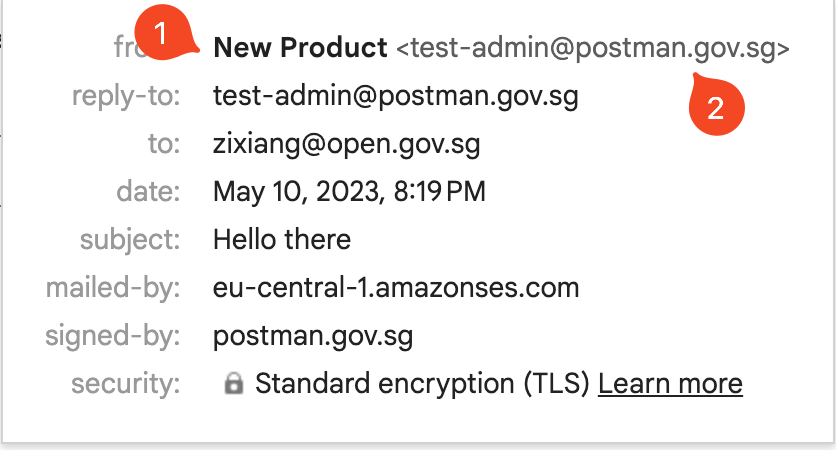
# CC and BCC
Our email API supports CC and BCC.
## What is CC and BCC?
CC stands for "Carbon Copy" and BCC stands for "Blind Carbon Copy." Both are features in an email system that allow you to send the same message to multiple recipients.
1. **CC**: When you CC someone on an email, the CC list includes recipients who should receive a copy of the email for their information. Everyone included in the To and CC fields can see who else received the email, including the email addresses of other recipients listed in the CC field. It's often used when the information contained in the email is relevant to the individuals in the CC field, but they're not the primary recipients who need to take action.
2. **BCC**: The BCC feature works similarly to CC in terms of sending the email to multiple recipients. However, when you add recipients to the BCC field, those email addresses are hidden from all other recipients. Even other BCC recipients cannot see each other's email addresses. This is a useful feature when you want to protect the privacy of certain recipients, or you want to communicate without revealing to the main recipients that you're also communicating with others.
## How It Works
You can add CC and BCC recipients to your email by adding the `cc` and `bcc` fields to your API request. The `cc` and `bcc` fields each accept an array of email addresses.
An example JSON payload making use of the `cc` and `bcc` fields:
```JSON
{
"recipient": "primary-recipient@email.com",
"subject": "subject",
"body": "body",
"cc": ["cc-recipient@email.com"],
"bcc": ["bcc-recipient@email.com"]
}
```
## Limitations
1. Due to our underlying email provider, each email can have a maximum of 50 recipients (including the primary recipient, CC recipients, and BCC recipients). Note that our API is designed to only allow one primary recipient per email.
2. If the primary recipient is on our blacklist, the email won't be sent. If there are blacklisted recipients in the `cc` or `bcc` fields, these recipients will be ignored and the email will still be sent to the other recipients.
3. Within each array of `cc` and `bcc` recipients, no duplicate email addresses are allowed.
4. The [email status](/email-api-guide/programmatic-email-api/tracking-email-status#email-status) of CC and BCC recipients are not tracked.
5. The email status of the primary recipient is still tracked, but the `OPEN` status of an email with CC and BCC email is not accurate as [the tracking pixel](/email-api-guide/programmatic-email-api/tracking-email-status#tracking-open-rates) will be triggered when any of the recipients open the email. This is an inherent limitation of the tracking pixel as the content of the email is identical for all recipients.
# Recipient Blacklist
## Purpose
We keep a blacklist of email addresses to whom our system will not send emails. Typically, these email addresses are added to the blacklist after a delivery attempt has resulted in a hard bounce, (e.g. the email address does not exist).
Without a blacklist, our system would continue to attempt to send emails to these addresses, which would result in a poor reputation for our system and adversely impact the deliverability of emails to other recipients.
For more information on email deliverability, you can visit [AWS SES's documentation](https://docs.aws.amazon.com/ses/latest/dg/send-email-concepts-deliverability.html).
## Is my recipient on the blacklist?
Currently, we do not provide a way to check if a recipient is on the blacklist prior to sending out an email.
However, there are two ways you will be informed if a recipient is on the blacklist:
1. In our current setup, during your API call to our system, we will check if the recipient is on the blacklist. If the recipient is on the blacklist, we will return an error message indicating that the recipient is on the blacklist. However, to scale our system, we plan to change this behavior in the future, so we advise against relying on this behavior.
2. You can query an email by its ID using this [API endpoint](/email-api-guide/programmatic-email-api/get-email-by-id-api). If the email was not sent because the recipient was on the blacklist, this will be indicated in the `errorCode` field of the response.
## How do I remove a recipient from the blacklist?
There are some instances where a blacklisted recipient may be a valid recipient. For example, if a recipient's email address was blacklisted because it did not exist, but the recipient has since created an email address with the same email address, then the recipient should be removed from the blacklist.
In this case, you should [contact us](https://go.gov.sg/postman-contact-us) to remove the recipient from the blacklist.
# Email Tagging and Classification
We have implemented these features to allow you to better keep track of the types of emails that you are sending via our programmatic email API. These features are experimental and we are happy to iterate on them based on user feedback.
## Email Tagging
Our [email sending API endpoint](/email-api-guide/programmatic-email-api/send-email-api) (`/transactional/email/send`) now accepts an optional `tag` field. This field accepts a string of up to 255 characters.
An example JSON payload making use of this `tag` field:
```JSON
{
"recipient": "recipient@agency.gov.sg",
"subject": "Hello there",
"body": "How are you",
"classification": "FOR_ACTION",
"tag": "Greetings v2"
}
```
In this example, the `tag` field is wholly defined by the API user. When the API user queries for the email using the [email status API endpoint](/email-api-guide/programmatic-email-api/get-email-by-id-api) (`/transactional/email/{id}`), the `tag` field will be returned as part of the JSON object.
In the [List Emails API](/email-api-guide/programmatic-email-api/list-emails-api), the API user can query for emails with a specific tag using the `tag` query parameter. For example, `GET /transactional/email?tag=Greetings%20v2` will return all emails with the tag `Greetings v2`.
To make this feature more useful, we are considering generating monthly reports of the different emails based on these user-defined tags. If you have ideas for how this feature might be useful to you, please [contact us](https://go.gov.sg/postman-contact-us).
## Email Classification
Our [email sending API endpoint](/email-api-guide/programmatic-email-api/send-email-api) (`/transactional/email/send`) now accepts an optional `classification` field. This fields accepts one of the following enums:
* `URGENT`
* `FOR_ACTION`
* `FOR_INFO`
An example JSON payload making use of this `classification` field:
```JSON
{
"recipient": "recipient@agency.gov.sg",
"subject": "Hello there",
"body": "How are you",
"classification": "FOR_ACTION"
}
```
When the API user queries for the email using the [email status API endpoint](/email-api-guide/programmatic-email-api/get-email-by-id-api) (`/transactional/email/{id}`), the `classification` field will be returned as part of the JSON object.
We encourage users to make use of this field. To make this feature more useful, we are considering priority sending of emails based on this classification. If you have ideas for how this feature might be useful to you, please [contact us](https://go.gov.sg/postman-contact-us).
# Email Body
The `body` field in the request body is the email body. API user can provide the email body in either plain text or HTML format.
## Size Limit
The `body` field can accept up to 1MB of data. If the email body exceeds the size limit, the API will return a `400 Bad Request` error.
In fact, we recommend that you keep your email body within 100KB for the following reasons:
* The larger your email body, the longer it takes for your API call to complete.
* Popular web clients like Gmail will clip emails that are larger than this size.
* This means users will have to click on a link to view the full email, resulting in a worse user experience.
* To track open rates, we embed a 1x1 pixel image in the email. If the email is clipped, there is a chance that the image will not be loaded, thus affecting the accuracy of the open rate. For more information, see [this section](/email-api-guide/programmatic-email-api/tracking-email-status#tracking-open-rates)
* The exact clipping limit is not known, but it is estimated to be around 102KB.
A clipped message on Gmail
## HTML Sanitisation
The `body` field passed in the request body will be sanitised to prevent XSS attacks. The exact sanitisation process can be [found here](https://github.com/opengovsg/postmangovsg/blob/master/shared/src/templating/xss-options.ts).
The easiest way to check the HTML output of your sanitised input is to make use of this [email editor](https://editor.postman.gov.sg/).
This same sanitisation process is applied to campaign emails.
## Embedding Images
For more information on embedding images within the body of your email, go to [this section](/email-api-guide/programmatic-email-api/send-email-api/email-body/embedding-images).
# Embedding Images
## Supported Image Formats
Our API supports embedding images within the body of your email using the following methods:
1. [Linked images](/email-api-guide/programmatic-email-api/send-email-api/email-body/embedding-images/linked-images) - this is the recommended, modern method for including images in your email.
2. [Content-ID images](/email-api-guide/programmatic-email-api/send-email-api/email-body/embedding-images/content-id-images) - we have built this as a fallback for legacy applications that are unable to host images on the Internet; this could also be used for images that are dynamically generated by your application.
Note that this is distinct from *attaching an image to an email*, which will typically require your recipient to click on the attachment to view the full-size image. For more information on attachments, [see here](/email-api-guide/programmatic-email-api/send-email-api/attachments). In contrast, embedded images are displayed within the body of your emails.
## Linked images vs Content-ID images
### Advantages of linked images
* Emails are smaller in size as the image are hosted on a server elsewhere
* Better support by email clients
* Doesn't count towards the limit on the number of attachments an email can have
### Advantages of content-ID images
* Images exist entirely within the email; API user do not need to host the image separately
* Intranet recipients do not need to connect to the Internet to see the image
### More Info
For more information, see the section on [linked images](/email-api-guide/programmatic-email-api/send-email-api/email-body/embedding-images/linked-images) and [content-ID images](/email-api-guide/programmatic-email-api/send-email-api/email-body/embedding-images/content-id-images) respectively.
## How About Base64-Encoded Images?
We do not officially support base64-encoded images for the following reasons:
* Popular email clients like Gmail do not support base64-encoded images and your recipients will not be able to see the images.
* Emails with base64-encoded images are significantly larger, are more likely to be clipped by email clients (for more information, [see here](/email-api-guide/programmatic-email-api/send-email-api/email-body#size-limit)) take longer to send, and are more likely to be marked as spam.
If your use case requires dynamically generated images and you are unable to host your own images on the Internet, we recommend that you look into [Content-ID images](/email-api-guide/programmatic-email-api/send-email-api/email-body/embedding-images/content-id-images) as a replacement for base64-encoded images.
While we do not officially support base64-encoded images, we do not prevent you from sending them. If you choose to do so, please note that you have to stay within the [email size limit](/email-api-guide/programmatic-email-api/send-email-api/email-body#size-limit).
# Linked Images
## How It Works
Linked images are images hosted on a server and displayed in the body of an email via HTML image tags. The email client will retrieve the image from the source indicated in the `img` tag.
An example linked image is: ``.
## Recommended for Same Images Across Multiple Emails
If you are using the same set of images across multiple emails, an easy way to use linked images in your email is to upload the image to a service like GoGovSG and reuse the same `img` tags in your emails.
For step-by-step instructions on how to upload images to GoGovSG, [see this](/campaign-guide-email/email/format-bar#embedding-an-image-in-email).
## Unique Image for Each Email
If you are embedding a unique image for each email, you may consider:
* Programmatically uploading your image to a file hosting service
* Currently, we do not provide such a service. However, we are looking into possible solutions, please [contact us](https://go.gov.sg/postman-contact-us) if this could be helpful to your agency.
* Using [content-ID images](/email-api-guide/programmatic-email-api/send-email-api/email-body/embedding-images/content-id-images)
## Sample API Call
```json
{
"subject": "Test subject",
"body": "
This contains an image
hello there
",
"recipient": "recipient@agency.gov.sg"
}
```
The resulting email:
# Content-ID Images
## How It Works
Content-ID images work by attaching the image to the email you send and then using standard HTML image tags that reference that image to eventually embed it in the email when the user opens it.
## Not Recommended for Same Images Across Multiple Emails
If you are using the same set of images across multiple emails, we advise you to look into using linked images for the following reasons:
* As the same images are being used, attaching the same image to each email is inefficient and bad for the environment
* Content-ID images are larger in size as the image is attached to the email. This slows down your API calls and increases costs.
For more information, [see here](/email-api-guide/programmatic-email-api/send-email-api/email-body/embedding-images/linked-images).
## Unique Image for Each Email
Content-ID images can be used for embedding dynamically generated images in your emails. This is a reasonable alternative for agencies that are unable to host images on the Internet.
## Using our API
To support content-ID images, we have parsed each attachment to add a `cid` field based on the order in which they are attached. This allows the first attachment to be referenced by `cid:0`, the second by `cid:1`, and so on. You can then use these `cid` values in your HTML image tags.
{% hint style="info" %}
Note that the `cid` values are zero-indexed, i.e. the first attachment is `cid:0`, the second is `cid:1`, and so on. This `cid` field is added for all files, including non-image files.
{% endhint %}
As content-ID images work by attaching emails, you will need to fulfill the requirements
### Example API Request
The following example shows how you can use the `cid` field to embed images in your email.
```zsh
curl --request POST \
--url https://api.postman.gov.sg/v1/transactional/email/send \
--header 'Authorization: Bearer ' \
--header 'Content-Type: multipart/form-data' \
--form recipient=recipient@agency.gov.sg \
--form from=sender@agency.gov.sg \
--form 'subject=test cid' \
--form 'body=Hello there.
' \
--form 'attachments=@/path/to/attachment/1 one.png' \
--form 'attachments=@/path/to/attachment/2 two.png' \
--form 'attachments=@/path/to/attachment/3 three.png' \
--form 'attachments=@/path/to/attachment/4 four.png' \
--form 'attachments=@/path/to/attachment/5 five.png'
```
The resulting email:
# Attachments
Our programmatic email API supports attachments via [`multipart/form-data` requests](https://www.w3.org/TR/html401/interact/forms.html#h-17.13.4.2).
## Overview
* The attachment feature is only available to users who have [set up sending emails from their own domains](/email-api-guide/programmatic-email-api/custom-from-address). If your agency would like to set this up, [contact us](https://go.gov.sg/postman-contact-us).
* Each email can have up to 10 attachments.
* Each attachment should not exceed 2MB in size.
* The cumulative size of all attachments should not exceed 10MB.
* You can find the list of supported attachment file types below.
You will receive a `413` error if the requirements above are not met.
### Supported attachment file types
List of supported attachment file types
* `asc`
* `avi`
* `bmp`
* `csv`
* `dgn`
* `docx`
* `dwf`
* `dwg`
* `dxf`
* `ent`
* `gif`
* `jpeg`
* `jpg`
* `mpeg`
* `mpg`
* `mpp`
* `odb`
* `odf`
* `odg`
* `ods`
* `pdf`
* `png`
* `pptx`
* `rtf`
* `sxc`
* `sxd`
* `sxi`
* `sxw`
* `tif`
* `tiff`
* `txt`
* `wmv`
* `xlsx`
## Sample API calls
### API call with one attachment
```zsh
curl --location --request POST 'https://api.postman.gov.sg/v1/transactional/email/send' \
--header 'Authorization: Bearer your_api_key' \
--form 'body="
Hello there
"' \
--form 'recipient="recipient@agency.gov.sg"' \
--form 'attachments=@"/your/local/path-to-file"' \
--form 'subject="Test email"'
--form 'from="user@agency.gov.sg"'
```
### API call with two attachments
```zsh
curl --location --request POST 'https://api.postman.gov.sg/v1/transactional/email/send' \
--header 'Authorization: Bearer your_api_key' \
--form 'body="
");
data.append("from", "user@agency.gov.sg");
data.append("attachments", "/your/local/path-to-file-1");
data.append("attachments", "/your/local/path-to-file-2");
const xhr = new XMLHttpRequest();
xhr.withCredentials = true;
xhr.addEventListener("readystatechange", function () {
if (this.readyState === this.DONE) {
console.log(this.responseText);
}
});
xhr.open("POST", "https://api.postman.gov.sg/v1/transactional/email/send");
xhr.setRequestHeader("Authorization", "Bearer your_api_key");
xhr.send(data);
```
# Rate Limit
## How It Works
Our rate limit is applied on a per account (i.e. email address) basis. The default rate limit of our API is 10 emails per second. If you exceed this limit, you will receive a `429` error code.
## Need a Higher Rate Limit?
To increase this rate limit, please [contact us](https://go.gov.sg/postman-contact-us). If you provide more details on your email workload, we could work out a higher rate limit for you.
# Get Email by ID API
This API allows you to retrieve metadata about a specific email sent via our API [via its `id`](/email-api-guide/programmatic-email-api/send-email-api#response-body). The most common use case for this API is to check on the status of an email.
## How It Works
{% hint style="info" %}
To use this API, you must save the `id` field in the response returned when making an API call to send the email. For more information, see [this section](/email-api-guide/programmatic-email-api/send-email-api#response-json-object).
{% endhint %}
### Get transactional email by ID
{% code title="Get endpoint by email ID" %}
```bash
GET /v1/transactional/email/{emailId}
```
{% endcode %}
{% code title="eg. Request body via email ID" overflow="wrap" %}
```javascript
const response = await fetch('/v1/transactional/email/{emailId}', {
method: 'GET',
headers: {
"Authorization": "Bearer "
},
});
const data = await response.json();
```
{% endcode %}
{% code title="eg. Response body via email ID" %}
```json
{
"id": 42,
"from": "Postman ",
"recipient": "hello@example.com",
"params": {
"body": "Hello World",
"from": "Postman ",
"subject": "Hello World",
"reply_to": "hello@example.com"
},
"attachments_metadata": [
{
"fileName": "text",
"fileSize": 0,
"hash": "text"
}
],
"status": "DELIVERED",
"error_code": null,
"error_sub_type": null,
"created_at": "2023-05-10T03:03:54.163Z",
"updated_at": "2023-05-10T03:05:00.000Z",
"accepted_at": "2023-05-10T03:03:55.406Z",
"sent_at": "2023-05-10T03:04:01.912Z",
"delivered_at": "2023-05-10T03:05:00.000Z",
"opened_at": null,
"classification": "FOR_ACTION",
"tag": "hello world"
}
```
{% endcode %}
**How do I retrieve the email ID?**
Refer to [this section of the guide](/email-api-guide/programmatic-email-api/send-email-api#id-string) for more information on how to retrieve the email ID.
**What do each of the attributes in the response body mean?**
Refer to [this section of the guide](/email-api-guide/programmatic-email-api/send-email-api#response-body) for more information on attributes.
## Limitations
We currently do not support pushing webhooks to your server when the status of an email changes. We are exploring the possibility of providing more email analytics, such as monthly reports aggregating statistics about email deliverability grouped based on user-defined tags. For more information, see [this section](/email-api-guide/programmatic-email-api/send-email-api/email-tagging-and-classification).
# List Emails API
This API allows you to retrieve previously sent emails.
```bash
GET /v1/transactional/email
```
The above returns the first 10 emails sorted by `created_at` in descending order
### Request body for listing transactional emails
{% code title="eg. Response Body" overflow="wrap" %}
```javascript
const response = await fetch('/v1/transactional/email', {
method: 'GET',
headers: {
"Authorization": "Bearer "
},
});
const data = await response.json();
```
{% endcode %}
### Query Parameters
**limit** integer
max number of messages returned
***
**offset** integer
offset to begin returning messages from
{% code title="`offset` endpoint example" %}
```sh
GET /transactional/email?limit=20&offset=10
```
{% endcode %}
The example above returns the next 20 emails sorted by `created_at` in descending order
***
**status** array of enums
status of messages to filter for.
This return emails with the specified status. For a list of possible values, see [this section](https://postman-v1.guides.gov.sg/email-api-guide/programmatic-email-api/tracking-email-status#email-status)
**item** enum
* `UNSENT`
* `ACCEPTED`
* `SENT`
* `BOUNCED`
* `DELIVERED`
* `OPENED`
* `COMPLAINT`
{% code title="`delivered` status example" %}
```bash
GET /transactional/email?status=DELIVERED
```
{% endcode %}
The example above returns the first 10 emails with the status `delivered`, soered by `created_at` in descending order.
***
**created\_at** object
Filter for `created_at` timestamp of messages that corresponds to the time the API call to send the email was made.
For `created_at`, the timestamp should be specified in valid [ISO 8601 format](https://en.wikipedia.org/wiki/ISO_8601). The list of supported operators are:
| Operators | Explanation |
| --------- | ------------------------ |
| `gt` | greater than |
| `gte` | greater than or equal to |
| `lt` | less than |
| `lte` | less than or equal to |
{% code title="`get` status time example" %}
```bash
GET /transactional/email?created_at[gt]=2023-05-10T03:03:54.163Z
```
{% endcode %}
The example above returns the first 10 emails created after `2023-05-10T03:03:54.163Z` ,sorted by `created_at` in descending order. Do note that if the timezone is not specified, it will be assumed to be UTC.
{% code title="`get` status example" overflow="wrap" %}
```bash
GET /transactional/email?created_at[gt]=2023-05-03&created_at[lt]=2023-05-10
```
{% endcode %}
Returns the first 10 emails created between `2023-05-03` and `2023-05-10` sorted by `created_at` in descending order.
***
**sort\_by** array of enum
The default sorting option is `created_at`, descending.
We currently support the following sorting options:
* `created_at`: sort by the time when the email was created; this roughly corresponds to the time when the API call to send the email was made
* `updated_at`: sort by the time when the email was last updated
We support both ascending and descending order.
To specify the order, add the prefix `+` for ascending order and `-` for descending order.
For example, `+created_at` will sort by `created_at` in ascending order, and `-updated_at` will sort by `updated_at` in descending order. If the prefix is omitted, descending order will be used.
{% code title="`sorted_by` example" overflow="wrap" %}
```bash
GET /transactional/email?sort_by=+created_at&created_at[gte]=2022-11-01&status=delivered&limit=48
```
{% endcode %}
Returns the first 48 emails with status `DELIVERED` created on or after `2022-11-01` sorted by `created_at` in ascending order.
***
### Response body for listing emails API
{% code title="Listing emails API response example" overflow="wrap" %}
```json
{
"has_more": false,
"data": [
{
"id": 42,
"from": "Postman ",
"recipient": "hello@example.com",
"params": {
"body": "Hello World",
"from": "Postman ",
"subject": "Hello World",
"reply_to": "hello@example.com"
},
"attachments_metadata": [
{
"fileName": "text",
"fileSize": 0,
"hash": "text"
}
],
"status": "UNSENT",
"error_code": "text",
"error_sub_type": "text",
"created_at": "2024-09-02T01:34:37.342Z",
"updated_at": "2024-09-02T01:34:37.342Z",
"accepted_at": "2024-09-02T01:34:37.342Z",
"sent_at": "2024-09-02T01:34:37.342Z",
"delivered_at": "2024-09-02T01:34:37.342Z",
"opened_at": "2024-09-02T01:34:37.342Z"
}
]
```
{% endcode %}
The response is a JSON object with the following fields:
* `has_more`: a boolean indicating whether there are more emails to retrieve
* `data`: an array of JSON email objects. You can find an example of a single JSON email object [here](/email-api-guide/programmatic-email-api/get-email-by-id-api#example-response). We support excluding the `params` field from the response object, see [this section](/email-api-guide/programmatic-email-api/send-email-api#body) for more information.
### Excluding `params` Field from Response
Depending on the email `body`, the `params` field could be fairly large and unnecessary to users who are calling this API to retrieve the latest status.
As such, we support an optional `exclude_params` field that allows you to exclude the `params` field from the response. To do so, set `exclude_params` to `true` in the query parameters, i.e. `GET /transactional/email?exclude_params=true`. If `exclude_params` is not specified, the `params` field will be included in the response.
# Programmatic GovSG WhatsApp API
{% hint style="warning" %}
**Updated 25 October 2023** We have stopped onboarding new agencies to the Gov.sg WhatsApp channel
{% endhint %}
Integrate your systems to send out secure government messages programmatically.
## What are programmatic Gov.sg WhatsApp API
These are WhatsApp messages sent through our Gov.sg WhatsApp channel (Read more about it [here](broken://pages/J7htJ1w2vKneTOoSEFmX)).
As your agencies might have existing systems and workflows to reach out to members of public which requires a more customised solution compared to our Gov.sg campaign offering, integration with our programmatic Gov.sg WhatsApp API is the answer to that. You can send out messages based on the available templates on our platform depending on your needs.
# Getting Started
This page gives you an overview of what to expect when onboarding to Postman Programmatic Gov.sg WhatsApp API.
{% hint style="warning" %}
**Updated 25 October 2023** We have stopped onboarding new agencies to the Gov.sg WhatsApp channel
{% endhint %}
### **Step 1: Request for access**
As Gov.sg WhatsApp channel is currently available on an invite-only basis, you have to send in a request via [this form](https://go.gov.sg/sgc-interest-form). Please also tell us about your use-case so we can make the appropriate templates available for your account.
Make sure that your account has been whitelisted for this channel before using it. An easy way to check this by logging into the [Postman platform](https://postman.gov.sg) and see if you can create a Gov.sg WhatsApp campaign.
### **Step 2: Generate API Key on Postman.gov.sg**
Log in to Postman.gov.sg using the whitelisted email address identified in **Step 1** and generate the API Key. This API key will be used to authenticate your requests. You may follow the steps outlined [here](/email-api-guide/api-key-management/generate-your-api-key).
### **Step 3: Start sendng test messages and integration**
Retrieve ID of the message template that you need using [this endpoint](/email-api-guide/programmatic-govsg-api/get-templates-api) and send out test messages using [the sending endpoint](/email-api-guide/programmatic-govsg-api/send-message-api).
### **Step 4: Communicate go-live date to the Postman team**
If you have any feature requests or need additional support, please let us know with an expected go-live date.
# Tracking Message Status
API users can track the status of messages sent via our API.
## Gov.sg WhatsApp Message Status
You can get the status of each email sent sent using [this API endpoint](/email-api-guide/programmatic-govsg-api/tracking-message-status).
We currently do not support pushing webhooks to your server when the status of a message changes.
For a list of statuses supported by our API, please refer to the table below.
Status
Definition
UNSENT
Initial state of a newly created transactional Gov.sg message (this status is not returned in the course of a successful request to send a Gov.sg message)
ACCEPTED
Message has been accepted by our service provider (this status is returned in the course of a successful request to send a Gov.sg message)
SENT
The send request was successfully forwarded to our service provider and our service provider will attempt to deliver the message to the recipient’s phone number (API user can check this and all subsequent statuses via the /transactional/govSG/{messageId} endpoint)
DELIVERED
The service provider has successfully delivered the message to the recipient's phone number
READ
The recipient has received the message and viewed it
ERROR
An error happened when the service provider is trying to deliver the message
## Error Codes and Error Description
The `error_code` and `error_description` fields in the JSON object returned [by our API](/email-api-guide/programmatic-govsg-api/tracking-message-status) supplement the email status and provide additional information.
You can find a non-exhaustive list of error codes below.
### Error code while attempting to send messages
* `invalid_recipient`: This error is returned when the recipient number provided is either not a valid phone number or doesn't have any WhatsApp account associated with it. Under this scenario, no message will be sent out.
### Error code after a message has been sent
After Postman platform has successfully forwarded the message request to our provider WhatsApp, all errors that are logged from WhatsApp will be recorded in Postman system with the corresponding `error_code` and human-readable `error_description`.
For more details about the possible errors that can happen, please check out [this page](https://developers.facebook.com/docs/whatsapp/cloud-api/support/error-codes/#error-codes).
## Tracking open rates
A message is recorded as `READ` when the recipient has opened the thread and blue-ticked the message. Please note that if the recipient configure their WhatsApp to not send read receipt, this won't happen hence the message status will finalise at `DELIVERED`.
# Get Available Templates API
## Overview
{% hint style="warning" %}
**Updated 25 October 2023** We have stopped onboarding new agencies to the Gov.sg WhatsApp channel
{% endhint %}
This endpoint returns information about the available message templates for your account that can be used to send out Gov.sg WhatsApp messages.
{% openapi src="" path="/govsg/templates" method="get" %}
{% endopenapi %}
## API Response
For general information about our API response formats, [see here](https://github.com/opengovsg/postmangovsg-guide/blob/main/overview/api-response-formats.md).
### Example Response
```json
{
"data": [
{
"id": 1,
"body": "From: {{ agency }}\nSubject: Upcoming phone call\n\nDear {{ recipient_name }},\nWe will be calling you today between {{ timeslot }} about {{ topic }}. We request your availability during this period.\n\nSincerely,\n{{ officer_name }}\n{{ officer_designation }}\n{{ agency }}\n\nThis is an automated message. Please do not reply.",
"params": [
"agency",
"recipient_name",
"timeslot",
"topic",
"officer_name",
"officer_designation"
],
"param_metadata": {
"topic": {
"displayName": "Topic"
},
"agency": {
"defaultFromMetaField": "agency"
},
"timeslot": {
"displayName": "Timeslot"
},
"officer_name": {
"defaultFromMetaField": "officer_name"
},
"recipient_name": {
"displayName": "Recipient Name"
},
"officer_designation": {
"defaultFromMetaField": "officer_designation"
}
},
"name": "Notify users of an upcoming call",
"multilingual_support": [
{
"languageCode": "zh_CN",
"language": "Chinese",
"body": "From: {{ agency }}\nSubject: Upcoming phone call\n\nDear {{ recipient_name }},\nWe will be calling you today between {{ timeslot }} about {{ topic }}. We request your availability during this period.\n\nSincerely,\n{{ officer_name }}\n{{ officer_designation }}\n{{ agency }}\n\nThis is an automated message. Please do not reply."
}
]
}
]
}
```
{% hint style="info" %}
The`id` and `languageCode` fields will be used in the [sending endpoint](/email-api-guide/programmatic-govsg-api/get-templates-api) later to indicate the specific template and lingual variation that you want to send your message out using.
{% endhint %}
# Send Message API
{% hint style="warning" %}
**Updated 25 October 2023** We have stopped onboarding new agencies to the Gov.sg WhatsApp channel
{% endhint %}
## Overview
This endpoints accept a request body that contains information about the Gov.sg WhatsApp message to be sent. Each successful request to this endpoint will send out a single Gov.sg WhatsApp message.
{% openapi src="" path="/transactional/govsg/send" method="post" %}
{% endopenapi %}
## Request Body
1. `recipient`: Mobile phone number of the recipient without special formatting (only contains numerical characters and prefixed with plus sign if country code is included).
**Notes**:
* Country code will need to be provided for non-SG mobile numbers.
* If country code is not provided, the phone number will be defaulted to be an SG number.
2. `template_id`: ID of the template that suits your need (can be retrieved from [GET templates endpoint](/email-api-guide/programmatic-govsg-api/get-templates-api))
3. `params`: A key-value object with keys being the parameter names (wrapped in double curly braces in the template body) and corresponding string values to fill in the template body.
4. `language_code` (optional): The language code that can be retrieved from the `multilingual_support` field of the template
## API Response
For general information about our API response formats, [see here](https://github.com/opengovsg/postmangovsg-guide/blob/main/overview/api-response-formats.md).
### Example Response
```json
{
"id": "505",
"recipient": "+6581489408",
"template_id": "1",
"params": {
"topic": "document collection",
"agency": "Open Government Products",
"timeslot": "1-3PM",
"officer_name": "John Tan",
"recipient_name": "Stanley Nguyen",
"officer_designation": "Reception Officer"
},
"language_code": "en_GB",
"created_at": "2023-07-31T16:39:59.631Z",
"updated_at": "2023-07-31T16:40:01.526Z",
"accepted_at": "2023-07-31T16:40:01.526Z",
"sent_at": null,
"delivered_at": null,
"read_at": null,
"errored_at": null,
"error_code": null,
"error_description": null,
"status": "ACCEPTED"
}
```
{% hint style="info" %}
For message status, we have 6 different states that a message can be in:
* `UNSENT` - Initial state of a newly created transactional Gov.sg message (this status is not returned in the course of a successful request to send a GovSG message)
* `ACCEPTED` - Message has been accepted by our service provider (this status is returned in the course of a successful request to send a Gov.sg message)
* `SENT` - The send request was successfully forwarded to our service provider and our service provider will attempt to deliver the message to the recipient’s phone number (API user can check this and all subsequent statuses via the `/transactional/govSG/{messageId}` endpoint)
* `DELIVERED` - The service provider has successfully delivered the message to the recipient's phone number
* `READ` - The recipient has received the message and viewed it
* `ERROR` - An error happened when the service provider is trying to deliver the message
{% endhint %}
# Get Message by ID API
This API allows you to retrieve metadata about a specific message sent via our API via its `id`. The most common use case for this API is to check on the status of a message.
## How It Works
{% hint style="info" %}
To use this API, you must save the `id` field in the response returned when making an API call to send the Gov.sg message.
{% endhint %}
{% openapi src="" path="/transactional/govsg/{messageId}" method="get" expanded="false" fullWidth="false" %}
{% endopenapi %}
## Example Response
```json
{
"id": "505",
"recipient": "+6581489408",
"template_id": "1",
"params": {
"topic": "document collection",
"agency": "Open Government Products",
"timeslot": "1-3PM",
"officer_name": "John Tan",
"recipient_name": "Stanley Nguyen",
"officer_designation": "Reception Officer"
},
"language_code": "en_GB",
"created_at": "2023-07-31T16:39:59.631Z",
"updated_at": "2023-07-31T16:40:02.558Z",
"accepted_at": "2023-07-31T16:40:01.526Z",
"sent_at": "2023-07-31T16:40:01.000Z",
"delivered_at": "2023-07-31T16:40:02.000Z",
"read_at": null,
"errored_at": null,
"error_code": null,
"error_description": null,
"status": "DELIVERED"
}
```
# List Messages API
## Overview
{% openapi src="" path="/transactional/govsg" method="get" %}
{% endopenapi %}
## Response format
* `has_more`: a boolean indicating whether there are more WhatsApp messages to retrieve.
* `data`: an array of JSON WhatsApp message objects. You can find an example of a single JSON message object [here](/email-api-guide/programmatic-govsg-api/get-message-by-id-api).
### Example response
```json
{
"has_more": false,
"data": [
{
"id": "505",
"recipient": "+6581489408",
"template_id": "1",
"params": {
"topic": "document collection",
"agency": "Open Government Products",
"timeslot": "1-3PM",
"officer_name": "John Tan",
"recipient_name": "Stanley Nguyen",
"officer_designation": "Reception Officer"
},
"language_code": "en_GB",
"created_at": "2023-07-31T16:39:59.631Z",
"updated_at": "2023-07-31T16:40:02.558Z",
"accepted_at": "2023-07-31T16:40:01.526Z",
"sent_at": "2023-07-31T16:40:01.000Z",
"delivered_at": "2023-07-31T16:40:02.000Z",
"read_at": null,
"errored_at": null,
"error_code": null,
"error_description": null,
"status": "DELIVERED"
}
]
}
```
# Frequently Asked Questions
## What is the the cost of using Postman's Programmatic Email API?
There is no cost for agencies to use Postman. OGP absorbs the infrastructure cost and the product is built and maintained in-house.
## Can I use Postman Programmatic Email API to send emails to Intranet recipients?
Yes. We work with SG-Mail to ensure that our emails can be delivered to Intranet recipients. For more information, [see here](/email-api-guide/programmatic-email-api/sg-mail-whitelisting).
## Can I use my Intranet application to call Postman Programmatic Email API?
As Postman is hosted on the Internet, there is ongoing work being done to allow Intranet applications to call our API. For more information, [see this](/email-api-guide/overview/connecting-your-intranet-application).
If your application is hosted on GCC2.0 or on commercial services, your application can call our API.
## How do I know if an email has been sent successfully?
A successful call to our API initiates the email sending process and does not guarantee that the email has been sent or delivered successfully. For more information, [see this](/email-api-guide/programmatic-email-api/send-email-api#status-code).
Currently, you can query an email based on its ID to get its up-to-date status. For more information, [see this](/email-api-guide/programmatic-email-api/get-email-by-id-api).
## Can I use Postman Programmatic Email API to mass send emails?
Currently, the API is designed to send one email per API call. As long as the user stays below their [rate limit](/email-api-guide/programmatic-email-api/send-email-api/rate-limit), the user can use it to mass send emails.
## Can I receive monthly reports showing the usage of the APIs by systems per month?
We currently do not have this feature but are actively exploring it. For more information, check out [this section](/email-api-guide/programmatic-email-api/send-email-api/email-tagging-and-classification#email-tagging) of the guide.
## Are there any limitations on the design of the emails?
Our API is designed to accommodate a range of use cases. However, we do limit the size of the email body and apply HTML sanitisation. For more information, [see this](/email-api-guide/programmatic-email-api/send-email-api/email-body).
## What is the onboarding process?
{% hint style="warning" %}
**Updated 26 September 2023:** Postman will no longer be onboarding any new programmatic API users nor create new custom from addresses till further notice
{% endhint %}
If you would like to try out the API integration straightaway, you can generate your own API key by logging into your Postman account. Steps to do so are available [here](https://guide.postman.gov.sg/~/changes/pv1f3DWM1ORa7R0uNLij/api-guide/api-key-management/generate-your-api-key). We recommend that you test your integration directly in the production version of Postman to ensure that your integration works as expected.
## What is Postman Programmatic Email API's product roadmap?
{% hint style="warning" %}
**Updated 26 September 2023:** Postman will no longer be onboarding any new programmatic API users nor create new custom from addresses till further notice
{% endhint %}
We are currently working on our new programmatic email API and will not be onboarding new users till further notice, following which we will publish our product roadmap. In the meantime, you can find [our feature list here](/email-api-guide/programmatic-email-api).
## Does my agency need to set up a custom from address?
{% hint style="warning" %}
**Updated 26 September 2023:** Postman will no longer be onboarding any new programmatic API users nor create new custom from addresses till further notice
{% endhint %}
If you are sending attachments in your API emails, then a custom from address is necessary. If you would like your emails to retain your agency branding in the email sender address, then you might also want to consider setting up a custom domain. See [here](https://guide.postman.gov.sg/api-guide/programmatic-email-api/custom-from-address#why-custom-from-address) for more information on custom from address. Kickstart the setup process by submitting this [form](https://go.gov.sg/postman-contact-us).
# Service Status
Have questions about Postman's uptime? We aim to maintain uptime of >99.5%.
## In-house Monitoring
We have internal services to monitor Postman uptime 24/7. These services send alerts if the product is down to the engineer-on-call, so that we can respond as soon as possible.
However, if you face specific or isolated issues, please report them to us [here](https://go.gov.sg/postman-contact-us).
## Subscribe to Status Updates
If you are unable to access Postman services and would like to check if it is due to an unplanned downtime, you may visit our status page for information.
{% embed url="" %}
Relatedly, you might also wish to check [Twilio status page](https://status.twilio.com/) and [AWS status page](https://status.aws.amazon.com/) if you're experiencing an unplanned incident.
Typically, we inform users of downtime only if resolution is expected to take longer than a day, or if your campaign is directly affected.
## Postman SLAs
Usually, if there is product downtime, we immediately work towards getting the service back up and running as soon as we can. We generally abide by these guidelines:
##
# For Recipients
You might be receiving emails from Postman from various government agencies. Our email address is donotreply\@mail.postman.gov.sg.
{% hint style="danger" %}
We will not ask you to transfer money through SMS and email. Please ignore the messages if any government agency asks you to provide your bank details or transfer money to an account. Payment should be done via the government agency's portal. When in doubt, you should check with the agency that sent you the message to confirm the authenticity before any action.
{% endhint %}
## What is Postman?
Postman is a multichannel mass messaging service for the Singapore government.
These channels are available:\
1\. SMS\
2\. Email\
3\. Password protected email (for sensitive info)
## Why am I receiving messages from Postman?
Government agencies use Postman's service to send broadcast or personalised messages to the citizens. SMS/Emails/Telegram bot messages coming from Postman are legitimate. When in doubt, you can always reach out to the agency that sent these messages to confirm the authenticity.
## How do I check that the email is really from Postman and not a spoofed email address?
Please go to the section on [Check Email Authenticity](https://guide.postman.gov.sg/faqs/faq-recipients/check-email-authenticity) for additional info.
## What should I do if I have questions regarding the email or SMS that I received?
**Emails**: Agencies have a reply-to email address set-up with Postman when they send their emails through Postman. You can click on `reply to` in your email client to write directly to the agency of interest if you have additional questions.
**SMS**: Agencies are advised to include a hotline to address queries. If no phone number is included in the SMS, you can reach out to their contact centre by searching for their hotline online.
## I am not the intended recipient!
It is possible that the recipient has changed his or her phone number or email address and thus the message was sent to you by mistake. Please inform the agency so they can reach out to the right person using their backup contact information especially if you think the message is important for the recipient.
## I think I might have received a scam message
It is possible that scammers have gotten your contact information and try to impersonate the government. Members of the Public (MOP) can submit a report to the [Singapore Police Force](https://eservices1.police.gov.sg/phub/eservices/landingpage/police-report) (SPF). You can also download the ScamShield app where you can check if the message you received is a scam message - more information [here](https://www.scamshield.gov.sg/check-for-scams/).
# Check Email Authenticity
This is what you could to do see if the email is coming from Postman.
If you are not sure about the authenticity of the email you received from Postman, you can check your email header.
## Outlook
If you are using Outlook, you can go to **File > Properties > Internet headers.**


What you want to see is the part of the header that shows the **authentication results**. You should be able to find something like this (see below).
{% hint style="success" %}
**Authentication-Results**:\
spf=**pass** smtp.mailfrom=<`someuniquemessageid`>[@mail.postman.gov.sg](mailto:010001732fa75c8d-6f7b6c04-ec03-4b1e-820b-9bf34a69d10c-000000@mail.postman.gov.sg);\
dkim=**pass** (signature verified) header.i=@[mail.postman.gov.sg](http://mail.postman.gov.sg/);\
dmarc=**pass** (p=none dis=none) d=[postman.gov.sg](http://postman.gov.sg/)
{% endhint %}
## Gmail
In Gmail, you need to go to **show original** to check the SPF, DKIM, and DMARC records.


# For Senders
## Troubleshooting Errors
### I have checked my CSV file many times but I cannot find the mistake and I keep getting an error for invalid recipient.
Common typos in the recipient field include spaces and symbols.
After you have sent the campaign, we will also provide the list of email addresses that bounced under statistics.
## Browser Compatibility
We only support Chrome, Firefox, Samsung Internet, the latest Microsoft Edge, and IE 11 at the moment.
## Credentials
### Can I see what Postman has before entering a credential?
If you are checking out Postman, you can go through most of the steps before we ask you to enter a credential. This is so that the public officers can learn how to navigate the user interface first before initiating the necessary paperwork for procuring a Twilio account. Without the credentials, we are not able to send the SMS messages.
### How would I know that my credentials are working?
Before you send an SMS or Telegram message to citizens, you will be asked to enter your credentials and send a message to yourself to test the credentials. We recommend that you log onto Twilio console so that you can copy and paste in the credentials when prompted.
### I don’t know how to find credentials in my Twilio console!
Not to worry! Go to [Getting Started - SMS & Twilio](https://guide.postman.gov.sg/campaign-guide/getting-started/sms#find-twilio-credentials-on-twilio-console) for more information.
## Features
### We want to manage subscriptions like MCI. Is Postman going to support this?
Subscription is currently not in the scope of Postman. It will likely be part of other productivity products under OGP.
### We want an audit function so we can check the SMS sent timestamp.
You can check the overall campaign sent status and timestamp on your Postman dashboard after your SMS campaign has been sent. You can also download the delivery report, which provides more details on individual recipients' sent status and timestamps.
Alternatively, you can log in to your Twilio console and search for the relevant phone number. Your agency is the only one that can check through your Twilio account. We will not be able to access it.
## Miscellaneous
### Do you offer Whatsapp as a channel? Any plans to do so?
Yes, Whatsapp is in the pipeline. However, do let us know on our [feature request form](https://go.gov.sg/postman-featurerequest) if you have a use case to help us understand how you intend to use it.
### Why don’t you support collaborator mode?
Messages sent to the public are usually governed by the communications teams within an agency. We recommend that you contact your communications team before setting up Postman so that the agency is clear on what is sent to the citizens. You can create a common email account or mailing list so that your teammates can see what has been sent out to the public. Postman is a productivity tool and we believe that the governance of the tool should fall under the purview of the agency.
## Billing
### How much does Postman cost?
Postman does not charge any agencies for using our email service, however, if you are sending SMS using Twilio through Postman, Twilio will charge.
### How does Twilio charge my agency?
Depending on your usage, Twilio has a few different plans. If you do pay-as-you-go, you only need a corporate credit card on file. It works like a prepaid mobile plan. You top-up certain amounts of money every month and deplete the account as you send SMS. Post-paid mobile plans require you to contact Twilio’s rep and initiate a procurement process that adheres to IM8 guidelines. You can go to [SMS & Twilio](https://postman-gov-sg.gitbook.io/guide/guide/getting-started/sms) to find out more.
### The procurement process for Twilio
Please go to Workplace and log in using your gov email address to see the full [content](https://onepublicservice.workplace.com/notes/265592651806700).
### What is the estimated cost of implementing Postman's solution?
Please go to [Cost Breakdown](https://guide.postman.gov.sg/faqs/faq-sender/cost-breakdown).
# Messaging Channel Comparison
Here is a comparison between the various messaging channels.
| | Email | SMS | Telegram Bot 👑 | WhatsApp\* |
| ------------------------------------------------------------------- | ------------------------------------------------------------------------------------------------------- | ------------------ | -------------------------------- | ----------------------------------------- |
| Cost per message |
| USD0.0415 | Free | 7 cents SGD |
| Cost of infrastructure set-up (estimate) | Covered by Postman | Covered by Postman | Covered by Postman | >10k SGD if an agency wishes to set it up |
| Onboarding timeline | A few minutes | A few hours | A few hours | Weeks |
| Target audience age group | All ages | All ages | <40 yo | >40 & <100 yo |
|
Added features that Postman can leverage (future roadmap)
| Open rate | 2-way reply | 2-way reply, poll, quiz, payment | 2-way reply |
| Able to selectively send to a subset of people | Yes, using the excel to remove certain recipients based on their characteristics | Yes | Yes | No |
\*We do not support sending of WhatsApp messages for public officers in general. The service is available only for MCI due to the complexity and cost involved.
# Cost Breakdown
Postman does not charge the user. Sending emails are free. Sending SMS depends on Twilio's SMS pricing and the recipient's country code. Sending Telegram bot messages are free.
## Email
| Channel | Email | Password Protected Email |
| ------------------ | ----- | ------------------------ |
| Recurrent cost ($) | $0 | $0 |
| Operation cost ($) | $0 | $0 |
## SMS
**Prerequisite**: Twilio account
Twilio provides simple and flexible [pricing plans](https://www.twilio.com/pricing) for different tiers of users. Please click [here](https://www.twilio.com/sms/pricing/sg) for the latest information on SMS cost. A U.S. phone number costs $1.15 USD per month. This is sufficient for Postman's current functionality of 1-way SMS from you to your recipients, as 2-way SMS communications are not currently supported by Postman.
| Twilio Payment Schemes | What do you need? |
| ----------------------- | ---------------------------------- |
| Pay-as-you-go | Corporate credit card |
| Volume discount | Procure by contacting Twilio sales |
| Committed-use discounts | Procure by contacting Twilio sales |
| Recurrent cost ($) |
USD $1.15 per phone line (US number) USD $80 per phone line (Singapore number)
|
| ------------------ | ---------------------------------------------------------------------------------------- |
| Operation cost ($) | USD $0.0415 (4.15 cents) per SMS |
### How to evaluate Twilio's product?
{% hint style="info" %}
Twilio's baseline send rate is 10 messages per second. You need to contact their sales team if you want a custom send rate for your use case.
{% endhint %}
Figuring out what to get from Twilio is like selecting for your mobile plan from a Telco. It depends on your needs. The main considerations are:
1. Volume
2. Frequency
For example, if you are sending a campaign once daily and <1000 SMS at a time, then you don't need to buy multiple phone numbers or increase the baseline send rate of 10 messages per second. The default option is good enough for your use case. However, you are sending a campaign four times a day and at the volume of 50k SMS at a time then you might want to consider sending it at a higher rate. You need to contact Twilio sales to find out the cost of setting a higher send rate for your agency.
## Telegram Bot
**Prerequisite**: Your own prepaid phone card that has Telegram installed on it.
| Channel | Telegram Bot |
| ------------------ | --------------------------------------- |
| Recurrent cost ($) | $x depending on your prepaid phone card |
| Operation cost ($) | $0 |
# Terms & Conditions
## 1 . General
1.1. These Terms of Use govern your access to and use of our services, including the application (whether as software or as a website or otherwise), its contents, push notifications and all other accompanying materials as identified in the Schedule below (collectively, the "Service”).
1.2. This Service is provided to you by the Government Technology Agency ("GovTech"). GovTech’s office is located at 10 Pasir Panjang Road, #10-01, Mapletree Business City, Singapore 117438.
1.3. By accessing or using any part of this Service, you unconditionally agree and accept to be legally bound by these Terms of Use and any amendments thereto from time to time. GovTech reserves the right to change these Terms of Use at its sole discretion and at any time. You should read the Terms of Use carefully each time you access or use any part of this Service as such access or use will constitute your agreement to the Terms of Use and any amendments to it.
1.4. If you do not agree to these Terms of Use, please do not use this Service or any part of this Service.
1.5. If you are accessing or using the Service for and on behalf of another entity (such as your employer), you warrant and represent that you have the necessary authority to bind such entity to these Terms of Use.
## 2. Nature of this Service
Please see the Schedule for more information and terms concerning this Service.
## 3. Licence Terms and Restrictions
3.1. The Service, including the materials made available on or through the Service, is owned by, licensed to, managed or controlled by GovTech. Please see clause 4 (Third Party Materials) for more information.
3.2. Subject to these Terms of Use, GovTech grants to you a non-exclusive, revocable, and non-transferable right to access and use the Service for personal or internal purposes only, and only for such use permitted by the functions of the Service and intended by GovTech. You shall not, amongst other things, benchmark, reproduce, modify, reverse-engineer, decompile, adapt, publish, redistribute or sublicense the Service or any part of the Service without the prior written consent of GovTech or the respective third party owners. You also shall not use the Service in violation of any applicable laws or agreements that you have with any third parties. All express or implied rights to the Service not specifically granted herein are expressly reserved to GovTech.
3.3. GovTech reserves the right to:
3.3.1. Update or modify this Service from time to time;
3.3.2. Deny or restrict access to or use of the Service by any particular person without ascribing any reasons whatsoever; and
3.3.3. Discontinue or terminate this Service at any time without notice or liability to you whatsoever, whereupon all rights granted to you hereunder shall also terminate forthwith. You shall further upon notice from GovTech return or destroy all copies of the Service or materials therein that you may have downloaded.
3.4. You will not interfere or attempt to interfere with the proper working of the Service or otherwise do anything that imposes an unreasonable or disproportionately large load on GovTech’s servers.
3A. Account Access and Security
3A.1 You are solely responsible for maintaining the confidentiality and security of any authentication credentials associated with your use of the Service, including the security of any of your devices which store the authentication credentials.
3A.2 GovTech shall be entitled, but not obliged, to verify the identity of the person using the Service. Without prejudice to the foregoing, GovTech is not under any duty to verify that any biometric identifier used with the Service, or on your device, belongs to you.
3A.3 GovTech shall have the sole and absolute discretion to invalidate any authentication credentials at any time, or require you to have to re-authenticate or refresh your authentication credentials at any time, without having to give any reason for the same.
3A.4 GovTech shall be entitled, but not obliged, to act upon or rely on any instructions, information, transmissions of data, or communications received from the account or use of the Service in relation to your authentication credentials, as if such instructions, information, data or communications were issued by you, whether or not the same was authorized by you.
3A.5 For the avoidance of doubt, you are solely responsible for any loss of whatever nature arising from unauthorized or unofficial modifications made to your device which permit or escalate privileged access, or remove restrictions to such access, which are not intended by the manufacturer or provider of your device or operating system of your device (e.g., “rooting” or “jailbreaking” your mobile phone).
## 4. Third Party Materials
4.1. The Service may require, enable or facilitate access to or use of software or services of a third party (“Third Party”). In such an event, there may be terms of use of the third party software or service (the “Third Party Terms”). GovTech may be required under or as a result of the Third Party Terms to notify you of certain terms that apply to you (either directly as an end user, or as a party whose acts or omissions could cause GovTech to breach the Third Party Terms) when you use the Services. An example of Third Party Terms may be open source software terms or standard form terms of the distribution platform from which you obtain any part of the Service (e.g. Google Play Store or Apple App Store terms) which bind GovTech as a developer or user of the distribution platform (the “Distribution Terms”). Information on the Third Party Terms are embedded in the Service, already accounted for in these Terms of Use, publicly available (e.g the Distribution Terms) or otherwise listed in the Schedule herein. For the avoidance of doubt, insofar as this Clause 4 relates to the Distribution Terms, the relevant Distribution Terms are the terms of the specific platform from which you obtained a copy of the software or application that is part of the Service. For example, if you obtained the said copy from the Google Play Store, then the relevant terms are Google’s Distribution Terms.
4.2. It is your responsibility to check and read the most up-to-date versions of these Third Party Terms and you are deemed to have notice of the same. In particular, you are deemed to have notice of the Third Party Terms that GovTech (under the Third Party Terms) is required to notify you, and you unconditionally agree to be bound by all the obligations in the Third Party Terms which are applicable to you as the end user. For the avoidance of doubt, where Third Party Terms are listed, such Third Party Terms shall be deemed to include any privacy policies and acceptable use policies as are applicable to you.
4.3. If the Third Party Terms require you to enter into an agreement directly with the Third Party, then you unconditionally agree to enter into such agreement, and in any event, to be legally bound by the Third Party Terms. For the avoidance of doubt:
4.3.1. some Third Party Terms (particularly open-source terms) permit either a direct licence to you from the Third Party or a sublicence from GovTech to you. In such cases, your licence is a direct licence from the Third Party to you; and
4.3.2. the terms of your agreement with the Third Party will govern your use of the relevant third party software or service, and not these Terms of Use.
4.4. If the Third Party Terms expressly or impliedly require GovTech to incorporate certain terms in these Terms of Use (inclusive of terms which impose any minimum or maximum standards herein, and/or terms described in Clause 4.5 below), such terms are deemed to have been so incorporated (the “Incorporated Terms”). Examples of Incorporated Terms include provisions which require GovTech to give you notice of certain rights and liabilities or require GovTech to ensure that you acknowledge certain matters. Similarly, if the Third Party Terms expressly or impliedly require these Terms of Use to be altered such that the Third Party Terms are complied with, the parties herein agree that the Terms of Use shall be deemed to be so altered but only to the extent necessary for compliance.
4.5. Some Third Party Terms grant the Third Party, or require GovTech to grant the Third Party, direct rights of enforcement of these Terms of Use as a third party beneficiary, against you. Such Third Party Terms are deemed to have been incorporated into these Terms of Use as Incorporated Terms, and you hereby agree to grant such Third Party, such direct rights of enforcement against you.
4.6. For the avoidance of doubt, without prejudice to Clause 4.4, to the extent of any inconsistency between these Terms of Use and the Third Party Terms, the latter shall prevail provided nothing in the Third Party Terms increases the liability of GovTech beyond that stated in Clause 6.
## 5. Your Consent to Access Functions of Your Device
Use of the Service may require you to allow access by the Service to certain functions of your device, such as push notifications, the obtaining and/or sharing of your location, or the collection of data from you in connection with the Service. Please also see clause Error! Reference source not found. (Privacy Policy). Your use of the Service shall constitute your consent to the access by the Service of such functions of your device as may be reasonably required by the Service.
5A. Ownership of Feedback/Requests/Suggestions
You agree that all title and interest in any feedback, requests or suggestions from you concerning the Services shall be owned by GovTech.
5B. Confidentiality
5B.1 If you receive information or data (in whatever form) from GovTech or a Third Party which is designated confidential or proprietary or is otherwise reasonably understood to be confidential or proprietary (collectively, “Confidential Information”), you shall not use, disclose or reproduce the Confidential Information except for the purpose for which it was provided to you. If consent to disclose the Confidential Information to a third party is given by GovTech or the Third Party to you, any act or omission in respect of the Confidential Information by that person shall be deemed to be your act or omission and you agree to be fully liable for the same. In all cases, you shall protect the Confidential Information to the same extent you protect your own confidential information but in no event less than a reasonable standard of care. You shall ensure that any recipients are bound by confidentiality terms at least as restrictive as this Clause.
5B.2 You shall destroy any Confidential Information immediately upon request by GovTech or the Third Party.
5B.3 In the event:
5B.3.1 you are, or likely to be, required by an order of court to disclose Confidential Information; or
5B.3.2 you have reasonable grounds to suspect the unauthorised use or disclosure or reproduction of Confidential Information;
you shall immediately notify GovTech or the Third Party of the same and cooperate with GovTech or the Third Party to prevent or limit such disclosure.
5B.4 Nothing in this Clause 5B shall prejudice GovTech’s or the Third Party’s other rights at law.
## 6. Disclaimers and Indemnity
6.1. The Service is provided on an "as is" and “as available” basis without warranties of any kind. To the fullest extent permitted by law, GovTech does not make any representations or warranties of any kind whatsoever in relation to the Service and hereby disclaims all express, implied and/or statutory warranties of any kind to you or any third party, whether arising from usage or custom or trade or by operation of law or otherwise, including but not limited to any representations or warranties:
6.1.1. as to the accuracy, completeness, correctness, currency, timeliness, reliability, availability, interoperability, security, non-infringement, title, merchantability, quality or fitness for any particular purpose of the Service; and/or
6.1.2. that the Service or any functions associated therewith will be uninterrupted or error-free, or that defects will be corrected or that this Service, website and the server are and will be free of all viruses and/or other malicious, destructive or corrupting code, programme or macro.
6.2. GovTech shall also not be liable to you or any third party for any damage or loss of any kind whatsoever and howsoever caused, including but not limited to any direct or indirect, special or consequential damages, loss of income, revenue or profits, lost or damaged data, or damage to your computer, software or any other property, whether arising directly or indirectly from –
6.2.1. your access to or use of this Service, or any part thereof;
6.2.2. any loss of access or use of this Service or any part of this Service, howsoever caused;
6.2.3. any inaccuracy or incompleteness in, or errors or omissions in the transmission of, the Service;
6.2.4. any delay or interruption in the transmission of the Service, whether caused by delay or interruption in transmission over the internet or otherwise; or
6.2.5. any decision made or action taken by you or any third party in reliance upon the Service,
regardless of whether GovTech has been advised of the possibility of such damage or loss.
6.3. Without prejudice and in addition to the foregoing, insofar as the Service facilitates or requires the provision, use or functioning of, or is provided in conjunction with, other products, software, materials and/or services not provided by GovTech, GovTech makes no representation or warranty in relation to such products, software, materials and/or services (including without limitation any representation or warranties as to timeliness, reliability, availability, interoperability, quality, fitness for purpose, non-infringement, suitability or accuracy).
6.4. You shall not rely on any part of the Service to claim or assert any form of legitimate expectation against GovTech, whether or not arising out of or in connection with GovTech’s roles and functions as a public authority.
6.5. You agree to defend and indemnify and keep GovTech and its officers, employees, agents and contractors harmless against all liabilities, losses, damages, costs or expenses (including legal costs on an indemnity basis) howsoever arising out of or in connection with your access or use of the Service (including third party software or services) or your non-compliance with the Terms of Use, Third Party Terms or Incorporated Terms, whether or not you had been advised or informed of the nature or extent of such liabilities, losses, damages, costs or expenses. You warrant and represent that your access or use of the Service does not and will not breach or violate any laws, regulations, trade, economic and/or export sanctions (wherever in the world) applicable to you, and that you shall not transmit any malicious code, illegal, infringing or undesirable content or materials to GovTech or its agents or any Third Party.
## 7. Hyperlinks
7.1. Insofar as the Service provides a hyperlink to material not maintained or controlled by GovTech, GovTech shall not be responsible for the content of the hyperlinked material and shall not be liable for any damages or loss arising from access to the hyperlinked material. Use of the hyperlinks and access to such hyperlinked materials are entirely at your own risk. The hyperlinks are provided merely as a convenience to you and do not imply endorsement by, association or affiliation with GovTech of the contents of or provider of the hyperlinked materials.
7.2. Caching and hyperlinking to, and the framing of, any part of the Service is prohibited save where you have obtained GovTech’s prior written consent. Such consent may be subject to any conditions as may be determined by GovTech in its sole discretion. If you hyperlink to or frame any part of the Service, that shall constitute your acceptance of these Terms of Use and all amendments thereto. If you do not accept these Terms of Use as may be amended from time to time, you must immediately discontinue linking to or framing of any part of the Service.
7.3. GovTech reserves all rights:
7.3.1. to disable any links to, or frames of, any materials which are unauthorised (including without limitation materials which imply endorsement by or association or affiliation with GovTech, materials containing inappropriate, profane, defamatory, infringing, obscene, indecent or unlawful topics, names, or information that violates any written law, any applicable intellectual property, proprietary, privacy or publicity rights); and
7.3.2. to disclaim responsibility and/or liability for materials that link to or frame any part of the Service.
## 8. Privacy Policy
You also agree to the terms of the Privacy Policy for this Service as may be amended from time to time. The Privacy Policy will form part of these Terms of Use.
## 9. Rights of Third Parties
Subject to the rights of the Third Party, a person who is not a party to this Terms of Use shall have no right under the Contract (Rights of Third Parties) Act or otherwise to enforce any of its terms.
## 10. Assignment
10.1. You may not assign or sub-contract this Terms of Use without the prior written consent of GovTech.
10.2. GovTech may assign, novate, transfer, or sub-contract the rights and liabilities in respect of the Service and this Terms of Use, without notifying you and without further reference to you. Your acceptance of this Terms of Use shall also constitute your consent to such assignment, novation, transfer or sub-contract.
10A. Severability
If any term of these Terms of Use is held by a court or tribunal of competent jurisdiction to be invalid or unenforceable, then these Terms of Use, including all of the remaining terms, will remain in full force and effect as if such invalid or unenforceable term had never been included but, to the extent permissible, such invalid or unenforceable terms shall be deemed to have been replaced by terms that are (a) valid and enforceable and (b) express the intention or produce the result closest to the original intention of the invalid or unenforceable terms.
## 11. Governing Law and Dispute Resolution
11.1. These Terms of Use shall be governed by and construed in accordance with laws of Singapore.
11.2. Subject to clause 11.3, any dispute arising out of or in connection with these Terms of Use, including any question regarding its existence, validity or termination, shall be referred to and finally resolved in the Courts of the Republic of Singapore and the parties hereby submit to the exclusive jurisdiction of the Courts of the Republic of Singapore.
11.3. GovTech may, at its sole discretion, refer any dispute referred to in clause 11.2 above to arbitration administered by the Singapore International Arbitration Centre (“SIAC”) in Singapore in accordance with the Arbitration Rules of the SIAC ("SIAC Rules") for the time being in force, which rules are deemed to be incorporated by reference in this clause. Further:
11.3.1. The seat of the arbitration shall be Singapore.
11.3.2. The tribunal shall consist of one (1) arbitrator.
11.3.3. The language of the arbitration shall be English.
11.3.4. All information, pleadings, documents, evidence and all matters relating to the arbitration shall be confidential.
Where GovTech is the defendant or respondent, it shall be given at least 30 days before the commencement of any legal action against it to elect to exercise the right herein to have the dispute submitted to arbitration. This right to elect shall not prejudice GovTech’s right to a limitation defence and the period to exercise the right shall not be abridged by reason of any accrual of a limitation defence in favour of GovTech during the said period.
These Terms of Use are updated on 6th of May, 2020 .
**SCHEDULE**
### 1. Name of Service: Postman
### 2. Nature of Service
a. Notwithstanding anything in the Terms of Use, the Service is intended for use by a Singapore public sector agency or a healthcare institution that is under the NHG, SingHealth, or NUHS healthcare clusters only.
b. This Service is a mass messaging tool for the permitted entities (listed in sub-paragraph a above) .
c. You are responsible for ensuring that your use of the Service is compliant with all applicable laws, including without limitation the Personal Data Protection Act and the Spam Control Act.
d. GovTech is not responsible for the content of the messages you choose to send, nor for the contents of any agreement you have (or purport to have) with the recipient of your messages.
e. Use of the Service may require you to already have the right to use certain third party service providers. For example, you may be required to have a Twilio account in order to use the Services. You may be required to provide details of your account in order to use the Services.
f. You warrant and represent to GovTech that (without prejudice to GovTech’s other rights in the Terms of Use such as Clause 3.2 and 6) you have full rights to use such third party services within or with the Service and your acts and/or omissions in respect of the such services will not cause GovTech to incur liability to any third party, including the service provider.
### 3. Third party software/services
a. Please see this [link](https://drive.google.com/open?id=1G3c593hnp7oGOdYWYkyGaU3Y1Qw_bmf1) for a list of open source components used in the Service.
b. Twilio, Inc.’s [Terms of Service](http://www.twilio.com/legal/tos), Acceptable Use Policy, Privacy Policy ()
c. Amazon Web Services - [Service Terms](https://aws.amazon.com/service-terms/) ()
# Privacy Policy
This Privacy Policy must be read in conjunction with the Terms of Use that accompany the applicable service you are requesting from us (the “Service”). In this Privacy Policy, “Public Sector Entities” means the Government (including its ministries, departments and organs of state) and public authorities (such as statutory boards).
1. Insofar as the Service consists of or is provided to you through a website, please note that:
1.1. We may use “cookies”, where a small data file is sent to your browser to store and track information about you when you enter our websites. The cookie is used to track information such as the number of users and their frequency of use, profiles of users and their preferred sites. While this cookie can tell us when you enter our sites and which pages you visit, it cannot read data off your hard disk.
1.2. You can choose to accept or decline cookies. Most web browsers automatically accept cookies, but you can usually modify your browser setting to decline cookies if you prefer. This may prevent you from taking full advantage of the website.
2. We may request certain types of data from you in connection with your access or use of the Service. The data that may be requested include those identified in the Annex herein. Your data may be stored in our servers, systems or devices, in the servers, systems or devices of our third party service providers or collaborators, or on your device, and may be used by us or our third party service providers or collaborators to facilitate your access or use of the Service.
3. If you provide us with personally identifiable data:
3.1. We may use, disclose and process the data for any one or more of the following purposes:
3.1.1. to assist, process and facilitate your access or use of the Service;
3.1.2. to administer, process and facilitate any transactions or activities by you, whether with us or any other Public Sector Entity or third party service provider or collaborator, and whether for your own benefit, or for the benefit of a third party on whose behalf you are duly authorized to act;
3.1.3. to carry out your instructions or respond to any queries, feedback or complaints provided by (or purported to be provided by) you or on your behalf, or otherwise for the purposes of responding to or dealing with your interactions with us;
3.1.4. to monitor and track your usage of the Service, to conduct research, data analytics, surveys, market studies and similar activities, in order to assist us in understanding your interests, concerns and preferences and improving the Service and other services and products provided by Public Sector Entities. For the avoidance of doubt, we may also collect, use, disclose and process such information to create reports and produce statistics regarding your transactions with us and your usage of the Services and other services and products provided by Public Sector Entities for record-keeping and reporting or publication purposes (whether internally or externally);
3.1.5. for the purposes of storing or creating backups of your data (whether for contingency or business continuity purposes or otherwise), whether within or outside Singapore;
3.1.6. to enable us to contact you or communicate with you on any matters relating to your access or use of the Service, including but not limited to the purposes set out above, via email, push notifications or such other forms of communication that we may introduce from time to time depending on the functionality of the Service and/or your device.
3.2. We may share necessary data with other Public Sector Entities, and third party service providers in connection with the Service, so as to provide the Service to you in the most efficient and effective way unless such sharing is prohibited by law.
3.3. We will NOT share your personal data with entities which are not Public Sector Entities, except where such sharing is necessary for such entities to assist us in providing the Service to you or for fulfilling any of the purposes in this Clause 3.
3.4. For your convenience, we may also display to you data you had previously supplied us or other Public Sector Entities. This will speed up the transaction and save you the trouble of repeating previous submissions. Should the data be out-of-date, please supply us the latest data.
4. To safeguard your personal data, all electronic storage and transmission of personal data is secured with appropriate security technologies.
5. You may withdraw your consent to the use and disclosure of your data by us with reasonable notice and subject to any prevailing legal or contractual restrictions; however, doing so may prevent the proper functioning of the Service and may also result in the cessation of the Service to you.
6. The Service may contain links to external sites whose data protection and privacy practices may differ from ours. We are not responsible for the content and privacy practices of these other websites and encourage you to consult the privacy notices of those sites.
7. Please contact if you:
7.1. have any enquiries or feedback on our data protection policies and procedures; or
7.2. need more information on or access to data which you have provided to us in the past.
This version of the Privacy Policy is dated 21 May 2020.
## Annex
**Name of Service**: Postman
Types of data collected/requested
a. User email
b. Message template
This Annex was last updated on 21 May 2020.
# Contact Us
{% tabs %}
{% tab title="Bug Report" %}
### Found a Bug?
Please read through the following before you report a bug.
1. **Found a bug? Check if the bug is known.** Someone else might have caught the same bug as you. Please check whether or not the bug you are experiencing is documented in our [Github](https://github.com/datagovsg/postmangovsg/issues/).
2. **Report it immediately.** Reporting a bug is like reporting news. Timeliness matters! Report it while it is fresh in your head.
3. **Reproduce the bug more than one time before you report it.** Bugs should be reproducible. Go through the same steps to see if the same bug occurred. If your bug is not reproducible, you can still file a bug report but be sure to mention its sporadic nature.
4. **Detailed summary.** Identify exactly what the problem is. It helps us greatly if you can tell us exactly what is wrong and how to reproduce the bug. Let us know which browser you used. Copy and paste the entire error message (if any) in your report.
5. **Screenshots, videos, log files.** This is how our internal team communicates when there is a bug. A screenshot is worth a thousand words!
6. **Write down your campaign ID.** The campaign ID can be found at the end of your url, after `https://postman.gov.sg/campaigns/`. In this example, the campaign ID is 3871. Please quote this number when you contact us.

**Submit** [**Legacy Postman Contact Us Form**](https://go.gov.sg/postman-contact-us)
{% endtab %}
{% tab title="Contact Us" %}
### Contact Us
For all other queries regarding Legacy Postman (emails) please submit the following form and we will get back to you within 5 business days.
If you would need help with troubleshooting, please include your campaign ID. The campaign ID can be found at the end of your url, after `https://postman.gov.sg/campaigns/`. In this example, the campaign number is 3871.
**Submit** [**Legacy Postman Contact Us form**](https://go.gov.sg/postman-contact-us)
{% endtab %}
{% endtabs %}
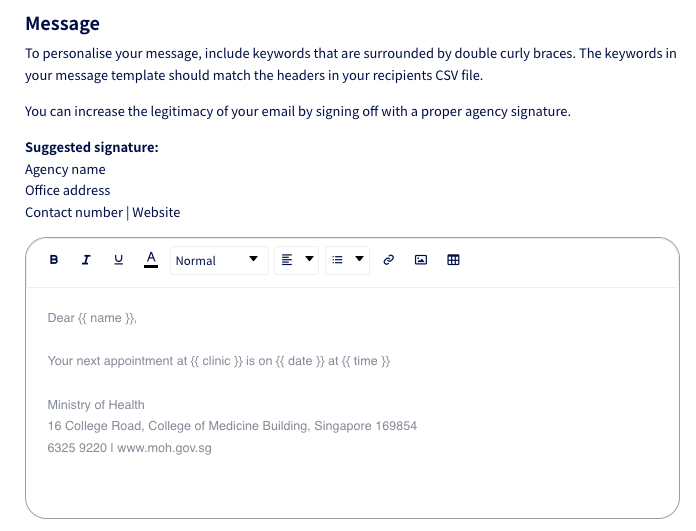


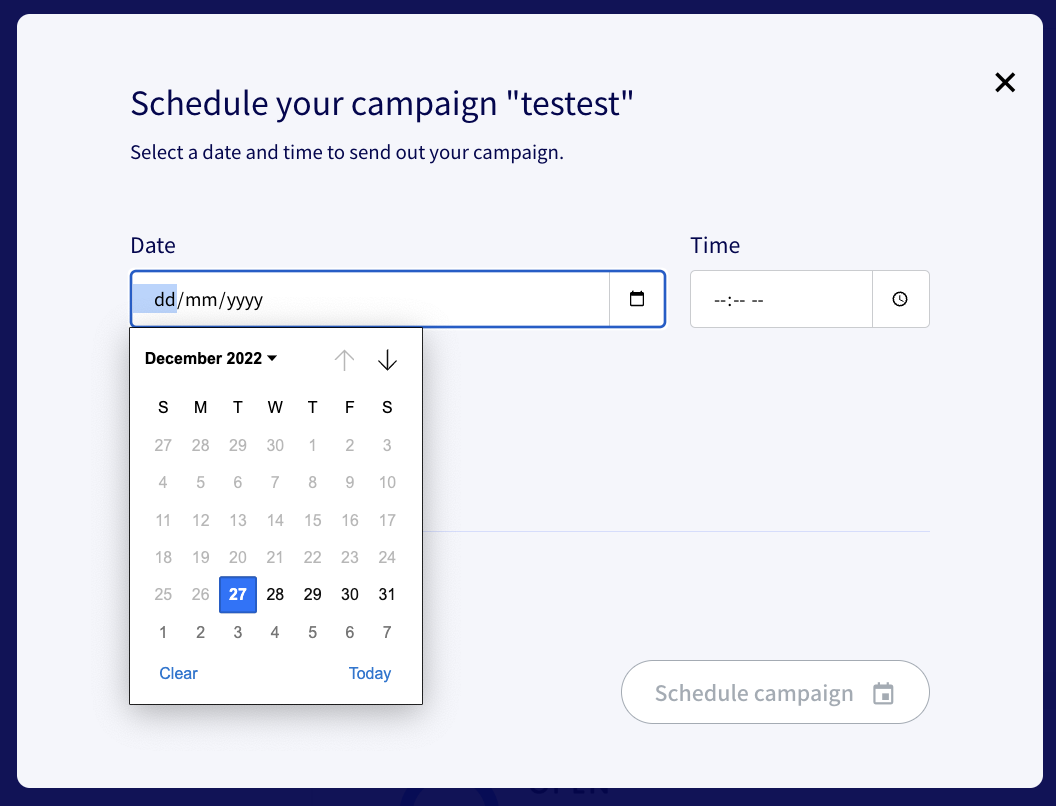
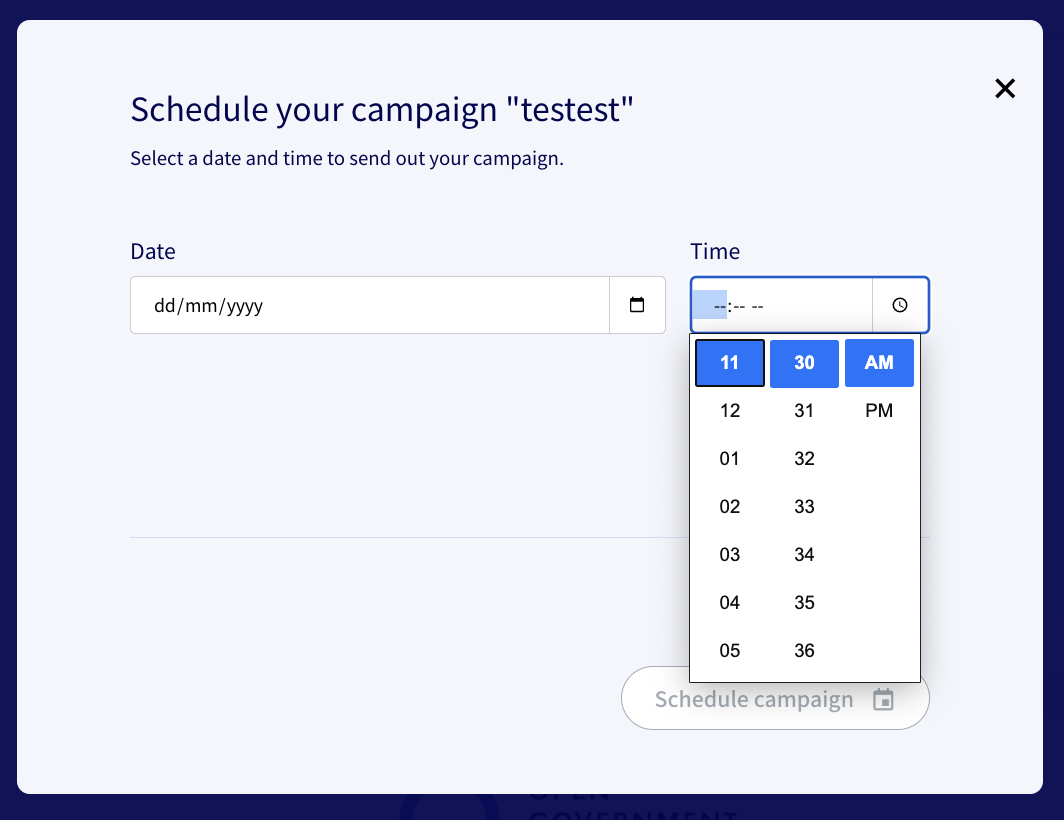
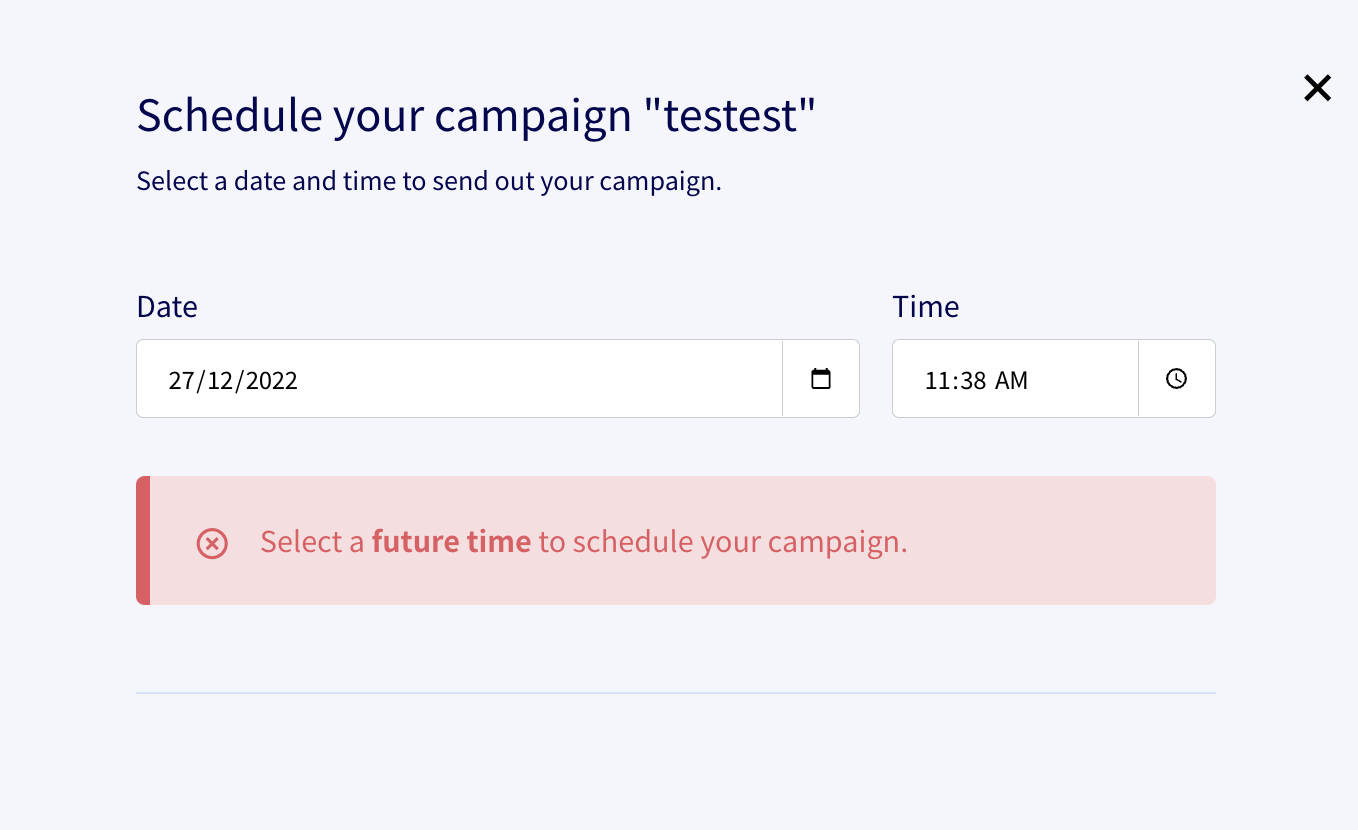
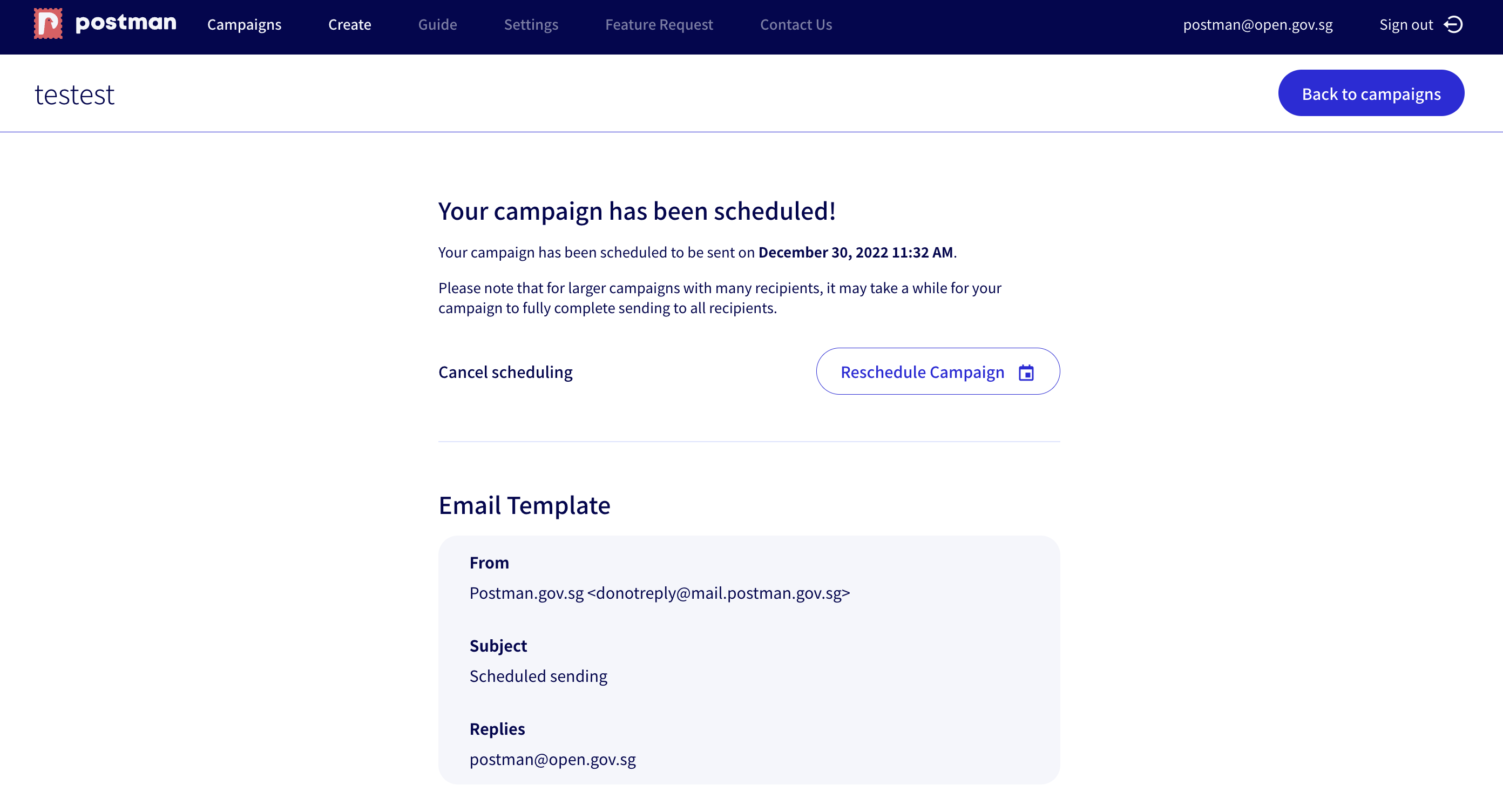
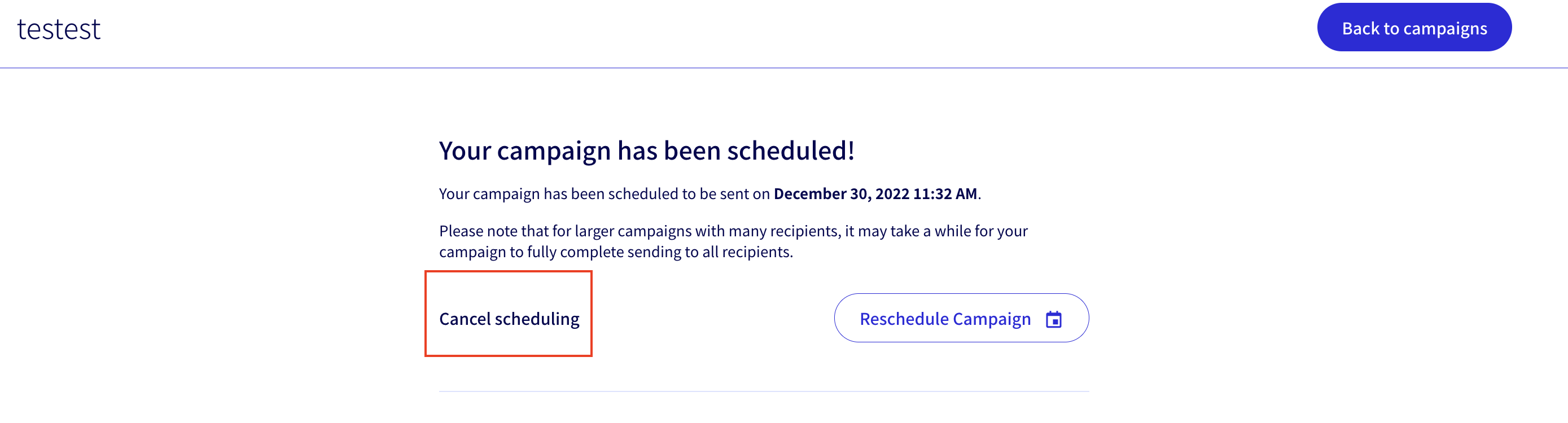
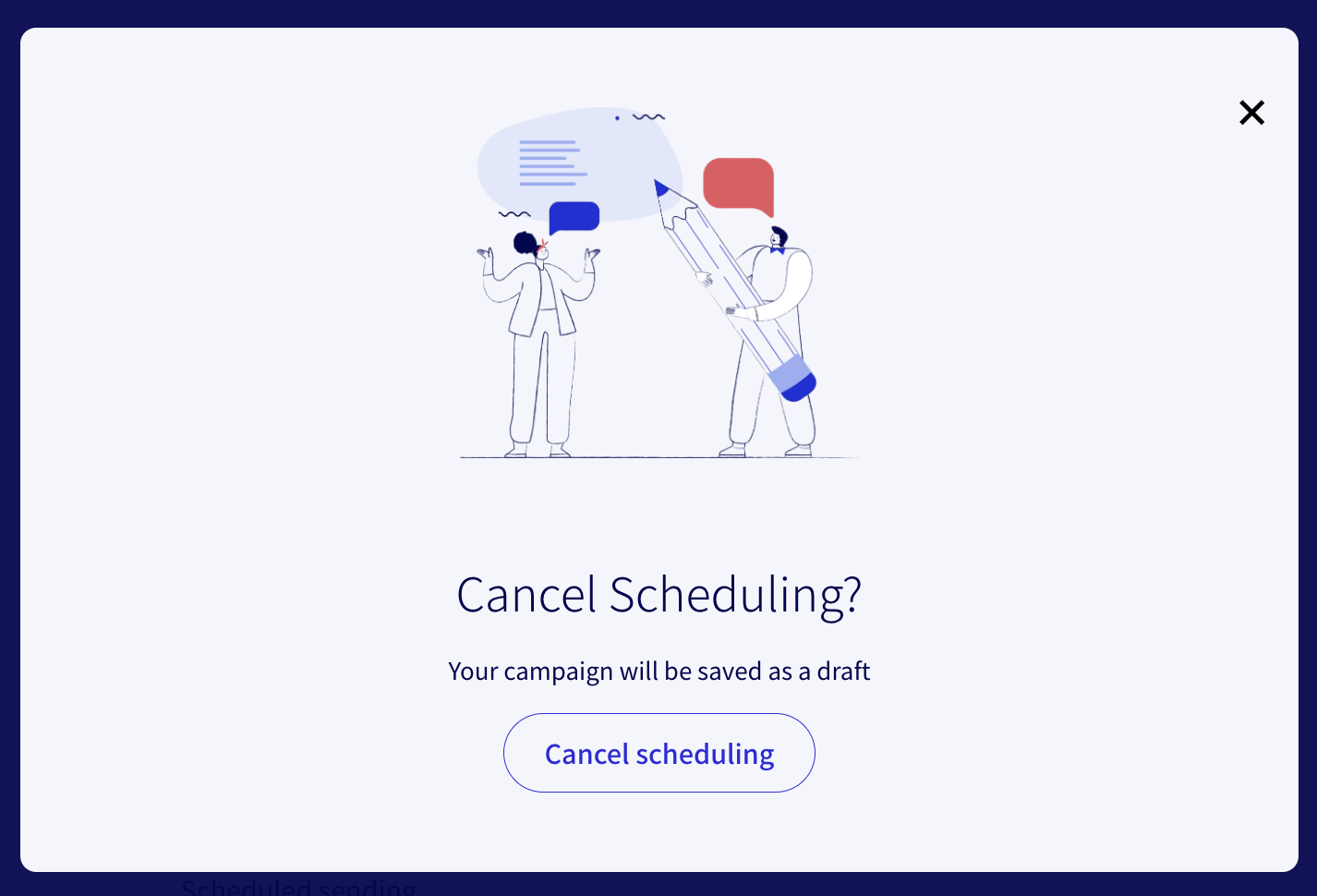
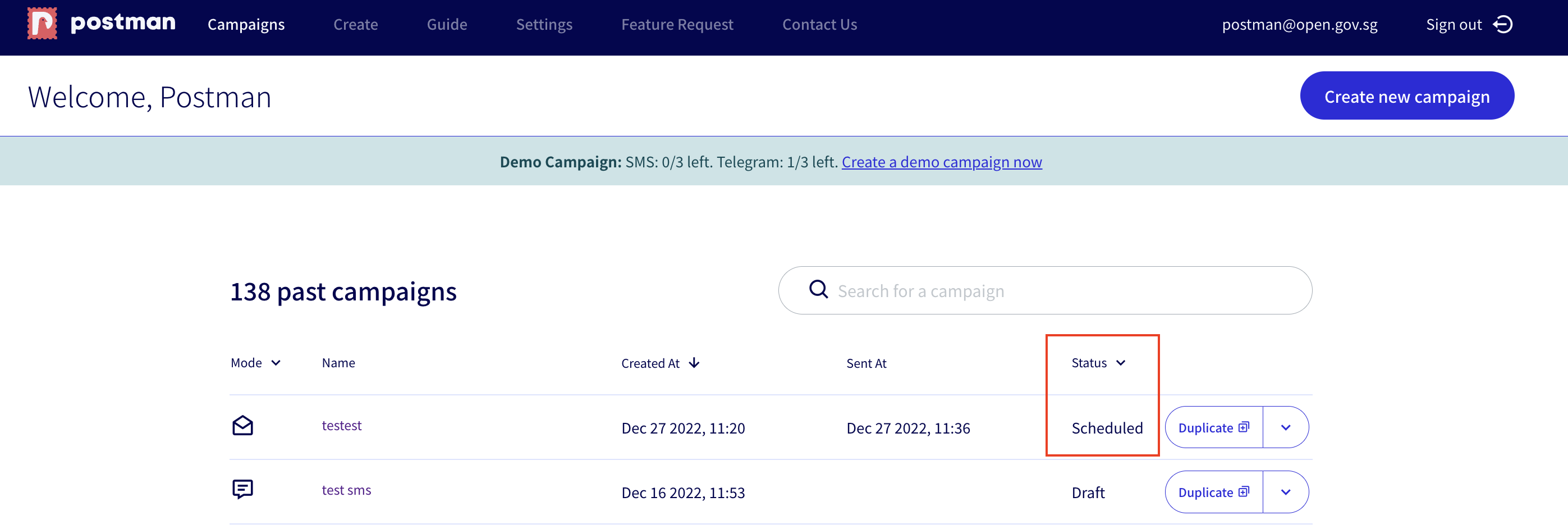
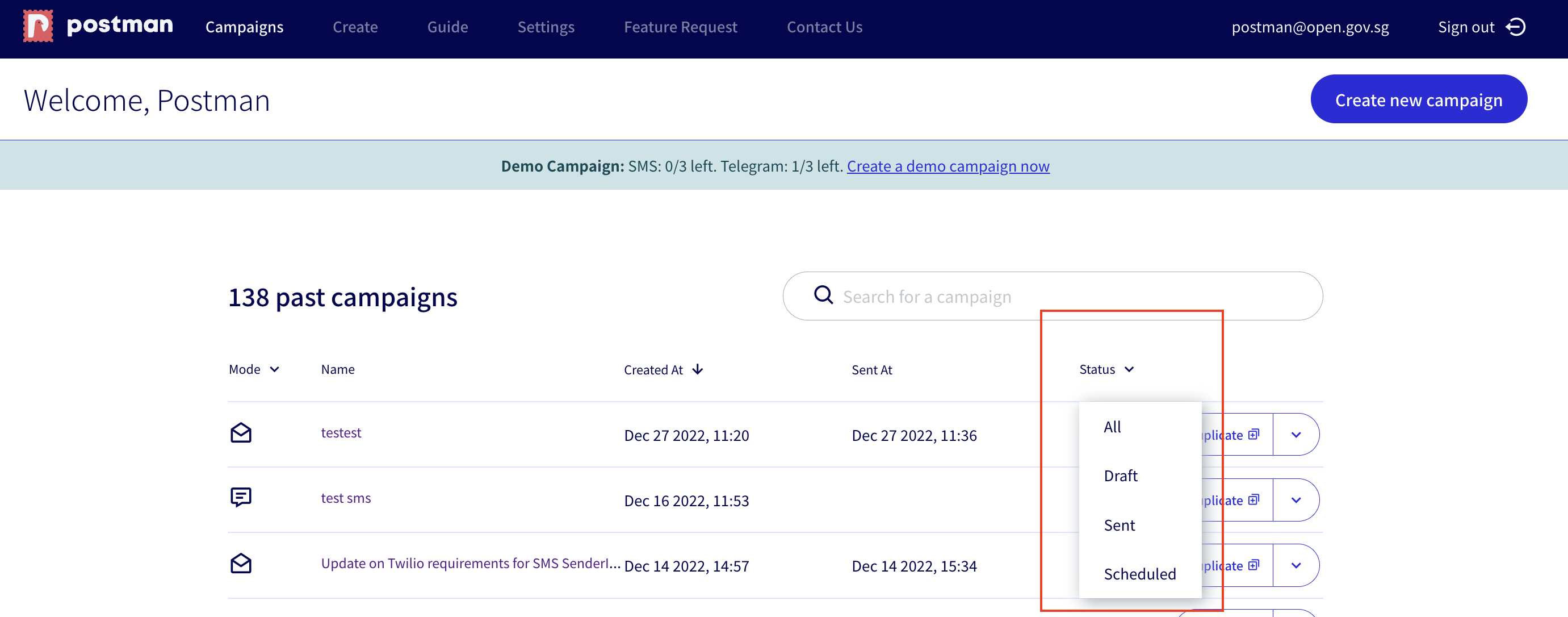
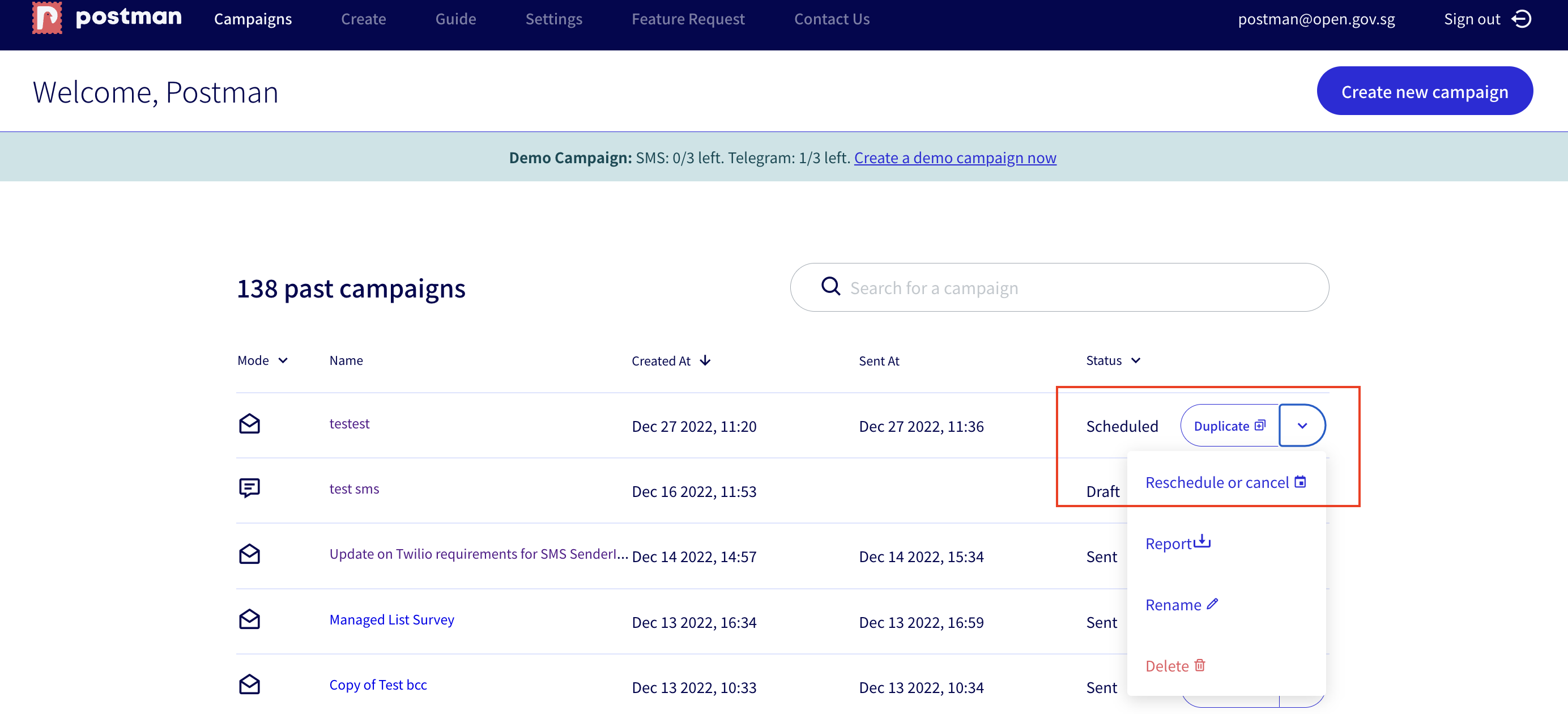

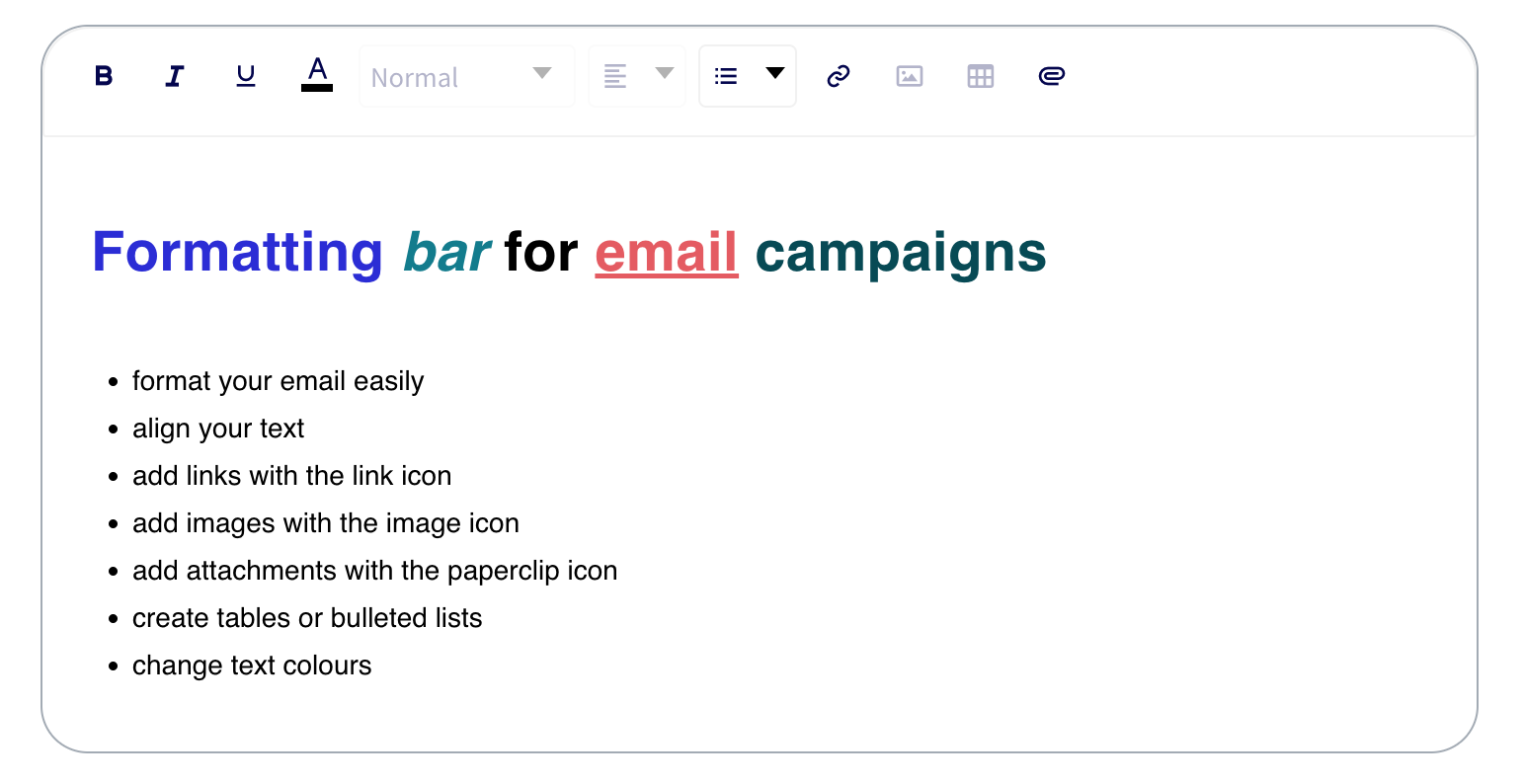
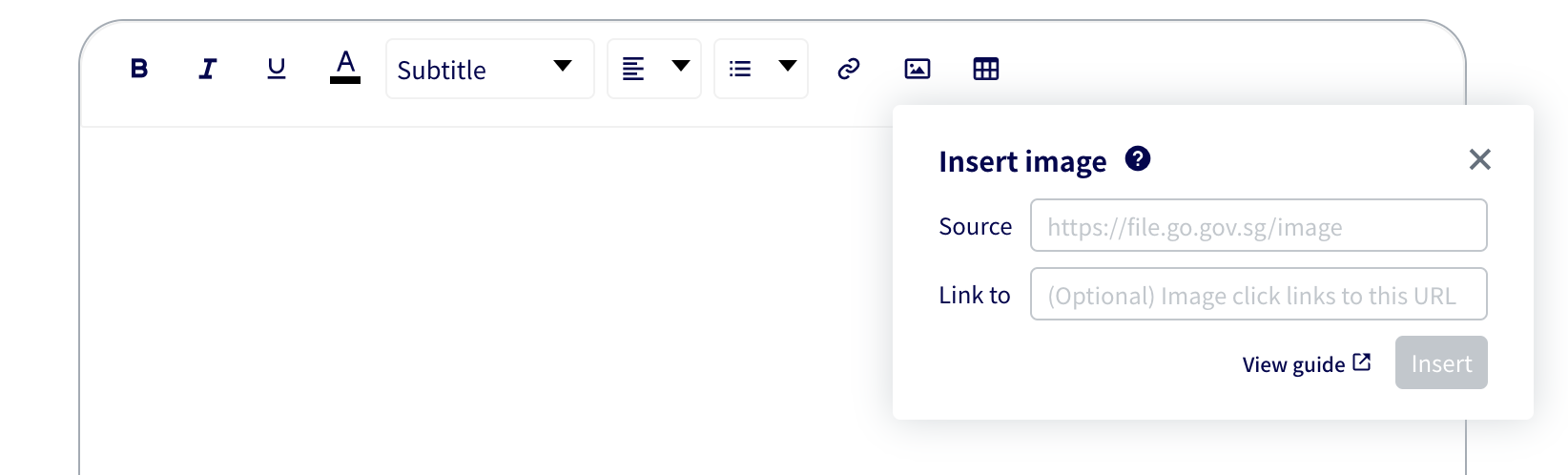
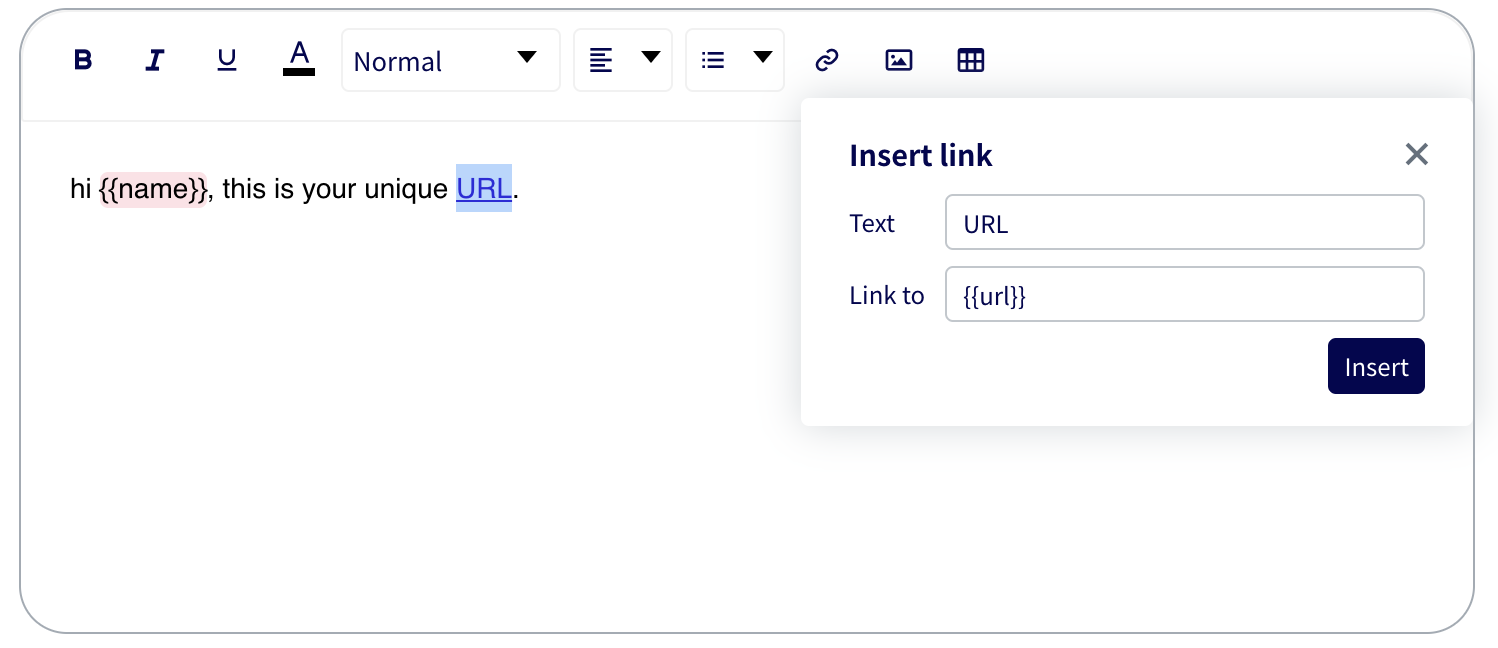

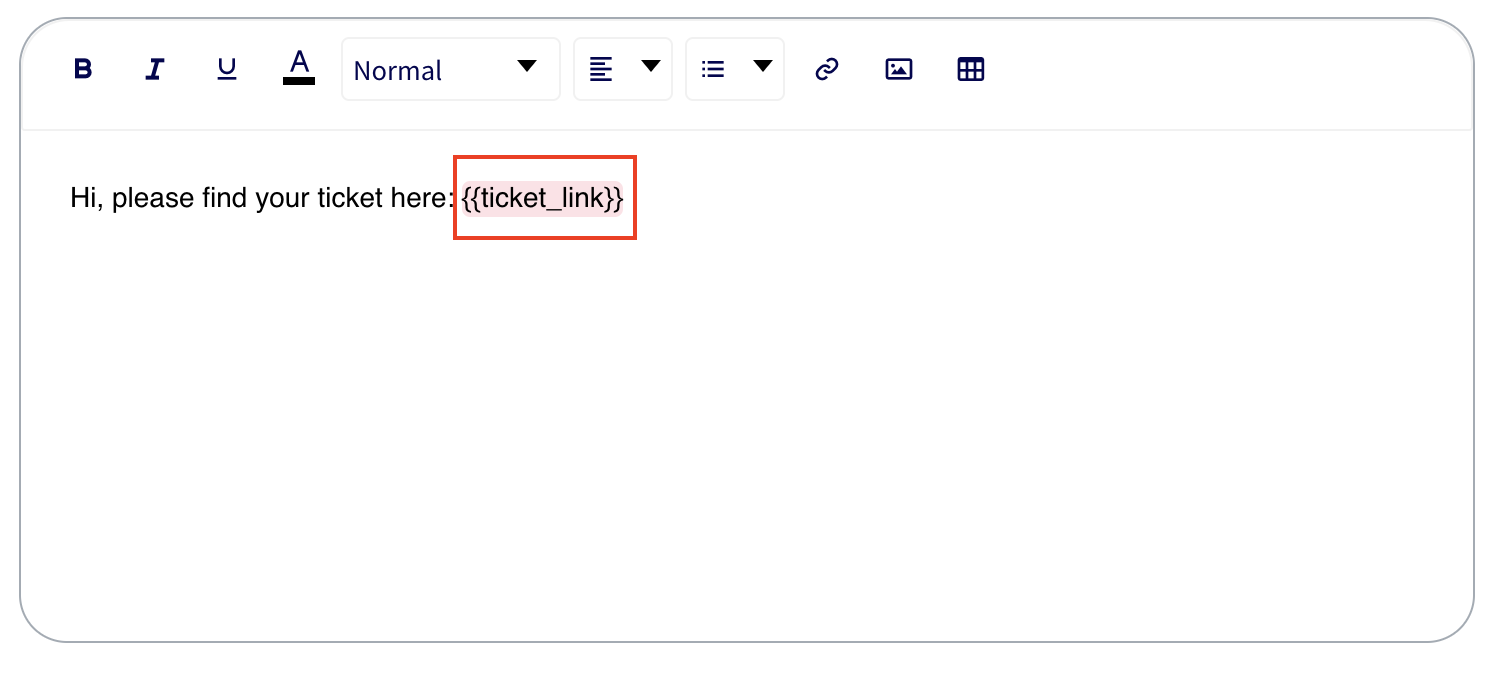
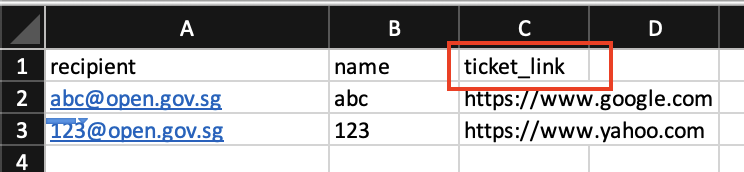

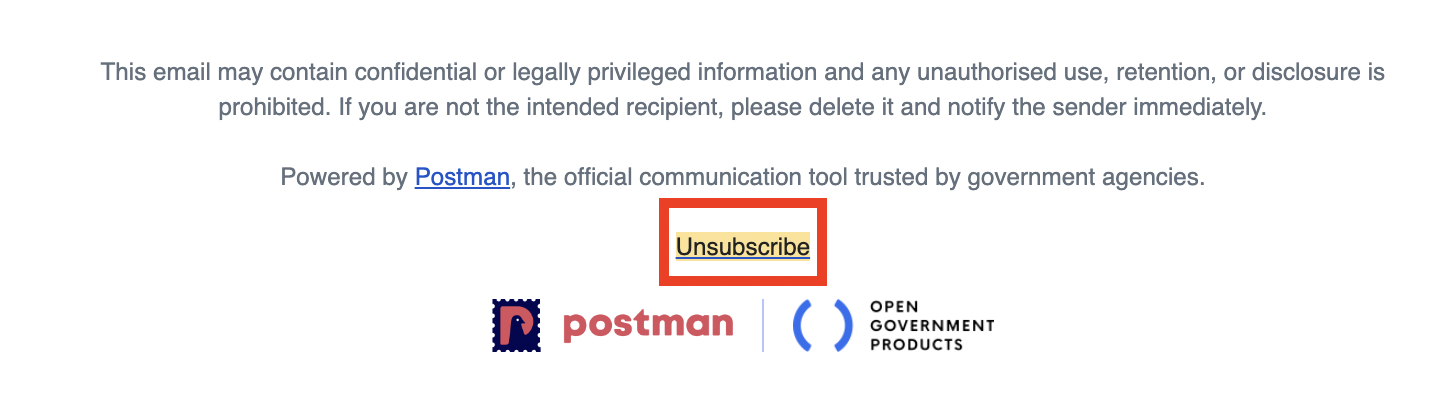
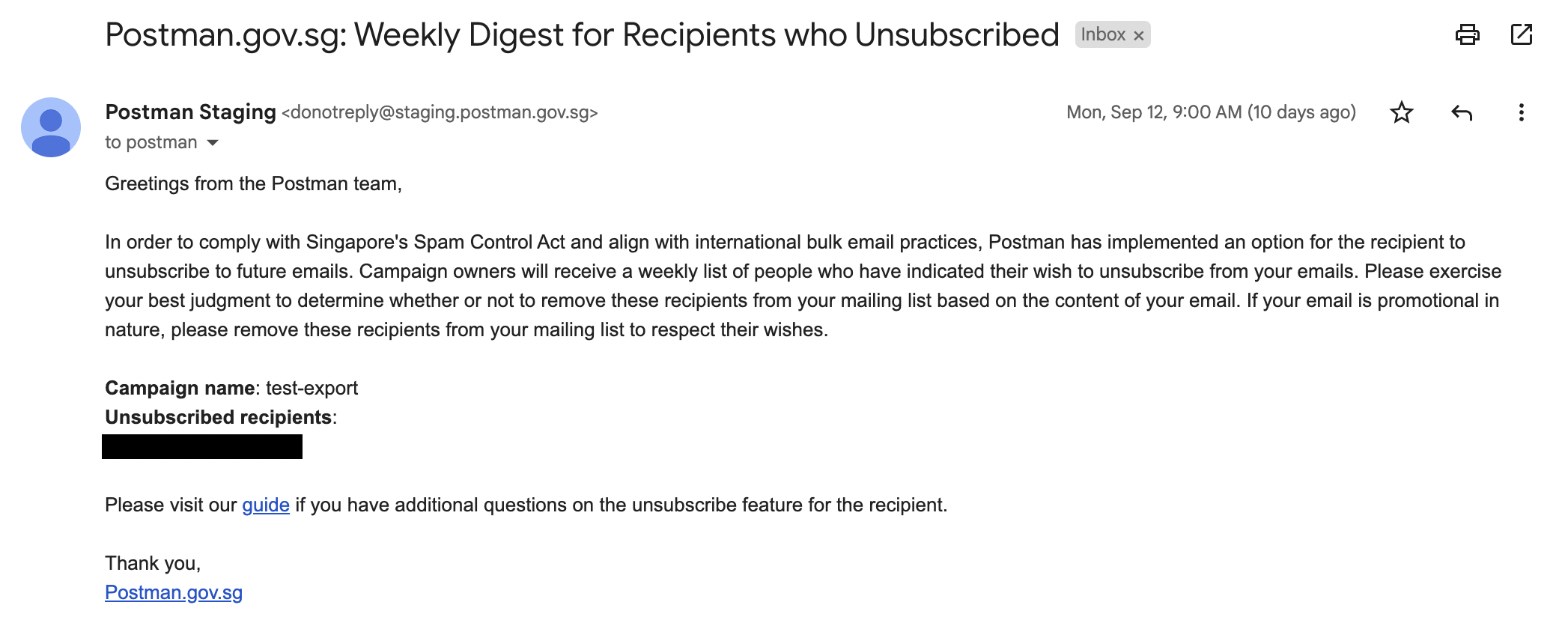
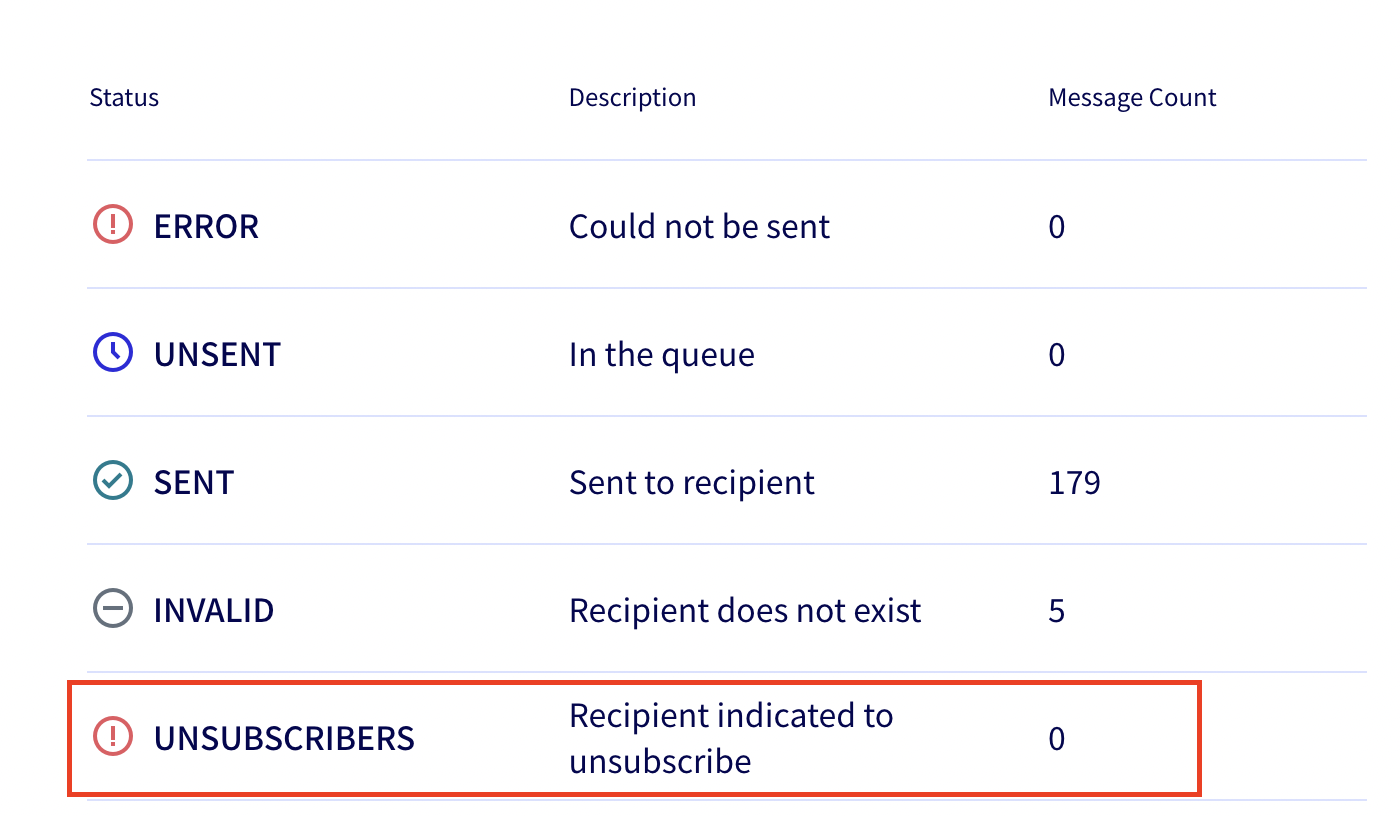

.png)
 Customise the header image with your agency logo ⤴.
This is a secret or private message that will be password-protected.
You can customise this page by following this **guide**.
---
Dear {{name}},
Your secret pin is {{pin}}.
Please keep your pin safe and not share it with others.
Sincerely,
Agency X
(This is a computer-generated letter which requires no signature)
Customise the header image with your agency logo ⤴.
This is a secret or private message that will be password-protected.
You can customise this page by following this **guide**.
---
Dear {{name}},
Your secret pin is {{pin}}.
Please keep your pin safe and not share it with others.
Sincerely,
Agency X
(This is a computer-generated letter which requires no signature) ```
## CSV File
You can use the sample CSV file that we have created and change the recipient's email address to your email address.
{% file src="/files/-MDKjkNyy6y1WL3Gt6hS" %}
Download sample csv here
{% endfile %}
## Sample Password-protected Page
Check out a sample page [here](https://postman.gov.sg/p/1/ab11edcd-d3c0-49c7-bebf-43857380e416).\
**PW**: 567A13012020

# SMS Campaigns - Basics
Send mass SMSes with Postman! These SMSes are sent through Twilio, our SMS aggregator. We will guide you through setting up an account with Twilio, before you can begin sending SMSes on Postman.
{% hint style="info" %}
**Update 21 Mar 2024:** We have updated our [SMS Onboarding process](/campaign-guide-sms/onboarding-overview); new users will now sign up for their own Twilio accounts, more information here.
{% endhint %}
{% hint style="warning" %}
**This portion of the guide is only for existing Postman SMS Users**
For agencies looking to onboard Postman's **SMS API**, this is currently not available.
You may access our new SMS API Docs [here](https://api-docs.postman.gov.sg).
{% endhint %}
## The basics
### What is the difference between Twilio and Postman?
Postman is a free multi-channel communications platform built by Open Government Products for all public service agencies. Postman provides a convenient interface for you to craft your message, upload your recipient list, and send your campaign. Using Postman itself is free.
Twilio is a commercial cloud communication service that allows users to send messages (including SMS) through an Application Program Interface (API). Twilio bills users directly for its services; in this case, any SMSes you send using the Postman interface will be billed to you directly by Twilio. Postman does not pay for the SMSes that you send, but neither does Postman charge you for sending SMSes using our interface.
### Why Twilio?
We evaluated other cloud-based SMS service providers like Nexmo and AWS SNS before we chose Twilio. We chose Twilio for its simple user interface with an interactive debugger. Its API documentation is also well written, and its API easy to set up. The API also optimises the rate limit to send bulk messages, and allow for users to retry for messages with errors during the first attempted delivery.
Importantly, Twilio API's success rate is 99.999% & uptime is around 99.95% monthly.
Since inception, we have used Twilio for SMS sending services, such as NDP ticketing, Digital MCs, SGH's elective surgery appointment reminders, and quarantine ops by MOH and ICA during Covid-19.
### Can I trial using Postman to send SMSes before deciding whether to onboard onto Twilio?
We understand that setting up your Twilio account to obtain the credentials to input in Postman, as well as settling billing processes, may take time. Therefore, we offer all user accounts **3** free demo SMS campaigns per account, at up to **20** free SMSes per campaign, so that you can try out the Postman interface for yourself. No need to set up Twilio credentials at this point. Simply log in with your gov.sg email address and click on `Create a demo campaign now`. If it's your first time logging into Postman, click `Try demo SMS/Telegram`.
```
## CSV File
You can use the sample CSV file that we have created and change the recipient's email address to your email address.
{% file src="/files/-MDKjkNyy6y1WL3Gt6hS" %}
Download sample csv here
{% endfile %}
## Sample Password-protected Page
Check out a sample page [here](https://postman.gov.sg/p/1/ab11edcd-d3c0-49c7-bebf-43857380e416).\
**PW**: 567A13012020

# SMS Campaigns - Basics
Send mass SMSes with Postman! These SMSes are sent through Twilio, our SMS aggregator. We will guide you through setting up an account with Twilio, before you can begin sending SMSes on Postman.
{% hint style="info" %}
**Update 21 Mar 2024:** We have updated our [SMS Onboarding process](/campaign-guide-sms/onboarding-overview); new users will now sign up for their own Twilio accounts, more information here.
{% endhint %}
{% hint style="warning" %}
**This portion of the guide is only for existing Postman SMS Users**
For agencies looking to onboard Postman's **SMS API**, this is currently not available.
You may access our new SMS API Docs [here](https://api-docs.postman.gov.sg).
{% endhint %}
## The basics
### What is the difference between Twilio and Postman?
Postman is a free multi-channel communications platform built by Open Government Products for all public service agencies. Postman provides a convenient interface for you to craft your message, upload your recipient list, and send your campaign. Using Postman itself is free.
Twilio is a commercial cloud communication service that allows users to send messages (including SMS) through an Application Program Interface (API). Twilio bills users directly for its services; in this case, any SMSes you send using the Postman interface will be billed to you directly by Twilio. Postman does not pay for the SMSes that you send, but neither does Postman charge you for sending SMSes using our interface.
### Why Twilio?
We evaluated other cloud-based SMS service providers like Nexmo and AWS SNS before we chose Twilio. We chose Twilio for its simple user interface with an interactive debugger. Its API documentation is also well written, and its API easy to set up. The API also optimises the rate limit to send bulk messages, and allow for users to retry for messages with errors during the first attempted delivery.
Importantly, Twilio API's success rate is 99.999% & uptime is around 99.95% monthly.
Since inception, we have used Twilio for SMS sending services, such as NDP ticketing, Digital MCs, SGH's elective surgery appointment reminders, and quarantine ops by MOH and ICA during Covid-19.
### Can I trial using Postman to send SMSes before deciding whether to onboard onto Twilio?
We understand that setting up your Twilio account to obtain the credentials to input in Postman, as well as settling billing processes, may take time. Therefore, we offer all user accounts **3** free demo SMS campaigns per account, at up to **20** free SMSes per campaign, so that you can try out the Postman interface for yourself. No need to set up Twilio credentials at this point. Simply log in with your gov.sg email address and click on `Create a demo campaign now`. If it's your first time logging into Postman, click `Try demo SMS/Telegram`.


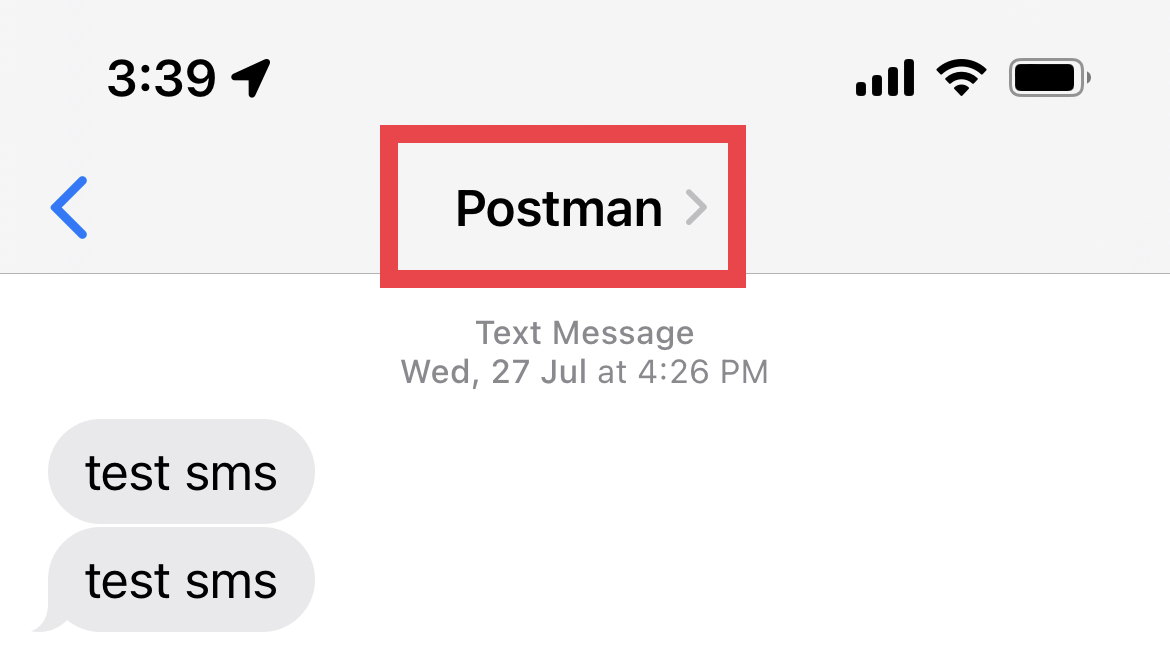


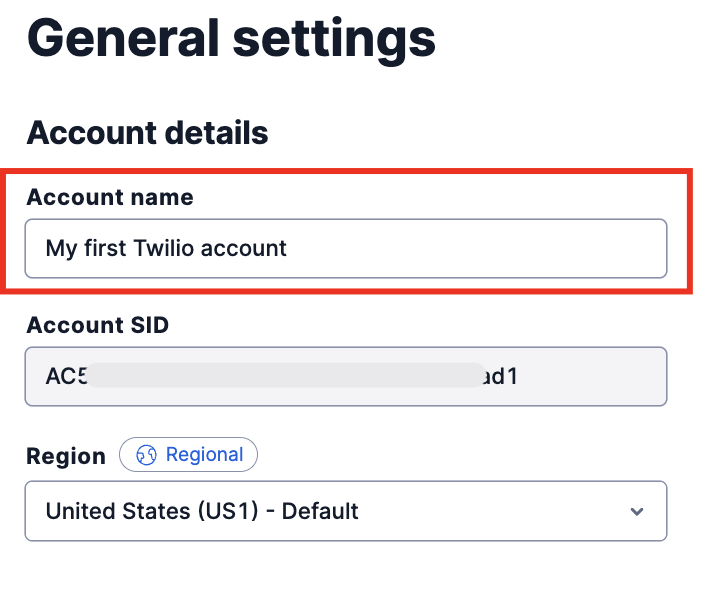
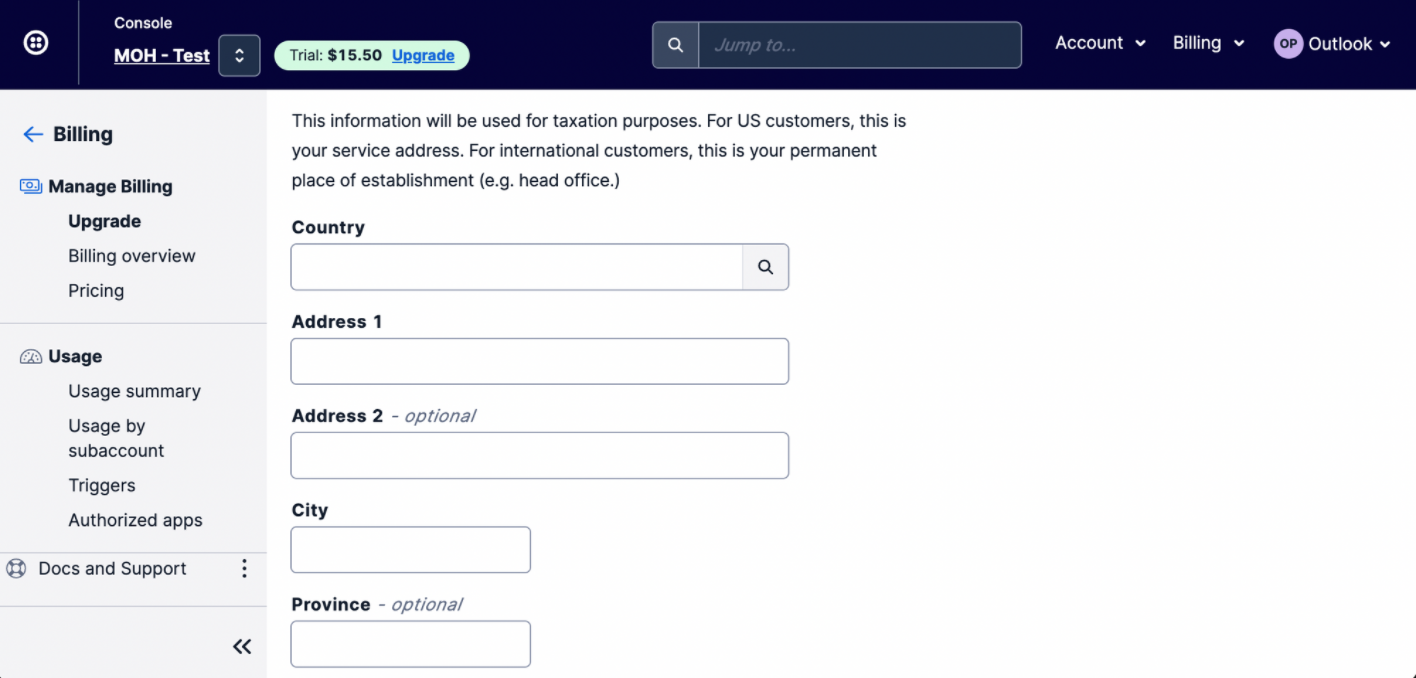
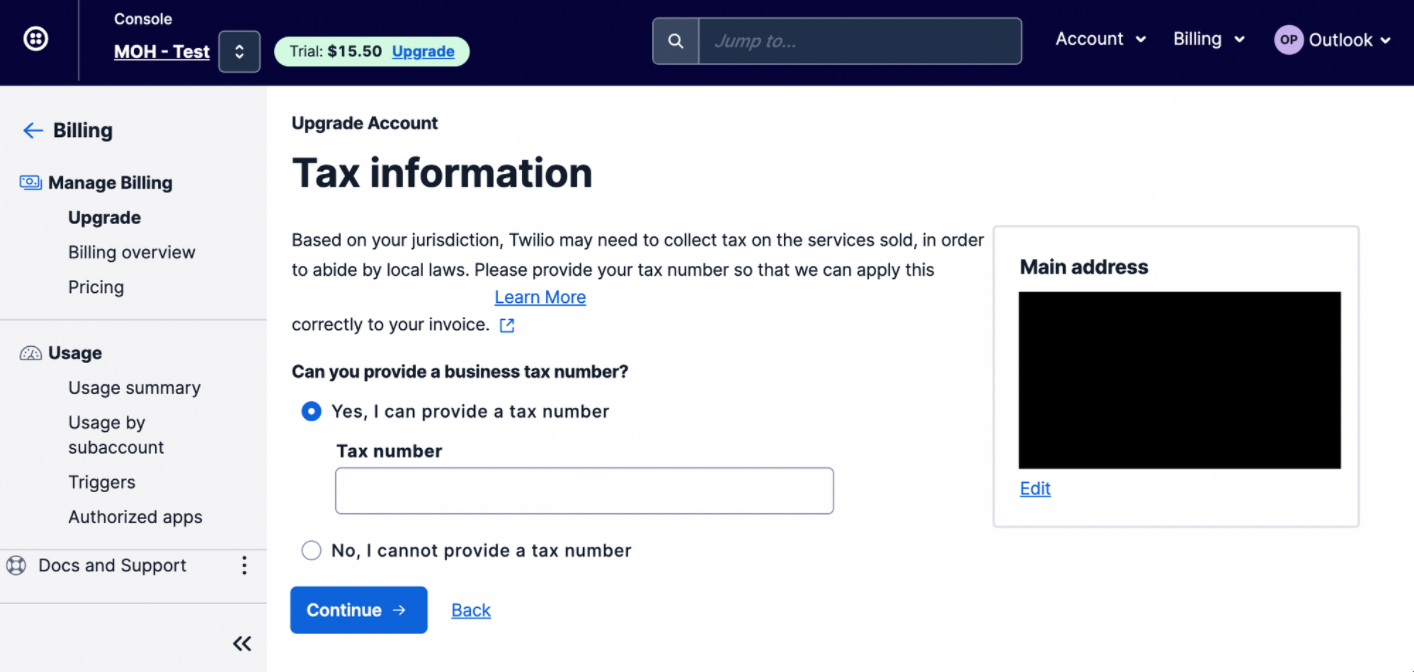
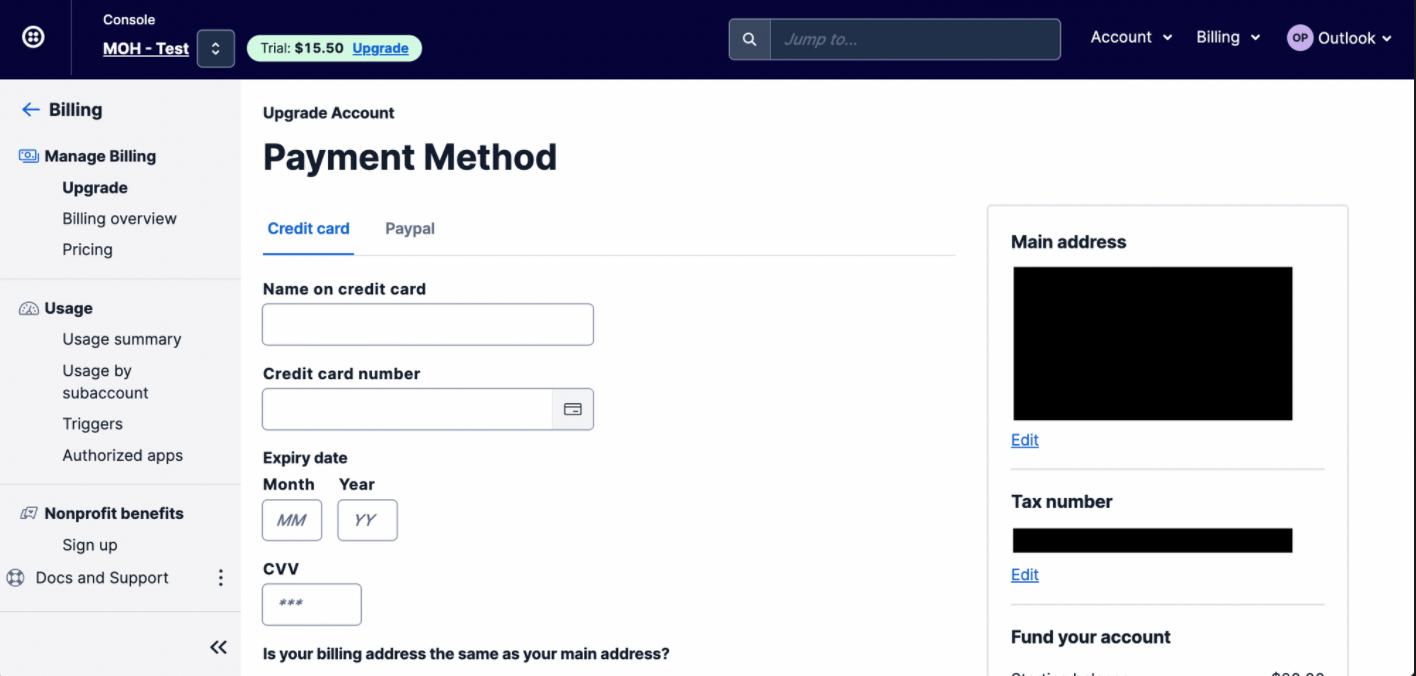

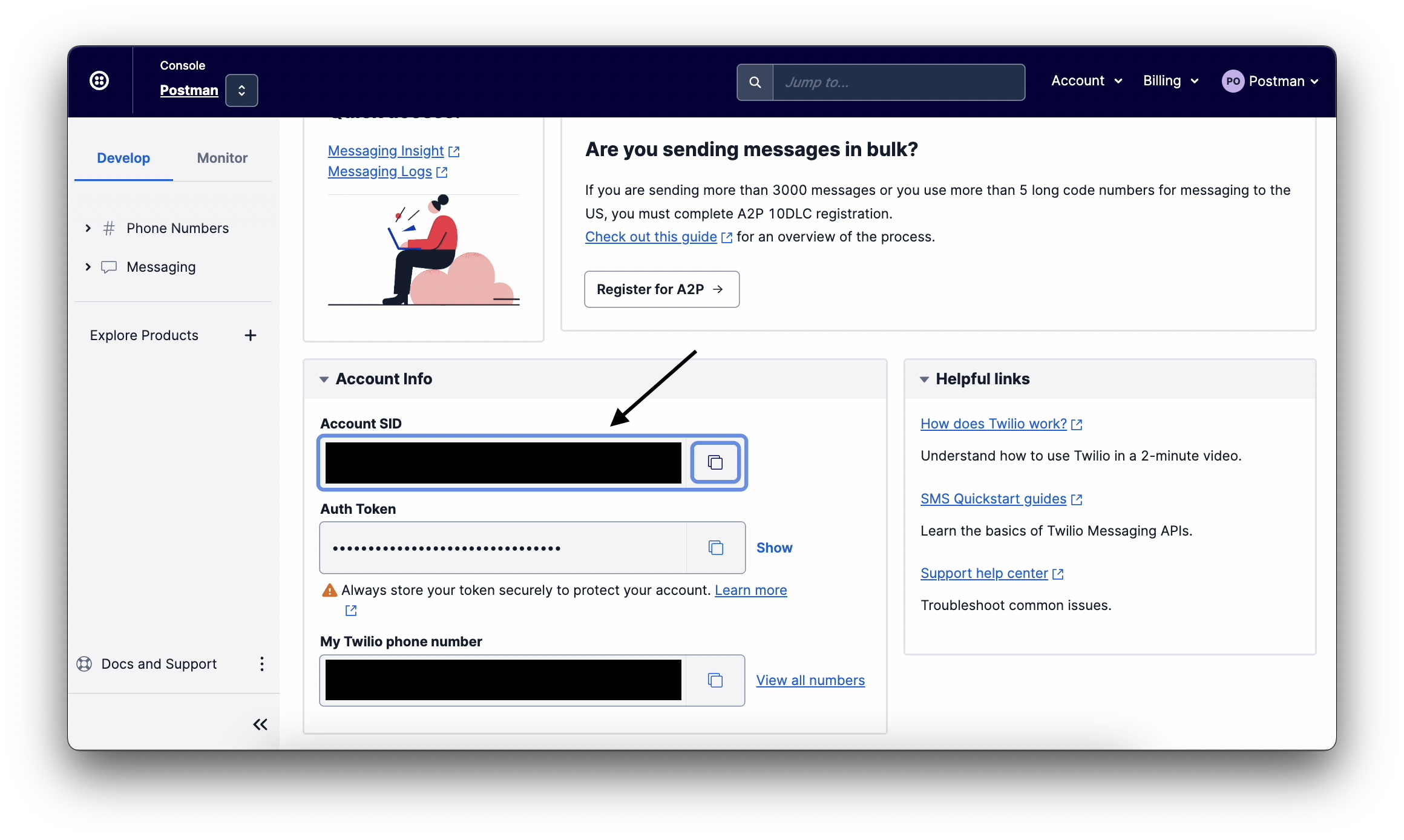

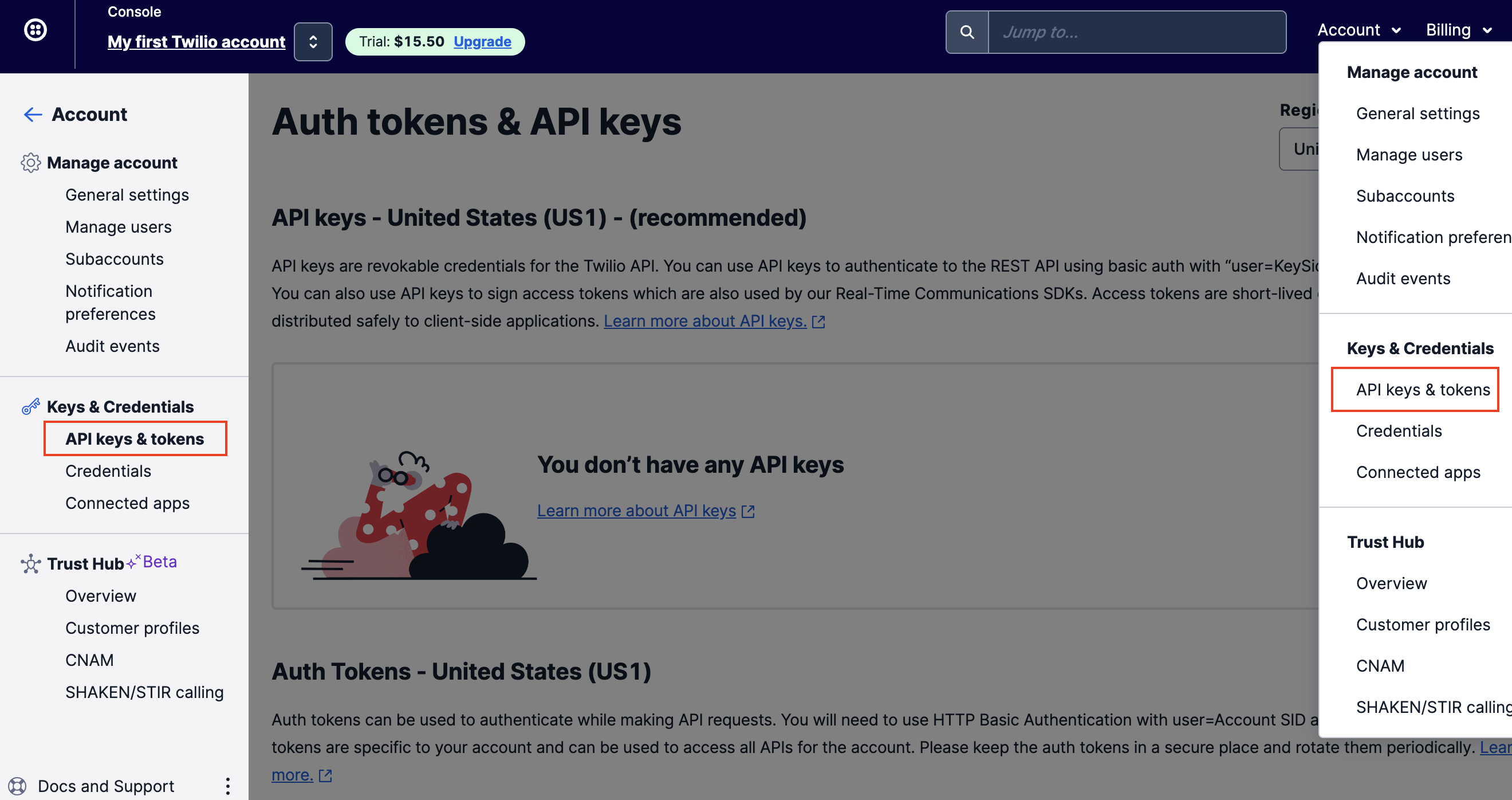

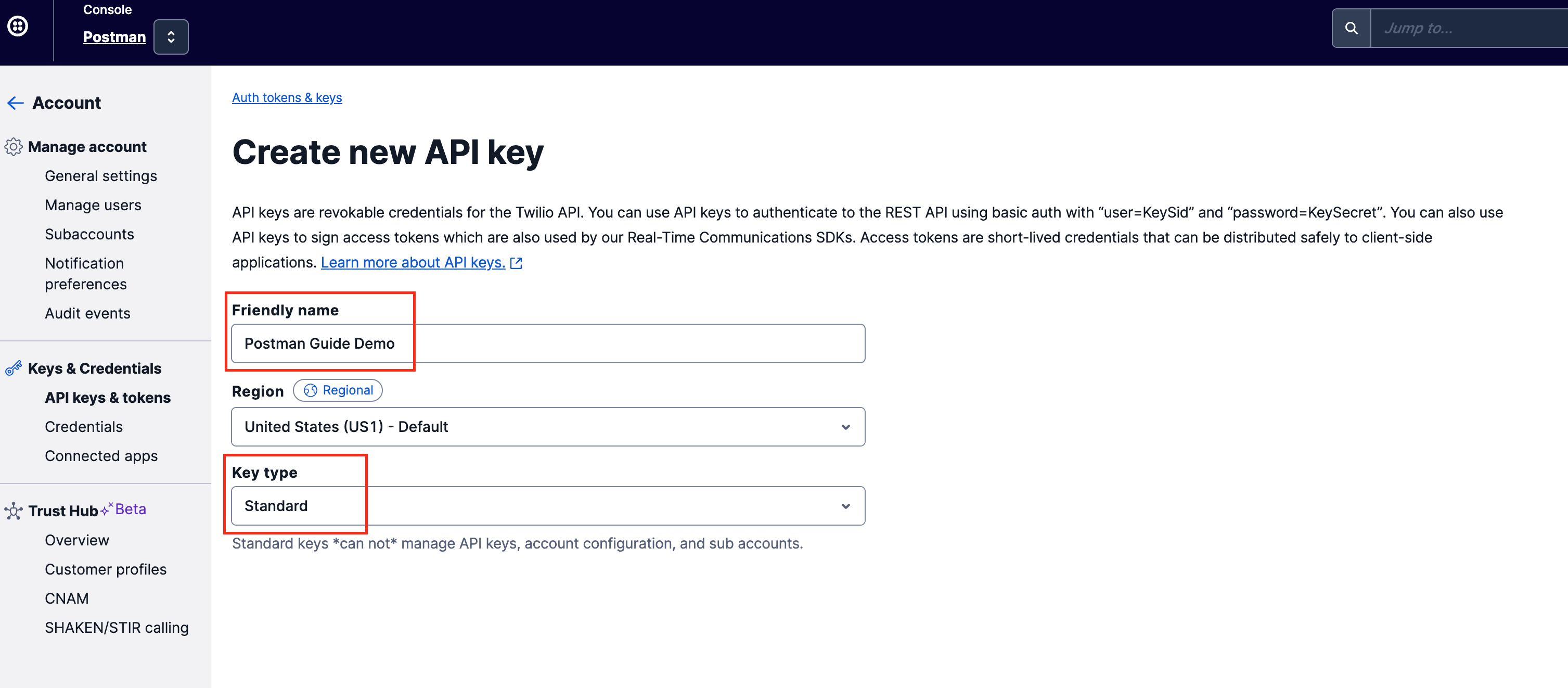


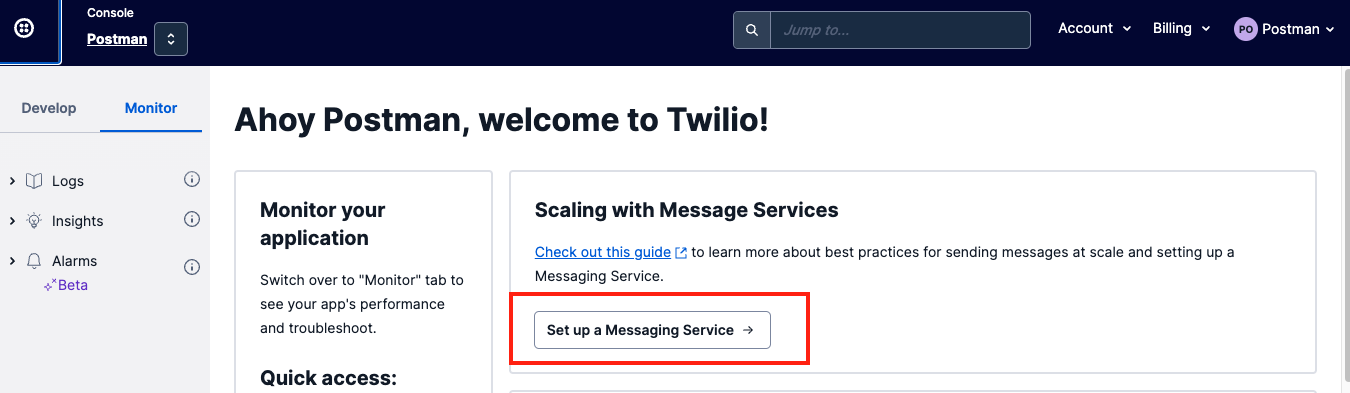
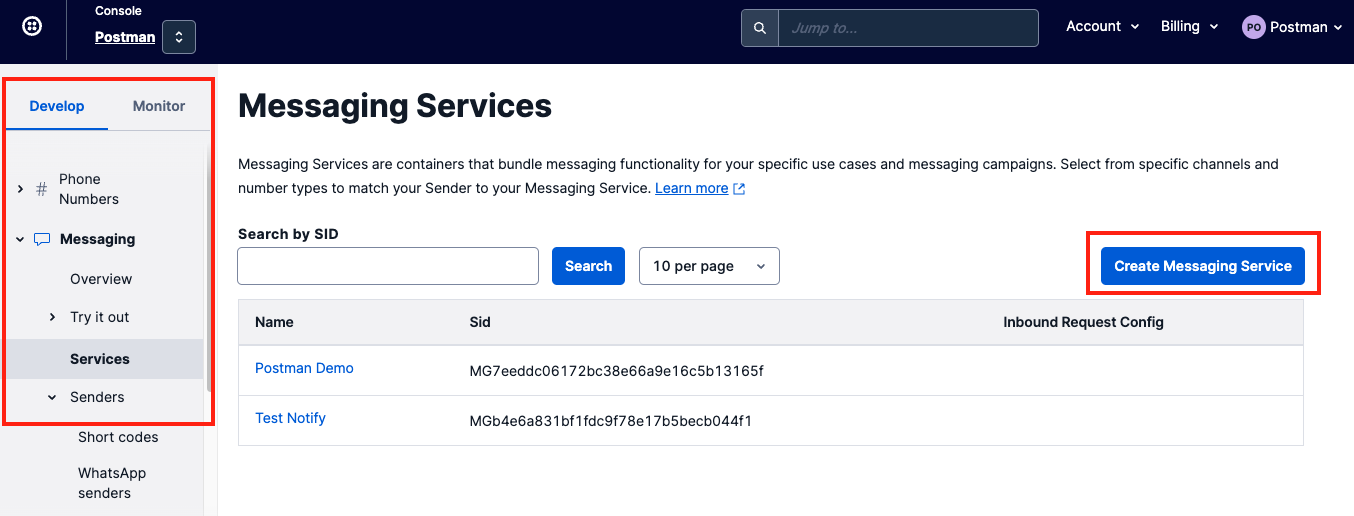

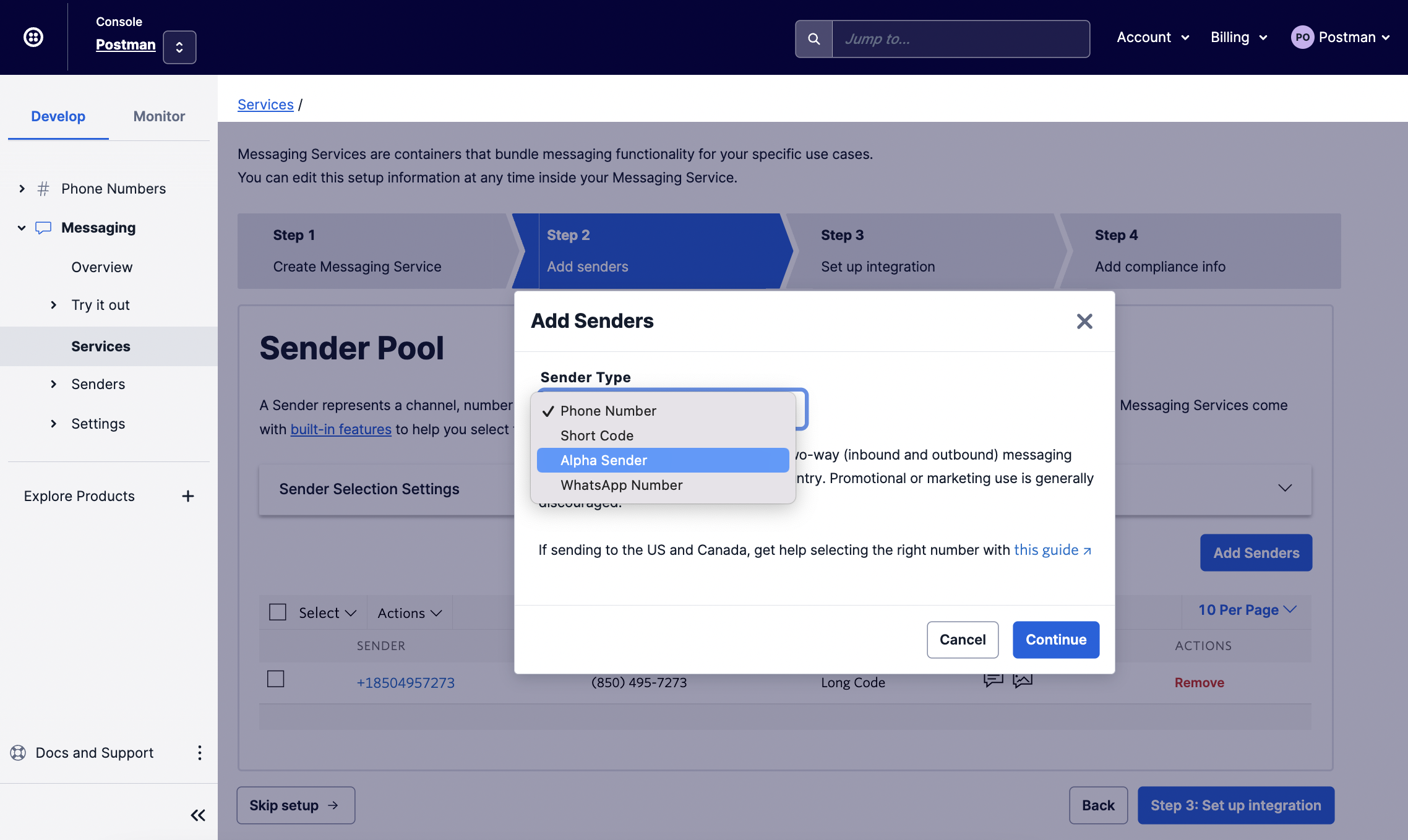

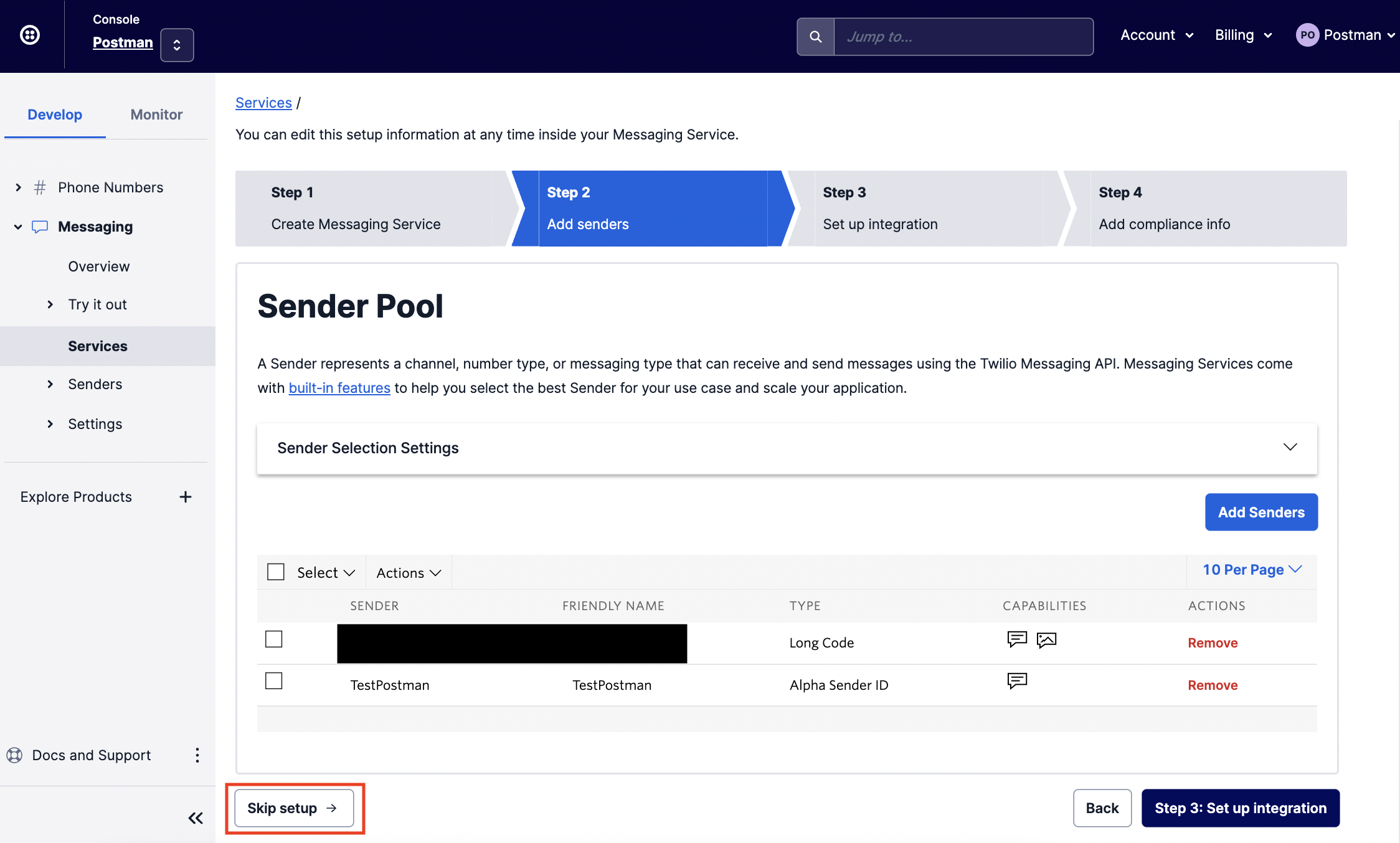


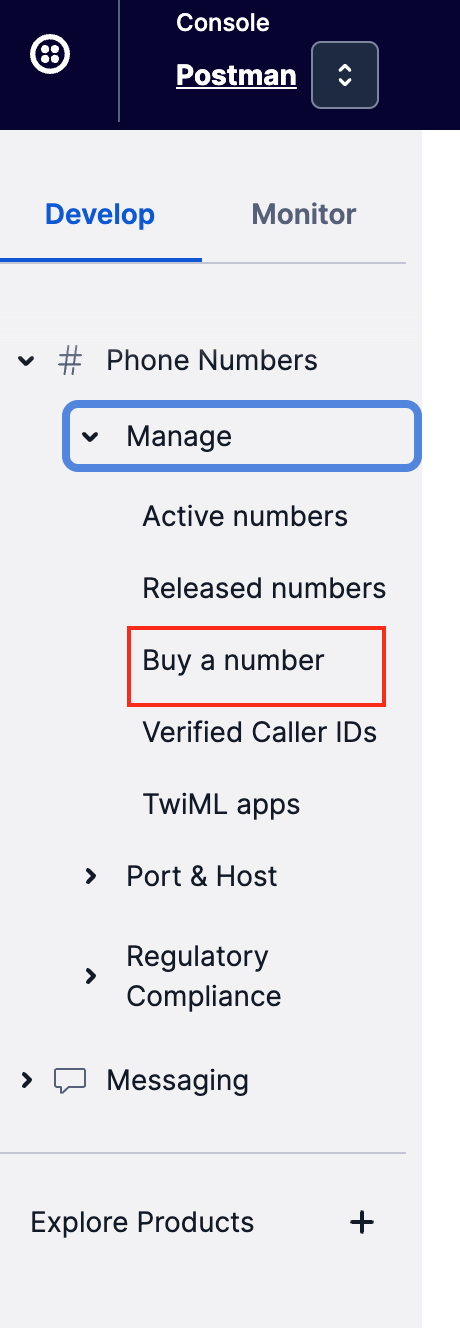
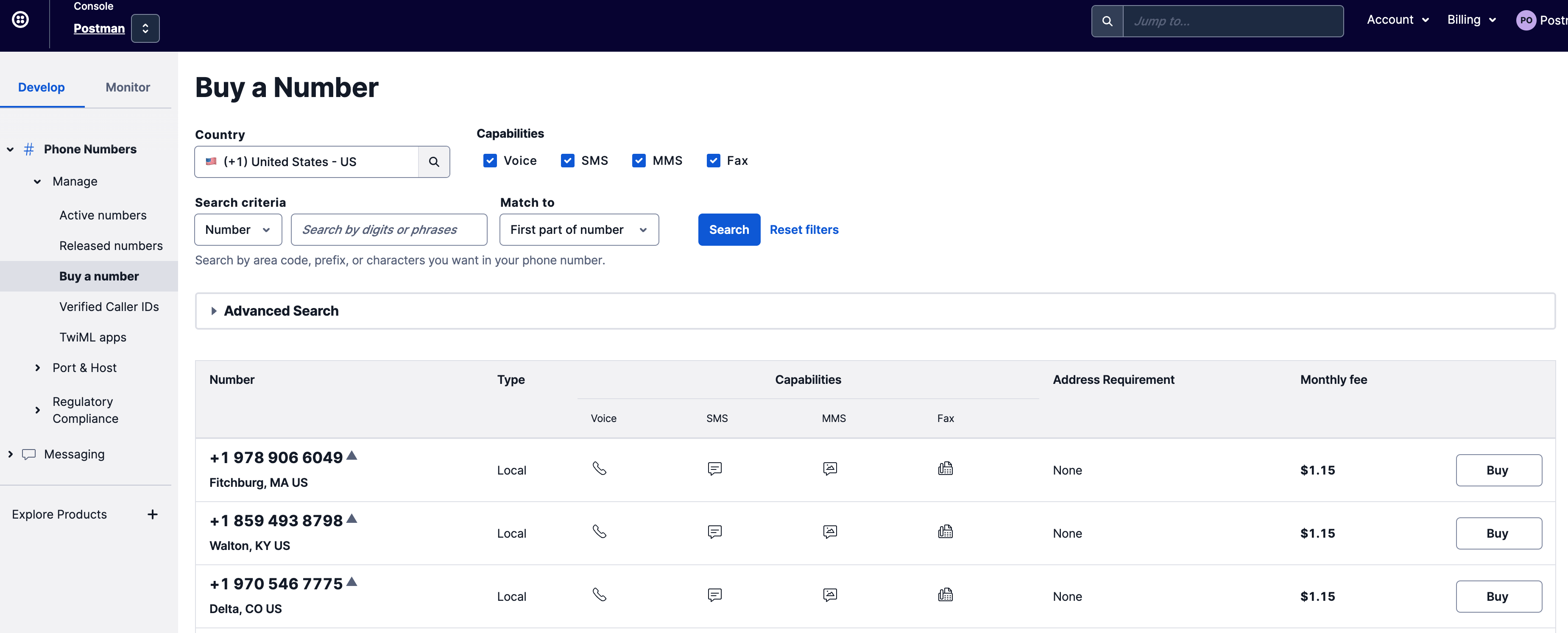
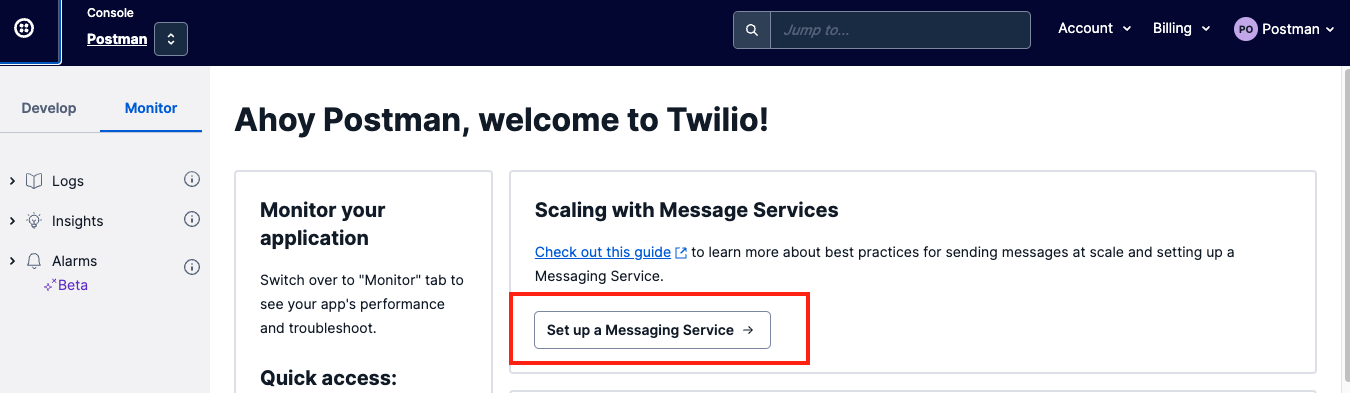

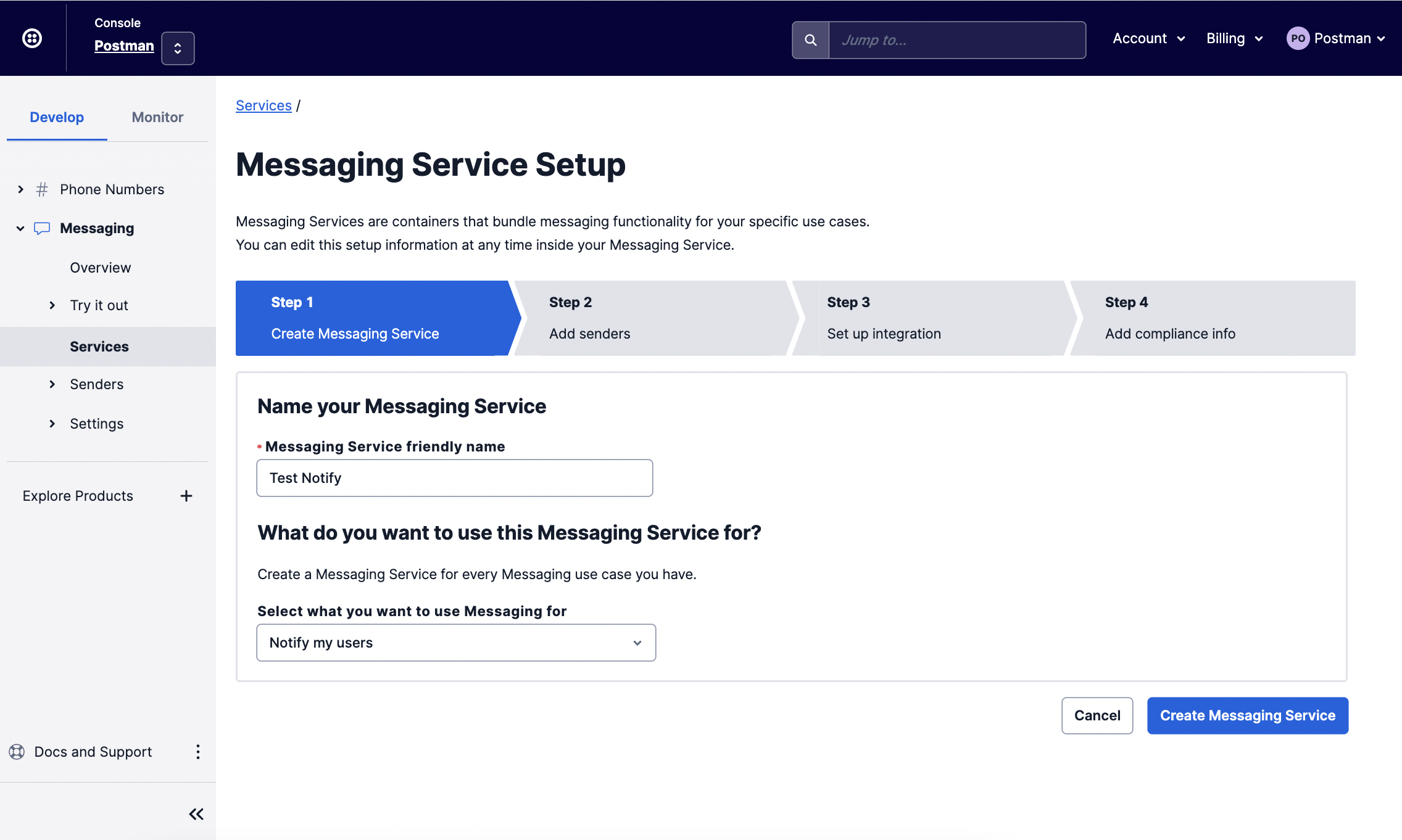

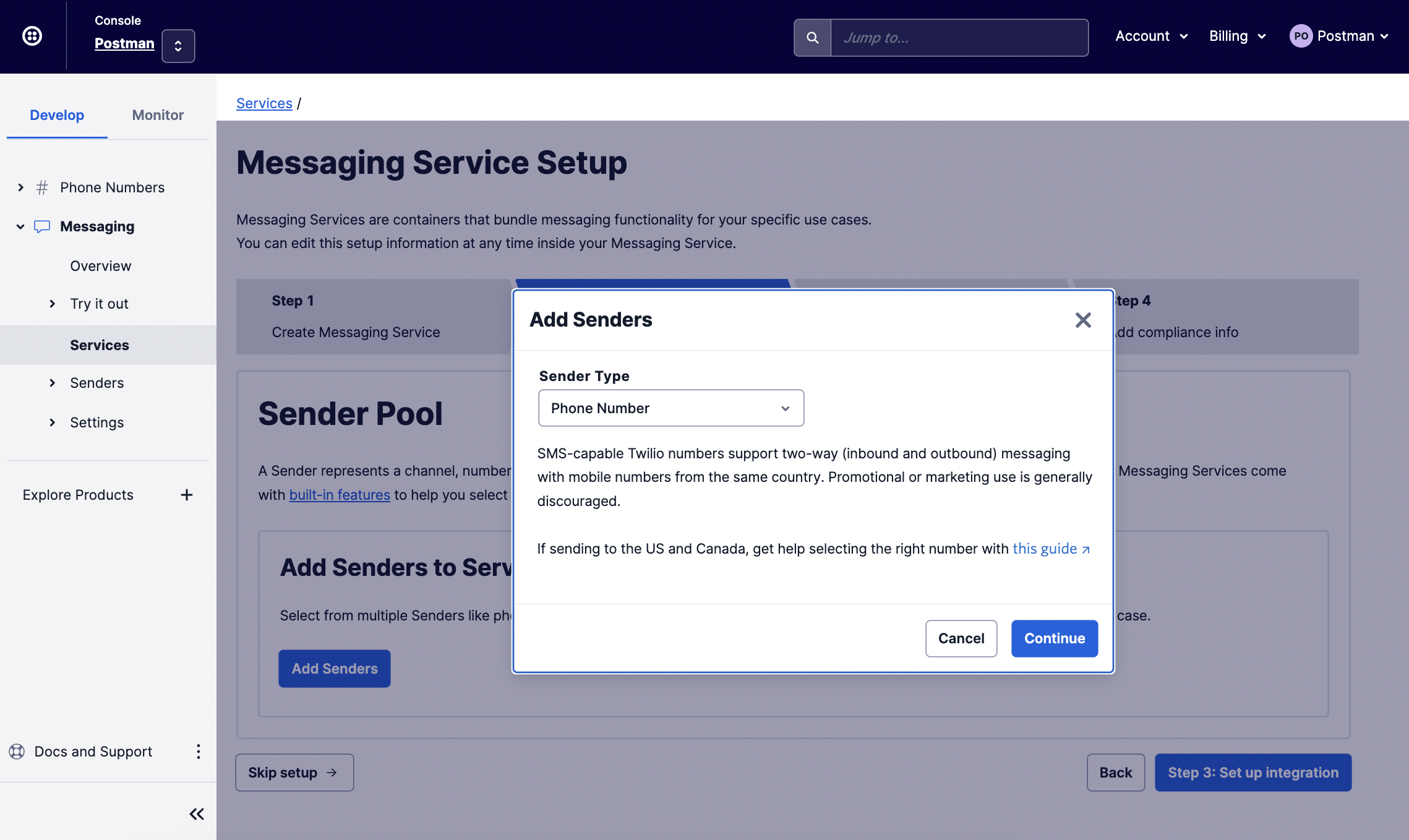
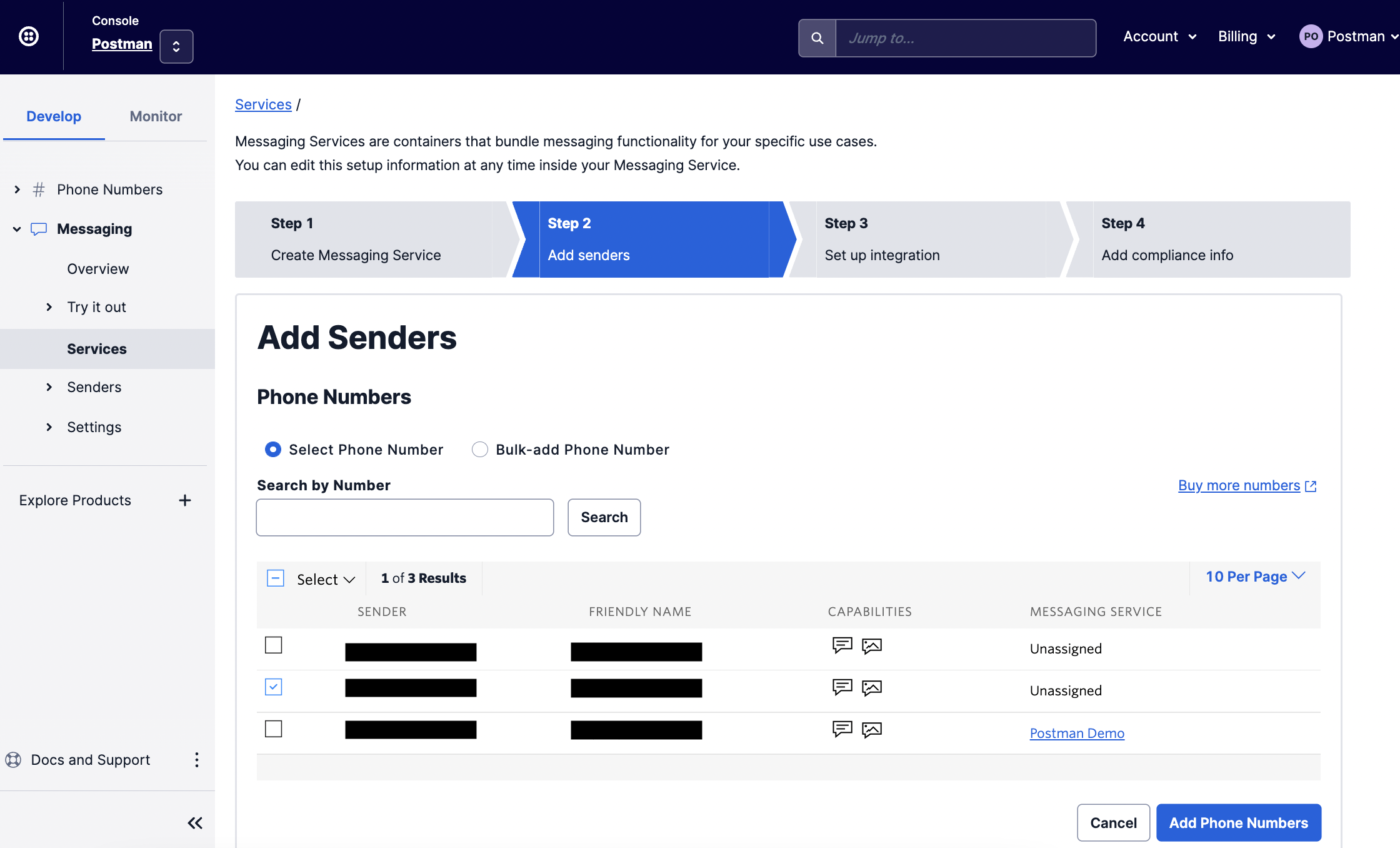


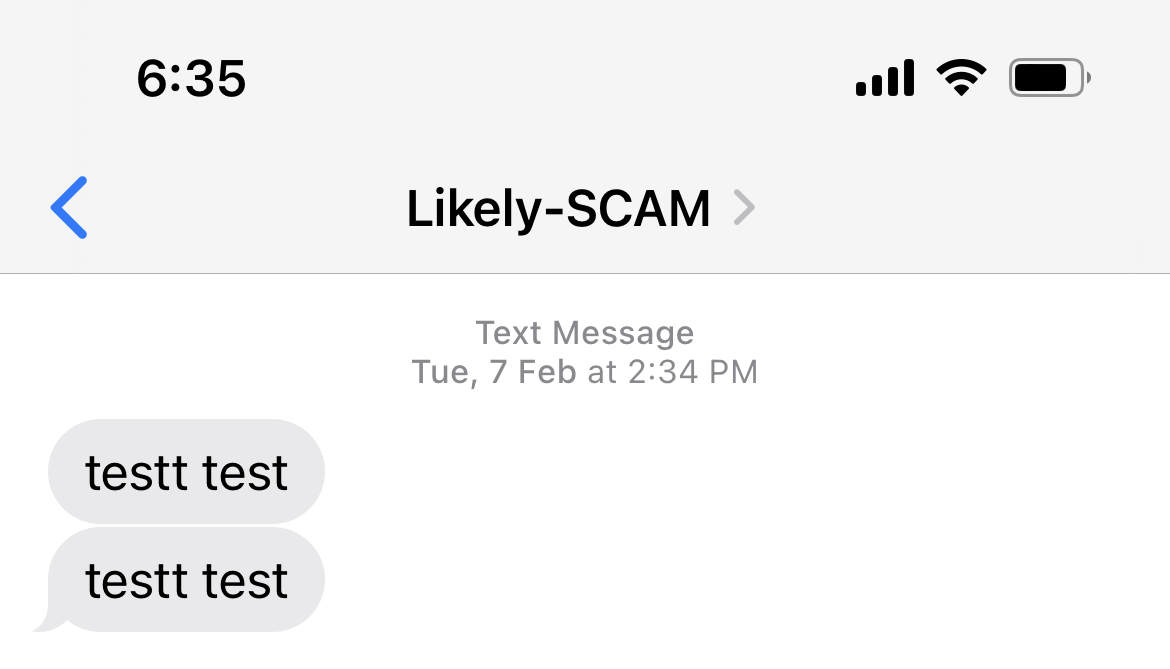
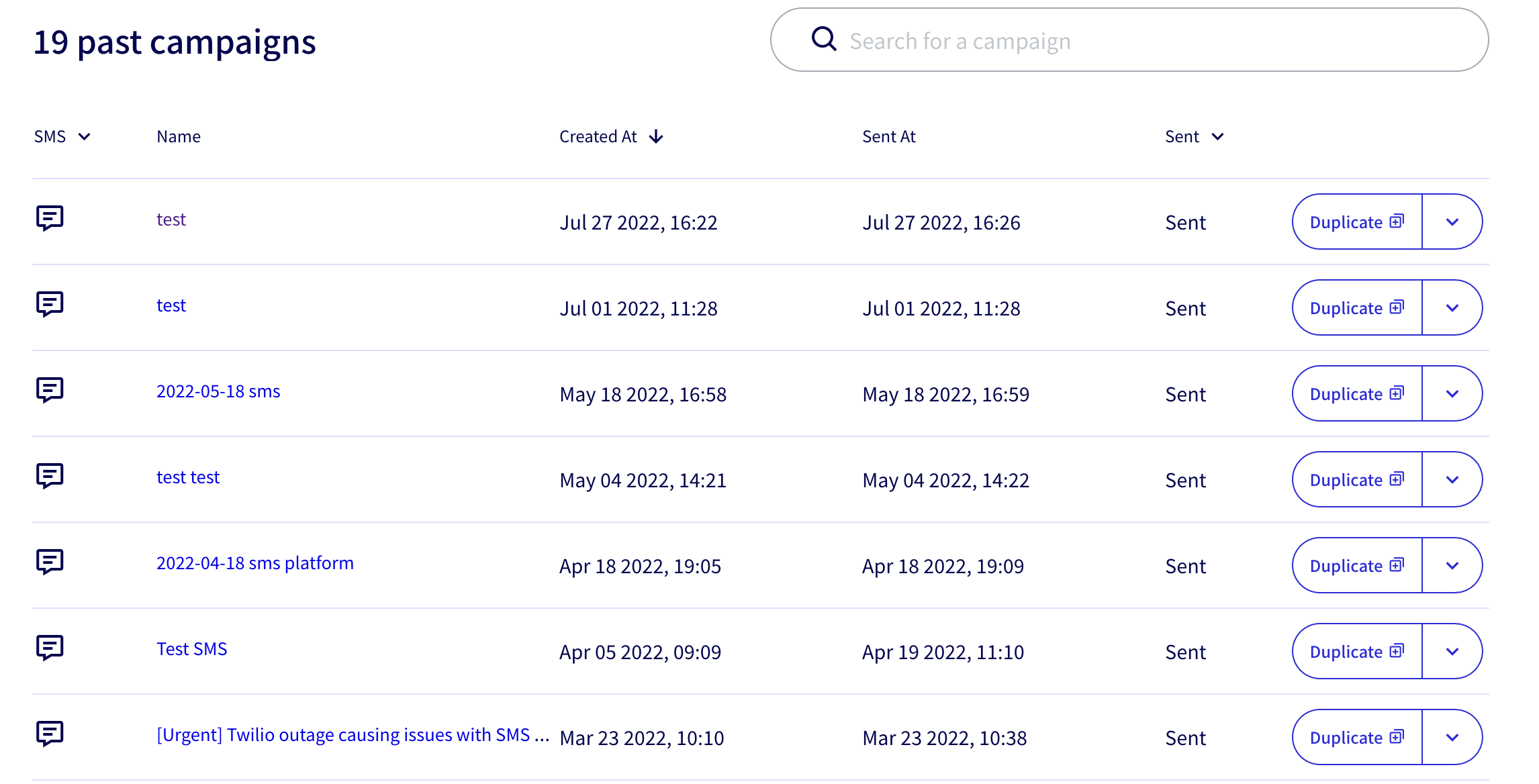
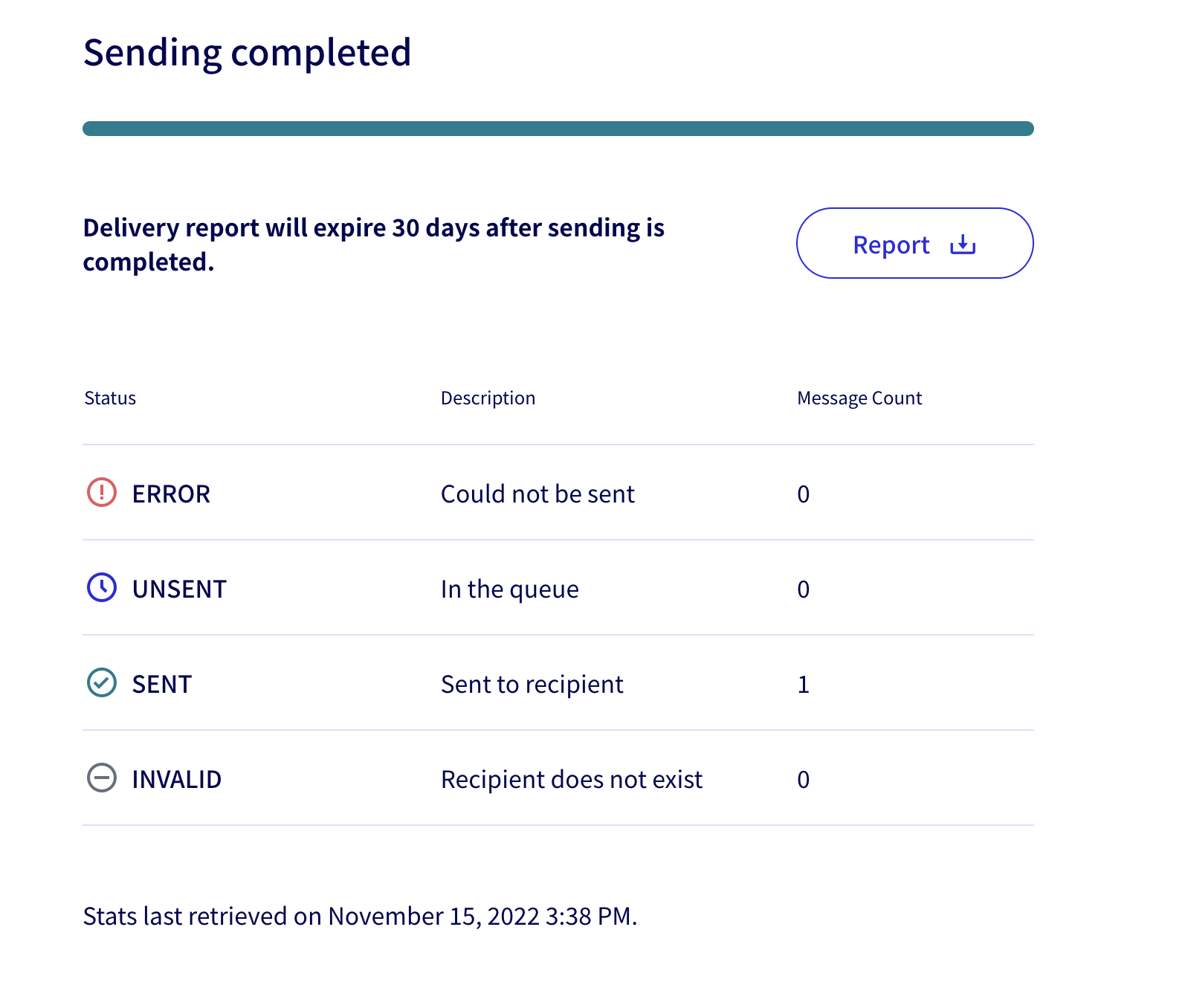
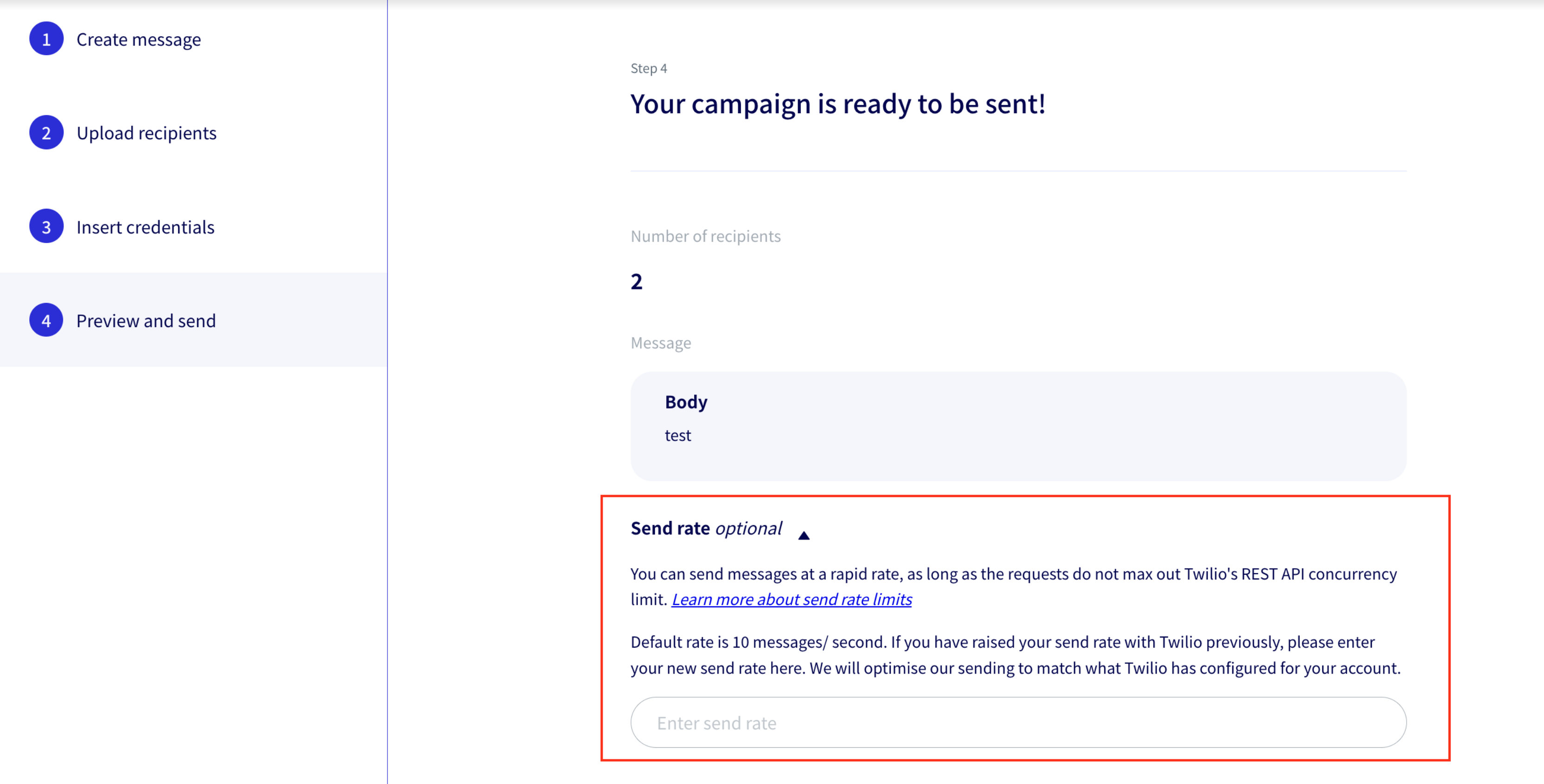
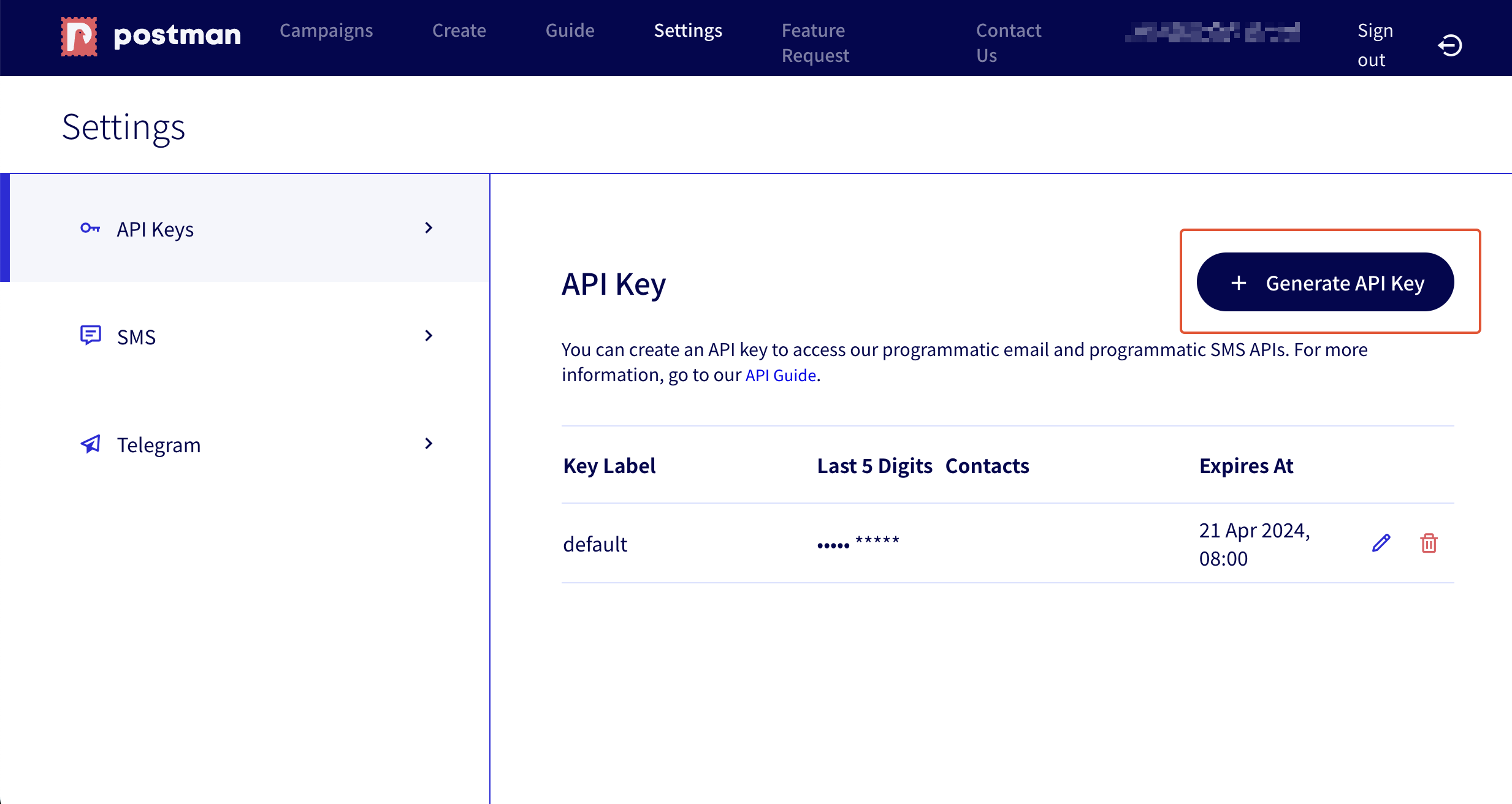
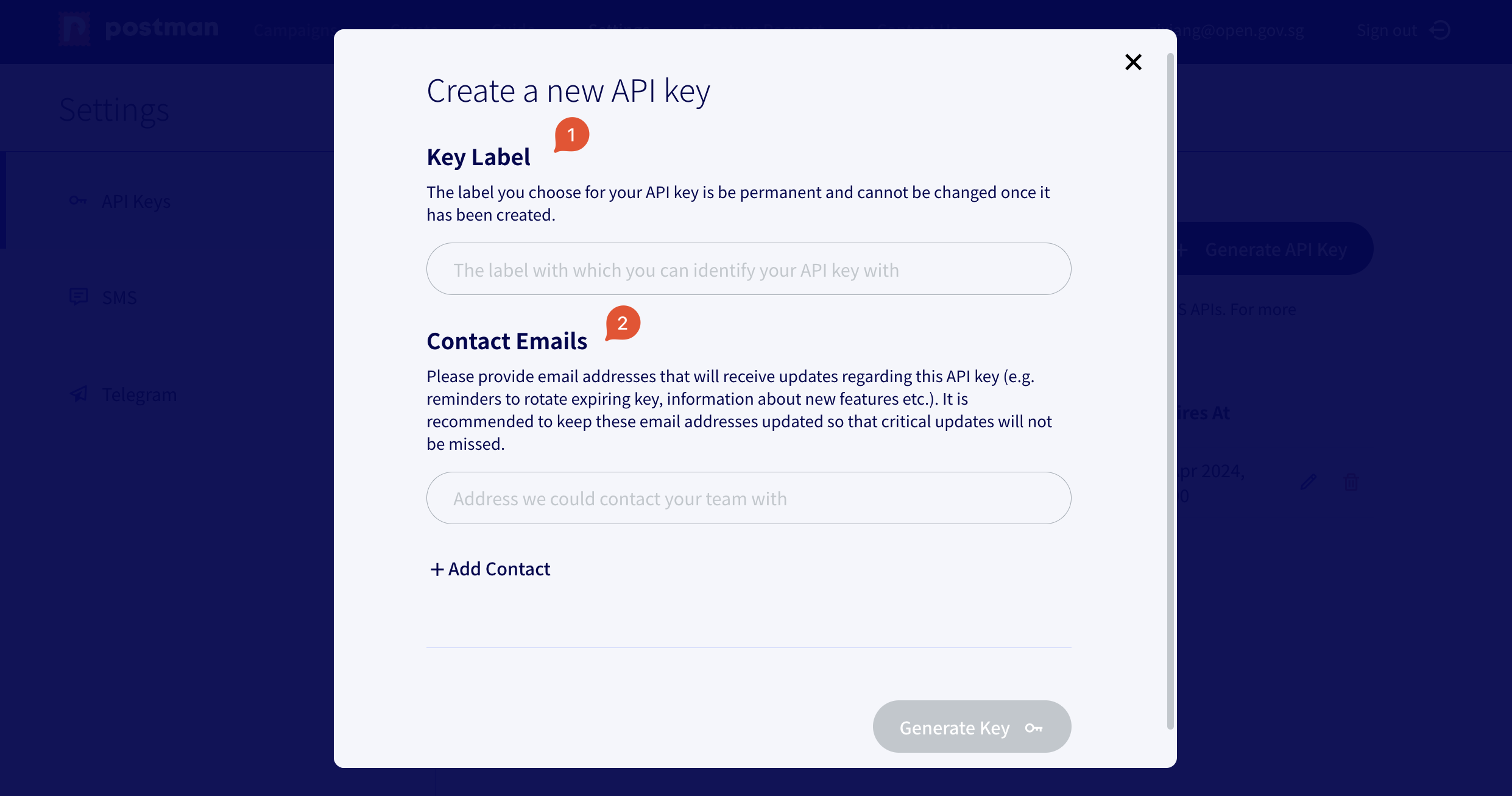
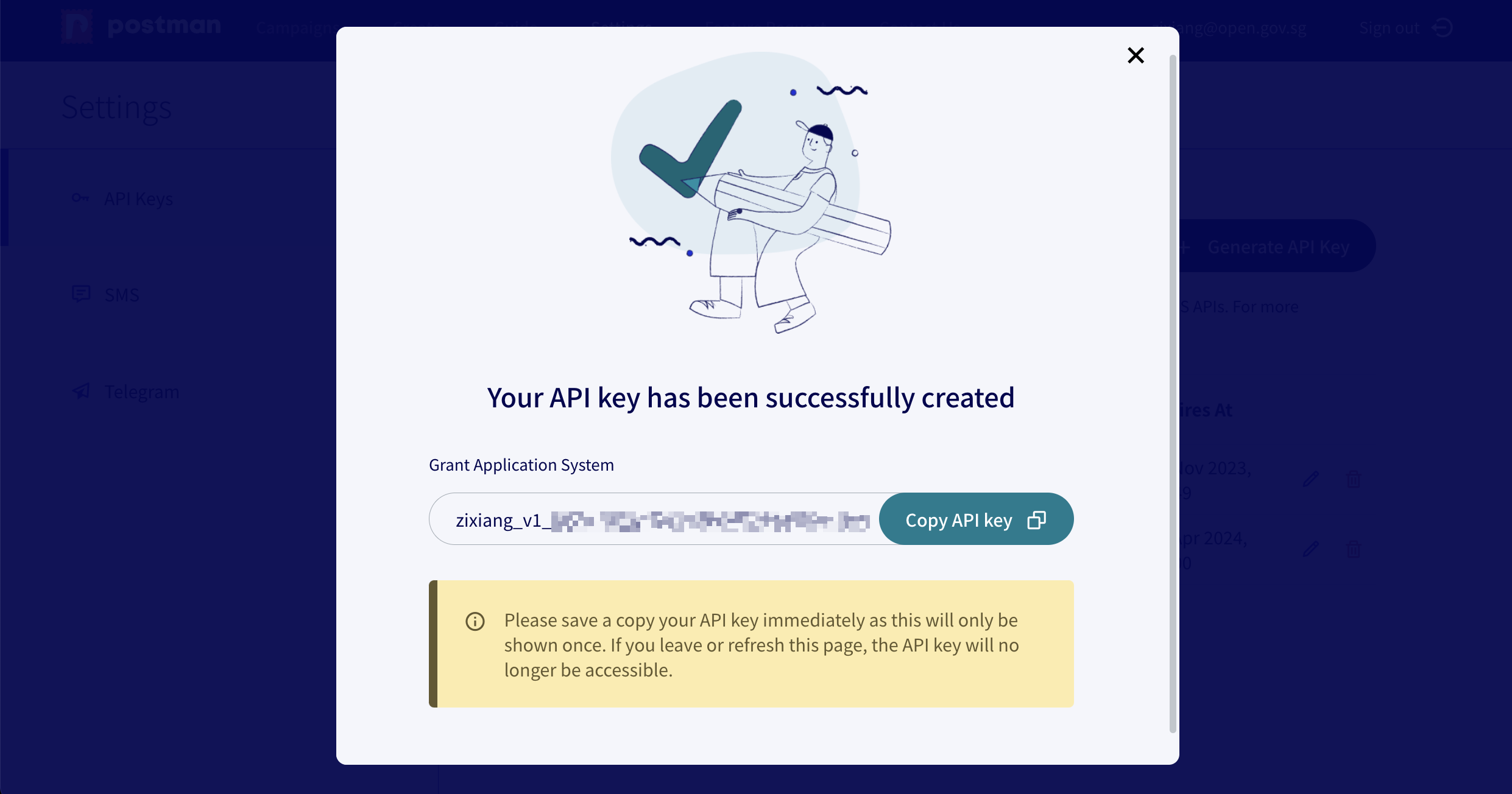
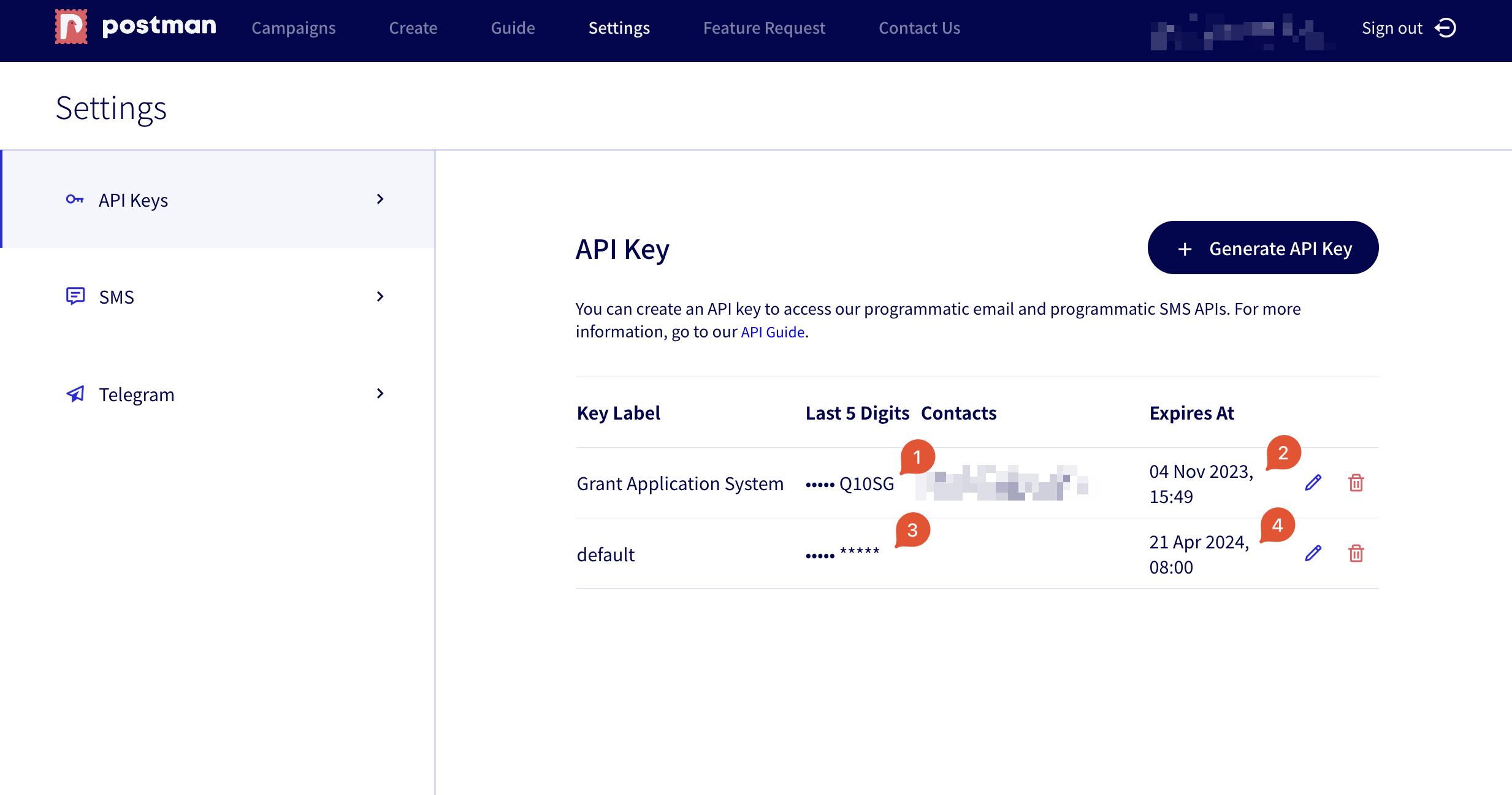
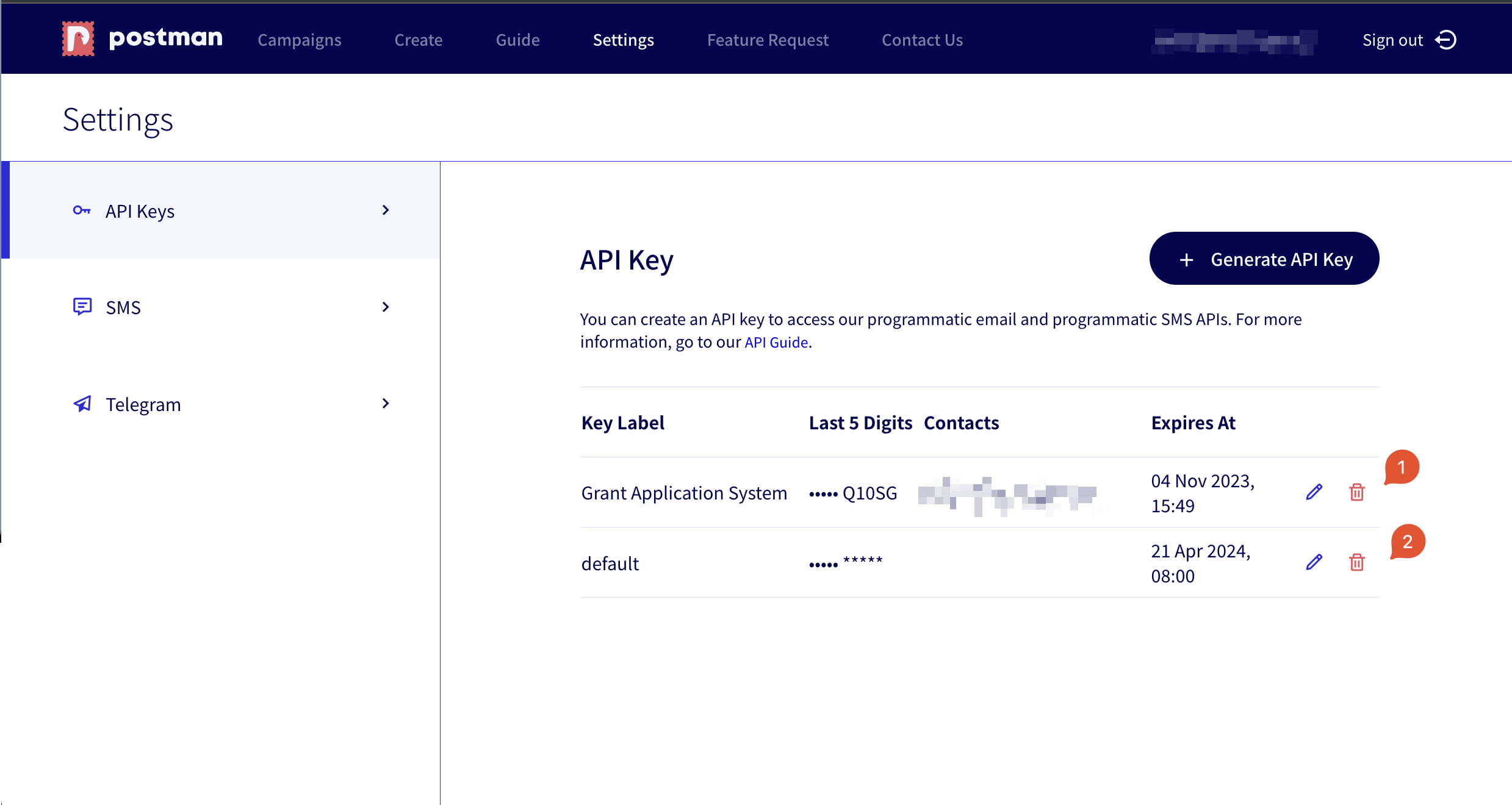




`) `.
## Recommended for Same Images Across Multiple Emails
If you are using the same set of images across multiple emails, an easy way to use linked images in your email is to upload the image to a service like GoGovSG and reuse the same `img` tags in your emails.
For step-by-step instructions on how to upload images to GoGovSG, [see this](/campaign-guide-email/email/format-bar#embedding-an-image-in-email).
## Unique Image for Each Email
If you are embedding a unique image for each email, you may consider:
* Programmatically uploading your image to a file hosting service
* Currently, we do not provide such a service. However, we are looking into possible solutions, please [contact us](https://go.gov.sg/postman-contact-us) if this could be helpful to your agency.
* Using [content-ID images](/email-api-guide/programmatic-email-api/send-email-api/email-body/embedding-images/content-id-images)
## Sample API Call
```json
{
"subject": "Test subject",
"body": "
`.
## Recommended for Same Images Across Multiple Emails
If you are using the same set of images across multiple emails, an easy way to use linked images in your email is to upload the image to a service like GoGovSG and reuse the same `img` tags in your emails.
For step-by-step instructions on how to upload images to GoGovSG, [see this](/campaign-guide-email/email/format-bar#embedding-an-image-in-email).
## Unique Image for Each Email
If you are embedding a unique image for each email, you may consider:
* Programmatically uploading your image to a file hosting service
* Currently, we do not provide such a service. However, we are looking into possible solutions, please [contact us](https://go.gov.sg/postman-contact-us) if this could be helpful to your agency.
* Using [content-ID images](/email-api-guide/programmatic-email-api/send-email-api/email-body/embedding-images/content-id-images)
## Sample API Call
```json
{
"subject": "Test subject",
"body": "