# What if I need to buy a phone number?

#### This step must be done before setting up your messaging service ID.

### How to buy a phone number?

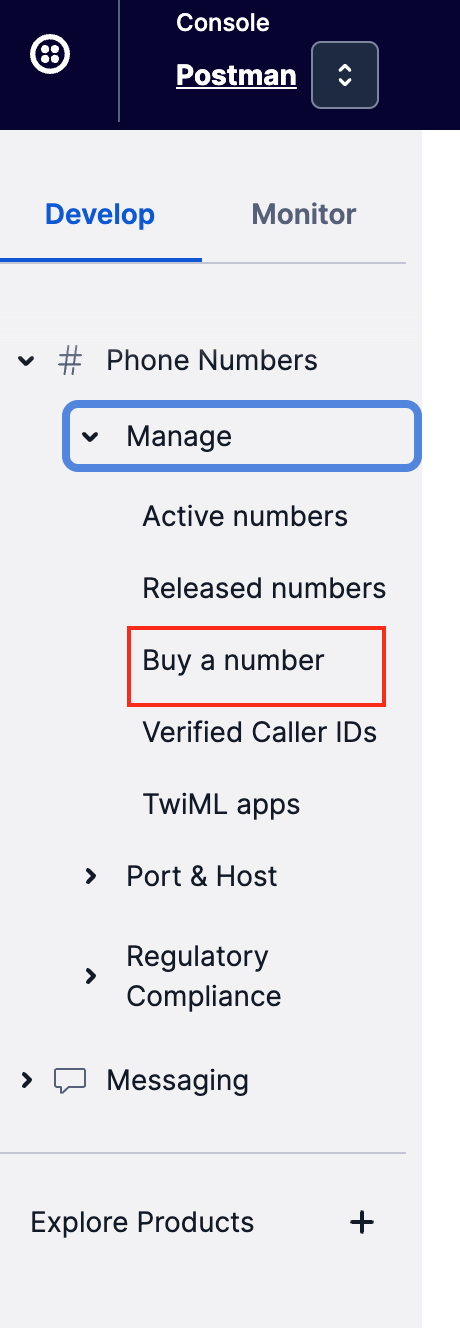
On the left console, select `Develop > Phone Numbers > Manage > Buy a number.`

<figure><img src="https://4126954886-files.gitbook.io/~/files/v0/b/gitbook-x-prod.appspot.com/o/spaces%2F-MAQH3DF49Lq0AJudrbF%2Fuploads%2FAtEuGYsmP0LJFn30SRUw%2Fimage.png?alt=media&#x26;token=5b392392-b89b-4271-bd25-3eebbcf9d2fc" alt="" width="230"><figcaption><p>Buy your number</p></figcaption></figure>

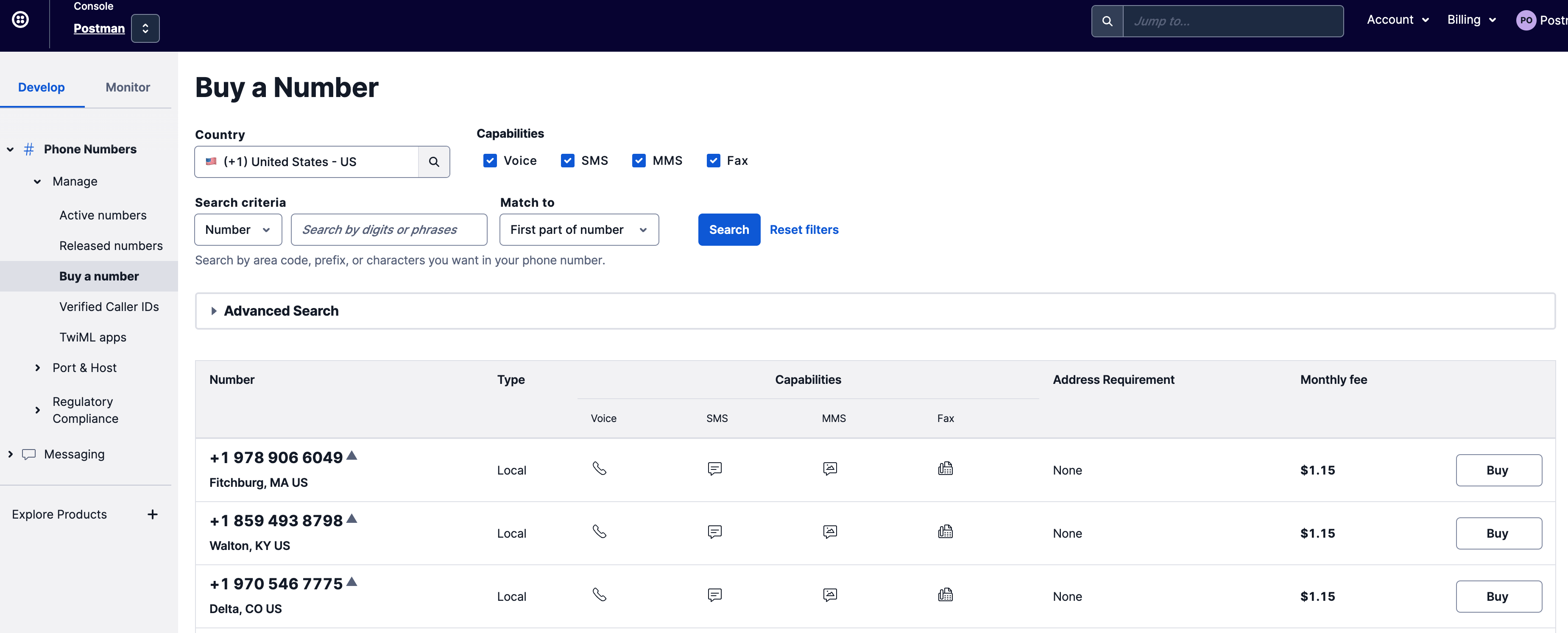
Select the phone number that you prefer.

<figure><img src="https://4126954886-files.gitbook.io/~/files/v0/b/gitbook-x-prod.appspot.com/o/spaces%2F-MAQH3DF49Lq0AJudrbF%2Fuploads%2FZwEa3fjt78gy9E3bYAI6%2Fimage.png?alt=media&#x26;token=35653c6e-b319-46c4-9c7e-50094bf36e3e" alt=""><figcaption><p>Buy your number</p></figcaption></figure>

### How to set up messaging service ID with phone number?

You need to create a messaging service and tie the phone number that you bought to this messaging service before you can send SMSes.

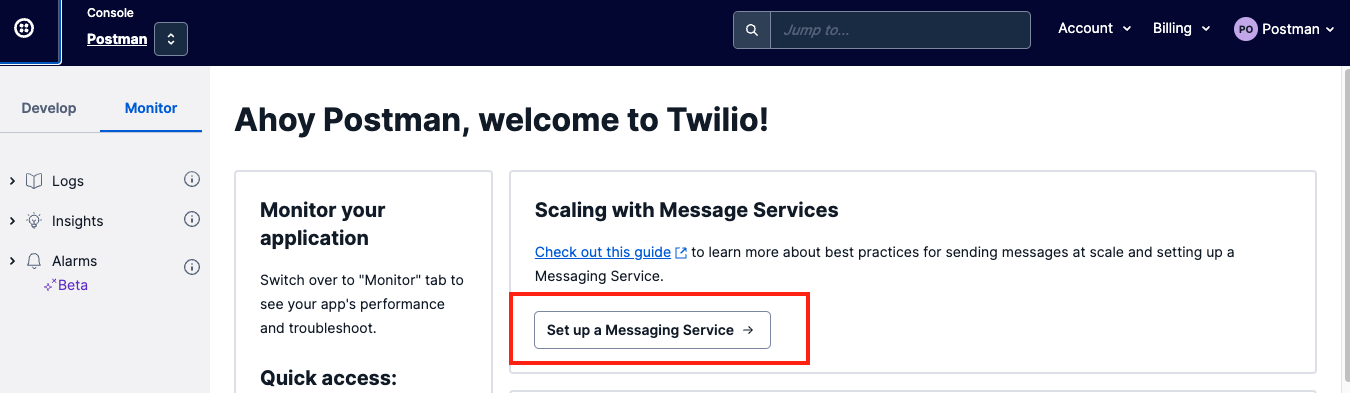
Go back to your Twilio home page, and select`Set up a Messaging Service`.

<figure><img src="https://4126954886-files.gitbook.io/~/files/v0/b/gitbook-x-prod.appspot.com/o/spaces%2F-MAQH3DF49Lq0AJudrbF%2Fuploads%2FoQ5b8NvYV5CglK8CPNCl%2Fimage.png?alt=media&#x26;token=0f6b464c-8861-4572-8dde-8e2357a091e2" alt=""><figcaption><p>Set up your messaging service</p></figcaption></figure>

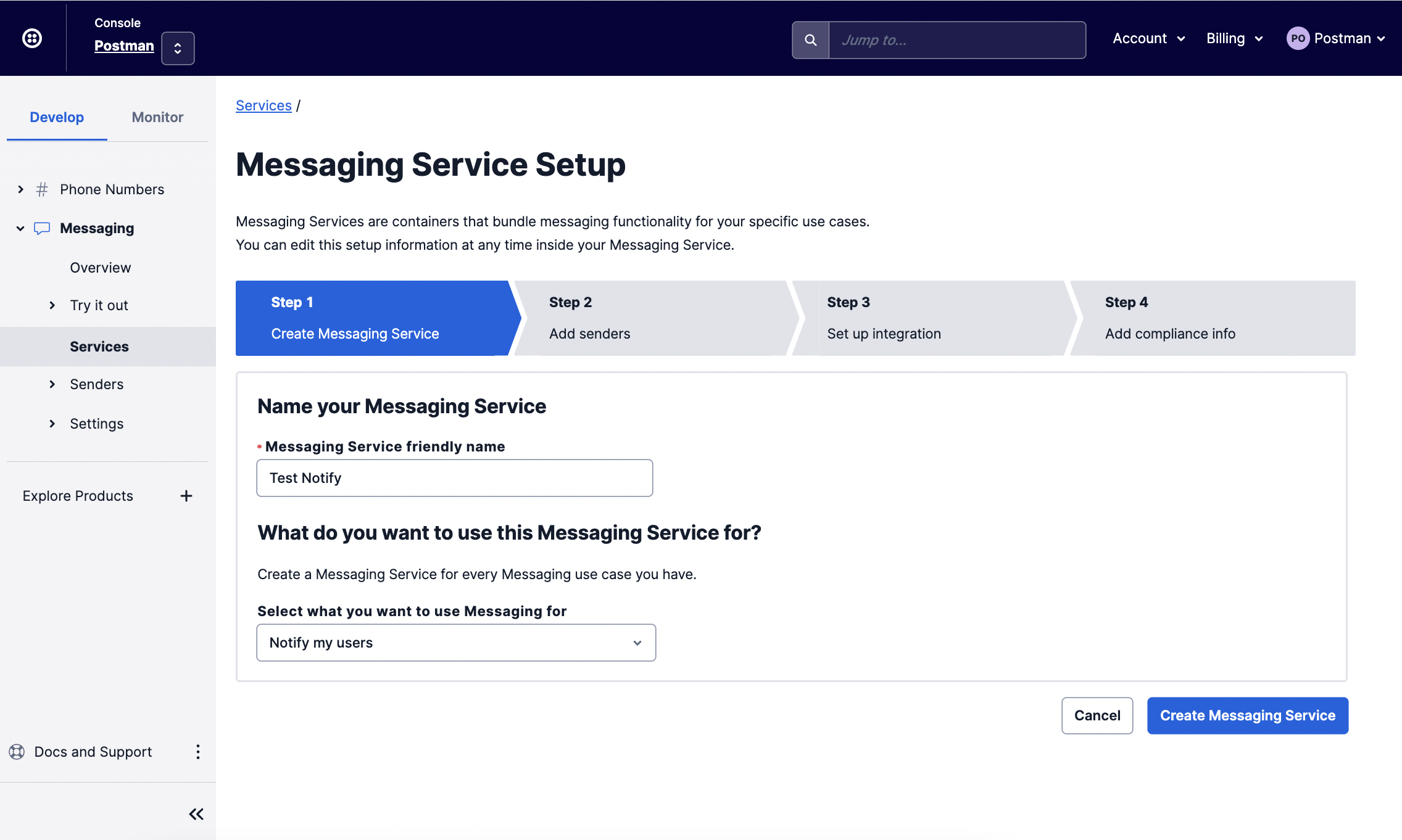
On the side bar, click `Develop > Messaging > Services > Create Messaging Service.`

<figure><img src="https://4126954886-files.gitbook.io/~/files/v0/b/gitbook-x-prod.appspot.com/o/spaces%2F-MAQH3DF49Lq0AJudrbF%2Fuploads%2FJs9SXa7xbyZeF4SBi4zo%2Fimage.png?alt=media&#x26;token=cfee2ff4-2664-4ad7-84d9-7f98d504e2ae" alt=""><figcaption><p>Create your messaging service</p></figcaption></figure>

Name your messaging service and indicate the purpose. This will help you better identify your use cases if you have multiple, and will also help Twilio detect your specific use case quicker should you need their help for troubleshooting.

<figure><img src="https://4126954886-files.gitbook.io/~/files/v0/b/gitbook-x-prod.appspot.com/o/spaces%2F-MAQH3DF49Lq0AJudrbF%2Fuploads%2FxoEhqINxI1GI6NYAexIz%2Fimage.png?alt=media&#x26;token=4fed9dc9-2e0b-4b74-9b9f-85866dbddff7" alt=""><figcaption><p>Set it up</p></figcaption></figure>

Add your `Sender Pool`. Sender Pool is where you configure the sender details such as the phone number you bought, and input your alphanumeric Sender ID.

Click `Add Senders.`

<figure><img src="https://4126954886-files.gitbook.io/~/files/v0/b/gitbook-x-prod.appspot.com/o/spaces%2F-MAQH3DF49Lq0AJudrbF%2Fuploads%2FvjAHjYJVD8HW6MdScUET%2Fimage.png?alt=media&#x26;token=1b4734bd-5027-4189-a502-a3b19141603c" alt=""><figcaption><p>Set up sender pool</p></figcaption></figure>

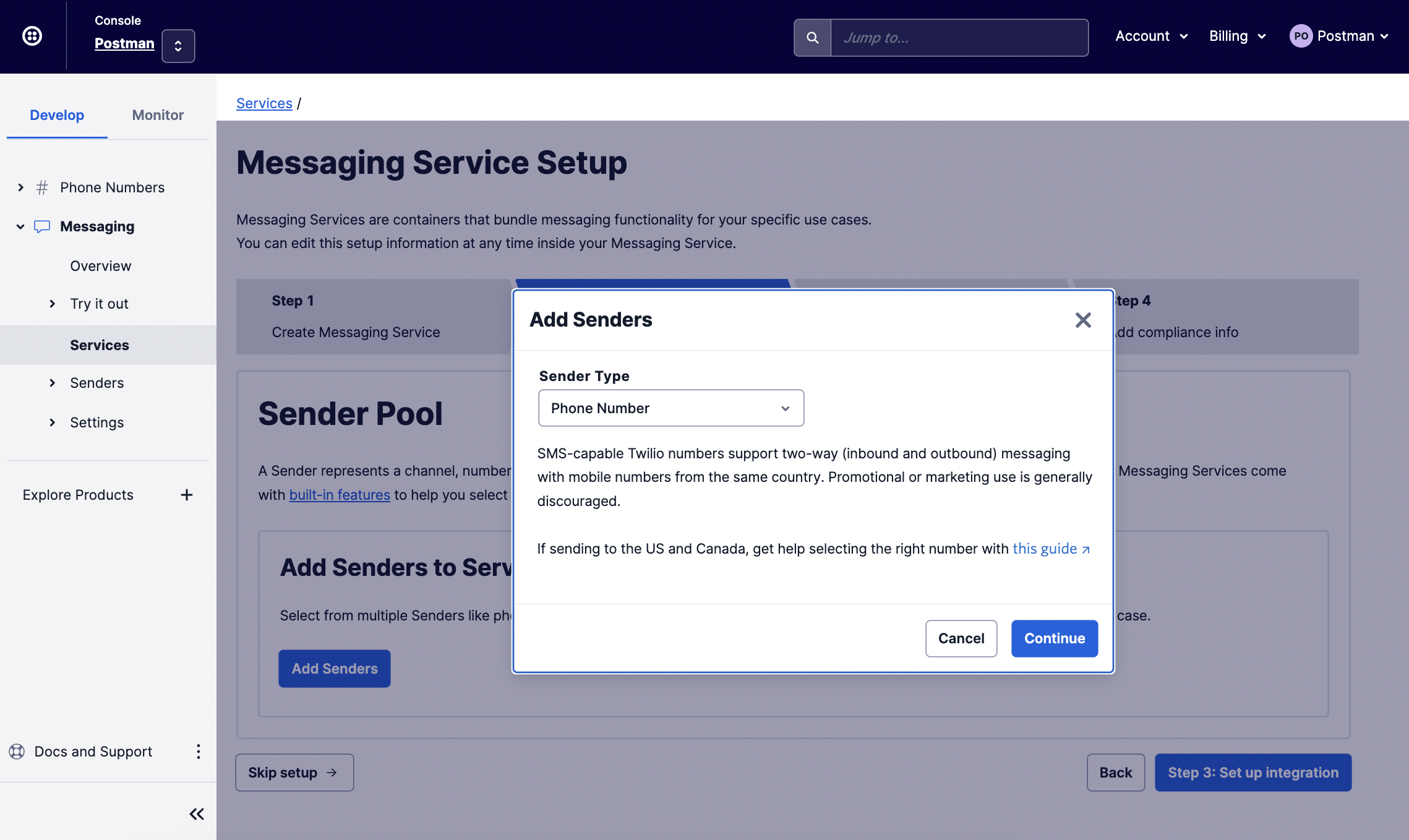
Add the phone number you purchased to this service.

<figure><img src="https://4126954886-files.gitbook.io/~/files/v0/b/gitbook-x-prod.appspot.com/o/spaces%2F-MAQH3DF49Lq0AJudrbF%2Fuploads%2FWvCrZYX2nkXtuLDeItaO%2Fimage.png?alt=media&#x26;token=01abb927-b340-4c60-be25-67c9683deca9" alt=""><figcaption><p>Select "Phone Number"</p></figcaption></figure>

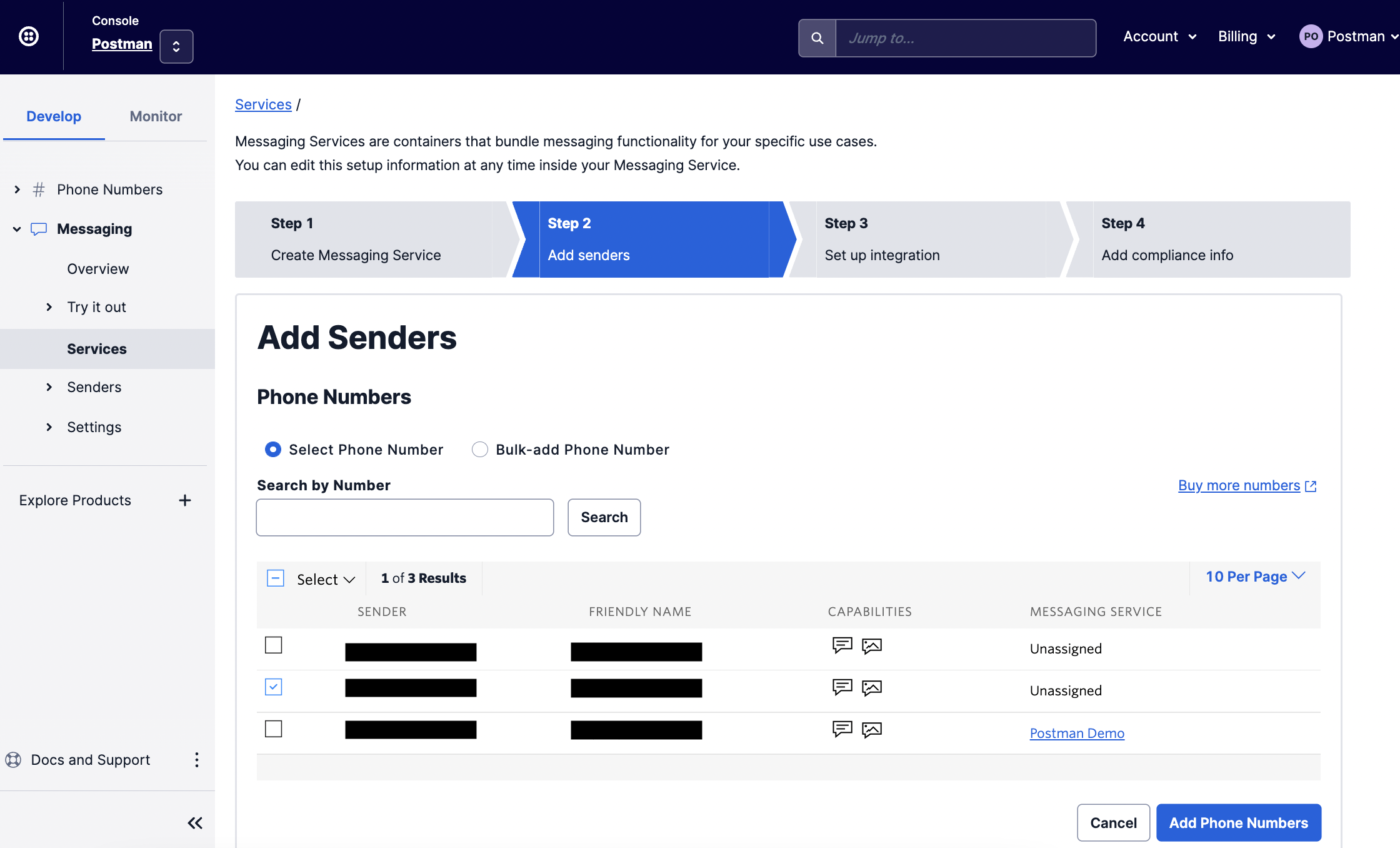
Select the number you want to associate with this messaging service (if you have more than one).

<figure><img src="https://4126954886-files.gitbook.io/~/files/v0/b/gitbook-x-prod.appspot.com/o/spaces%2F-MAQH3DF49Lq0AJudrbF%2Fuploads%2F5pfoMIleRDVYhScV4ZVg%2Fimage.png?alt=media&#x26;token=73f9bbae-8ccd-4bc4-9c3c-acb8fd2abcd9" alt=""><figcaption><p>Select desired number</p></figcaption></figure>

<figure><img src="https://4126954886-files.gitbook.io/~/files/v0/b/gitbook-x-prod.appspot.com/o/spaces%2F-MAQH3DF49Lq0AJudrbF%2Fuploads%2FBrnIdzKj9U9JywkCK0PH%2Fimage.png?alt=media&#x26;token=66ec9582-2ae8-417f-af4a-f53129fc6852" alt=""><figcaption><p>Number selected successfully</p></figcaption></figure>

Then, go back [here](https://guide.postman.gov.sg/campaign-guide/onboarding-overview/step-4-configure-your-twilio-account#set-up-your-alphanumeric-senderid) to continue the set-up of your alphanumeric Sender ID.