# Step 3b: Set Up Your Twilio Account

### Log into Twilio to set up your profile and billing details

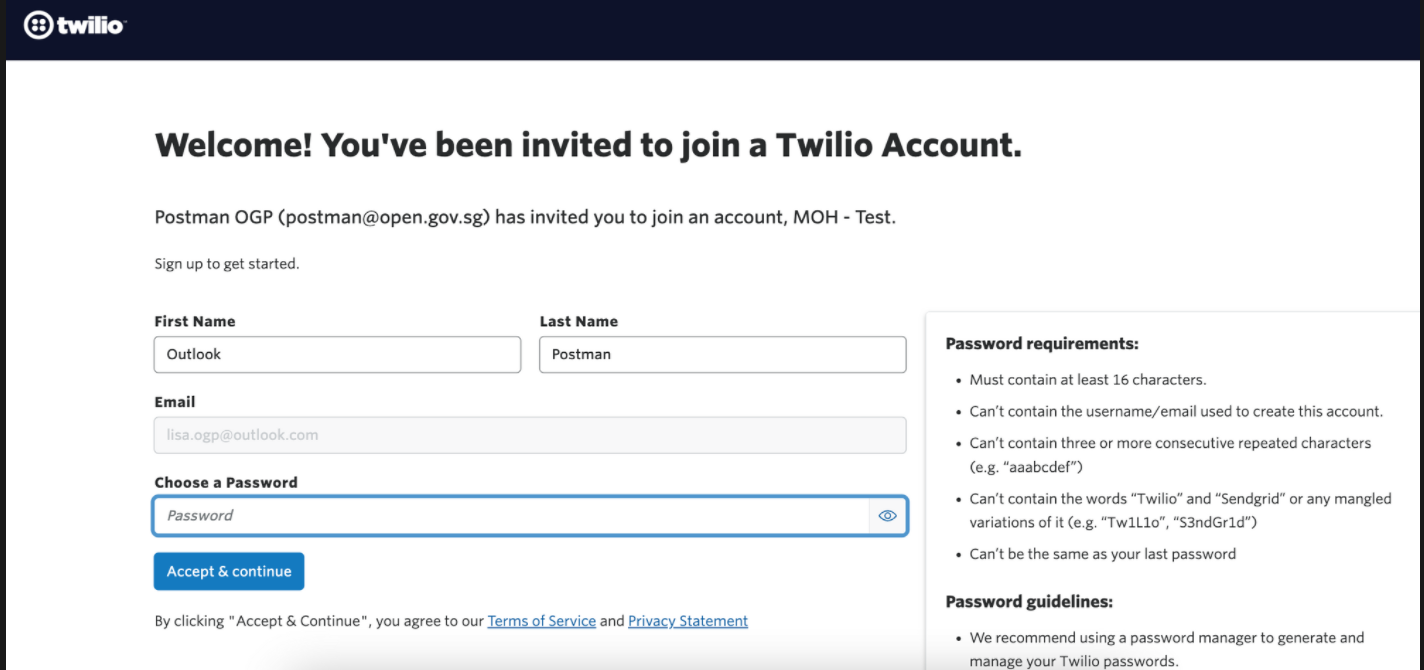
1. **Set up your account details.**

<figure><img src="https://4126954886-files.gitbook.io/~/files/v0/b/gitbook-x-prod.appspot.com/o/spaces%2F-MAQH3DF49Lq0AJudrbF%2Fuploads%2FijVVIjd9VV0lZrmNLIkQ%2Fimage.png?alt=media&#x26;token=13c21427-ac49-4bb7-b55d-f3894cd15295" alt=""><figcaption><p>Set up your name and password</p></figcaption></figure>

<figure><img src="https://4126954886-files.gitbook.io/~/files/v0/b/gitbook-x-prod.appspot.com/o/spaces%2F-MAQH3DF49Lq0AJudrbF%2Fuploads%2F9CX2tS0mBUlu22EnzE7G%2Fimage.png?alt=media&#x26;token=cb0e03df-f6a9-4dea-a834-50c282286bf1" alt=""><figcaption><p>Verify your account</p></figcaption></figure>

<figure><img src="https://4126954886-files.gitbook.io/~/files/v0/b/gitbook-x-prod.appspot.com/o/spaces%2F-MAQH3DF49Lq0AJudrbF%2Fuploads%2FsyDCFqpnrtoTPRkGI0Mv%2Fimage.png?alt=media&#x26;token=1b5c5bc2-2981-4446-bd6a-d64b655d2f1a" alt=""><figcaption><p>Save your recovery code</p></figcaption></figure>

Once you see this screen, your account has been successfully set up!

<figure><img src="https://4126954886-files.gitbook.io/~/files/v0/b/gitbook-x-prod.appspot.com/o/spaces%2F-MAQH3DF49Lq0AJudrbF%2Fuploads%2FFmz0qwULgxAHJKIWfvj6%2Fimage.png?alt=media&#x26;token=e0adfe25-63a9-4982-8e17-45fba1cada3e" alt=""><figcaption></figcaption></figure>

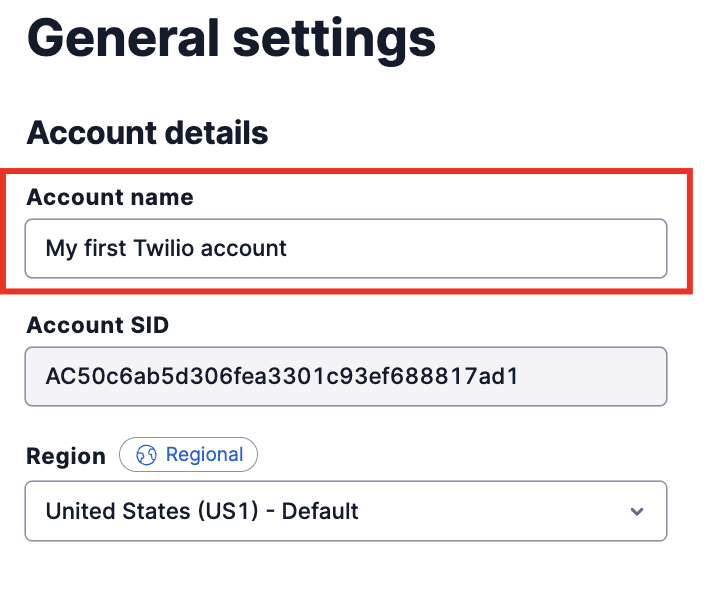
2. **Set up your account name.**

This helps us and Twilio better identify your account should you need help, without having to go into your account itself, which we prefer in order to respect the privacy and security of your account.

Go to `Account > General settings > Account details > Account name.`

<figure><img src="https://4126954886-files.gitbook.io/~/files/v0/b/gitbook-x-prod.appspot.com/o/spaces%2F-MAQH3DF49Lq0AJudrbF%2Fuploads%2Fgit-blob-a5a6ac63dd48c17ad17d1857ba364b1fa30a6db1%2Fimage.png?alt=media" alt="" width="355"><figcaption><p>Name your account</p></figcaption></figure>

3. **Set up your billing details.**

{% hint style="warning" %}
Setting up your billing details is necessary so that your tagged Sender ID will reflect correctly on your SMSes. Otherwise, your SMSes will continue to show "Likely-scam".
{% endhint %}

{% hint style="info" %}
**Information about Twilio billing**

Twilio works like a prepaid phone card. You will need to top up the credits in your Twilio account to start sending SMSes. We strongly recommend using your **corporate credit card** for this.

The alternative is direct invoicing, which is only available as an option if you send more than 25,000 SMSes a month (or meet the minimum spend of USD$12,000 annually). If this is your preferred option, please contact us so we can put you in touch with our Twilio account manager.

*Note: if you do not upgrade your account, you will not be able to send SMSes with your registered alphanumeric Sender ID.*
{% endhint %}

#### To set up your billing options, go to Billing > Manage Billing > Upgrade.
<figure><img src="https://4126954886-files.gitbook.io/~/files/v0/b/gitbook-x-prod.appspot.com/o/spaces%2F-MAQH3DF49Lq0AJudrbF%2Fuploads%2FD7xRTYS4yPnHAUPq6ruj%2Fimage.png?alt=media&#x26;token=74966d47-f3f4-42de-9260-8a8e934fa54b" alt=""><figcaption><p>Fill in the requested information</p></figcaption></figure>

<figure><img src="https://4126954886-files.gitbook.io/~/files/v0/b/gitbook-x-prod.appspot.com/o/spaces%2F-MAQH3DF49Lq0AJudrbF%2Fuploads%2FUoGfR4YnpiTUHMqQiGFO%2Fimage.png?alt=media&#x26;token=16ab2fe1-8d44-4574-bed1-dbfb324da63f" alt=""><figcaption><p>Insert your tax number (GST number)</p></figcaption></figure>

<figure><img src="https://4126954886-files.gitbook.io/~/files/v0/b/gitbook-x-prod.appspot.com/o/spaces%2F-MAQH3DF49Lq0AJudrbF%2Fuploads%2FehNhQNc0srVovL978pA2%2Fimage.png?alt=media&#x26;token=af390437-4e50-4178-9036-9b1c9887e399" alt=""><figcaption><p>Key in your corporate credit card details</p></figcaption></figure>